Tool/software: TI C/C++ Compiler
Hi TI Members,
As Title my CCS version is 7.4, and I do some thing that describe as following,
I tried to build project with command line,
cd D:\TI_PRJ\workspace-2\simple_peripheral_cc2640r2lp_stack_library\FlashROM_Library
"C:\\ti\\ccsv7\\utils\\bin\\gmake" -k -j 8 clean -O
"C:\\ti\\ccsv7\\utils\\bin\\gmake" -k -j 8 all -O
cd D:\TI_PRJ\workspace-2\simple_peripheral_cc2640r2lp_app\FlashROM_StackLibrary
"C:\\ti\\ccsv7\\utils\\bin\\gmake" -k -j 8 clean -O
"C:\\ti\\ccsv7\\utils\\bin\\gmake" -k -j 8 all -O
but when execute until last command , some error message shows from console,
C:\ti\xdctools_3_50_04_43_core\C:/ti/xdctools_3_50_04_43_core/xs: error:
can't create session manager: can't find a JVM;
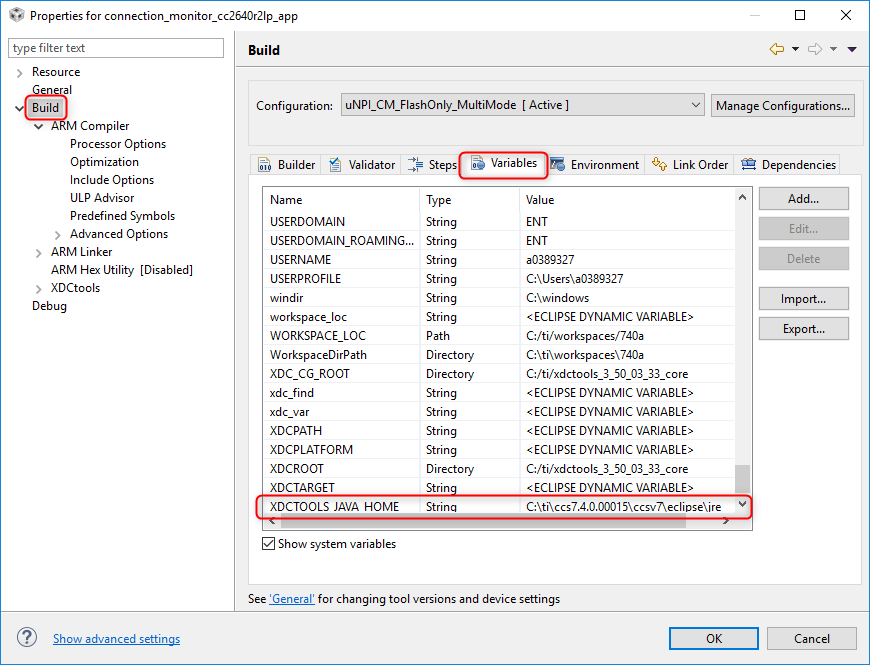
trysetting the environment variable'XDCTOOLS_JAVA_HOME'
to the absolute pathofany directory containing a32-bit Java Runtime Environment (1.7orgreater);
e.g.,'C:\Program Files (x86)\Java\jre7'.
TOOLS/subdir_rules.mk:12: recipefortarget'build-1287780815-inproc'failed
gmake[1]: *** [build-1287780815-inproc] Error1
TOOLS/subdir_rules.mk:9: recipefortarget'build-1287780815'failed
gmake: *** [build-1287780815] Error2
gmake: Target'all'notremade becauseoferrors.
When I set XDCTOOLS_JAVA_HOME done, it works fine.
but I want to know, this configuration should be set automatically when I checked "Generate Makefiles automatically" (at project >> property >> build / builder page), Right?
if not, is some setup error cause of this issue happened by myself?