This thread has been locked.

If you have a related question, please click the "Ask a related question" button in the top right corner. The newly created question will be automatically linked to this question.

F28M35 serial internal loopback

Other Parts Discussed in Thread: CONTROLSUITE

Hi, 

I'm using the demo code from controlsuite serial internal loopback C:\ti\originControlSUITE\device_support\f28m35x\v220\F28M35x_examples_Dual\Internal_Loopback_Serial

1. Could you please let me know how did we verify this demo works well? 

I can see RX, TX buffer sometimes both become 1, but it didn't constantly flash to highlight on those register, does it looks right to you?

The trouble I'm having is that I look at SCI register on C28, sometime it's setup all right in the following figure 1; however, sometimes it's not like figure 2

2. Should I manually enable the IPCMtoCBootControlSystem() code ? Because by default, it's grey out and looks like disabled while running.  

 IPCMtoCBootControlSystem(CBROM_MTOC_BOOTMODE_BOOT_FROM_FLASH);//yz

3. I follow the following procedure to enable dual-core debugging, does it look all right ?

1) launch M3 core

2) load C28 core 

3) reset C28, M3

4) running C28, M3 

  • Yinghui,

    It looks like the code is working. CCS highlights changed registers only when they change. If the same value is written to the register it will not highlight again (that is, it must be a changed value). If you would like, you could modify the code to have the value increment and then you will see the register in CCS highlight. Alternately, you can modify the code to slowly blink an LED, or run the code in real-time mode and manually change the value.

    The reason you are seeing the greyed out line is because this is a conditional build, where either the code line for RAM or Flash will be used, but not both. A good resource to learn more about the device and the procedure for dual-core debugging can be found in the F28M35x workshop:

    processors.wiki.ti.com/.../C2000_Archived_Workshops

    I hope this helps. If this answers your question, please click the green "Verified Answer" button. Thanks.

    - Ken
  • Ken,

    Thanks a lot for the information. I did prove that M3 receive the char from C28 with LED blinking.

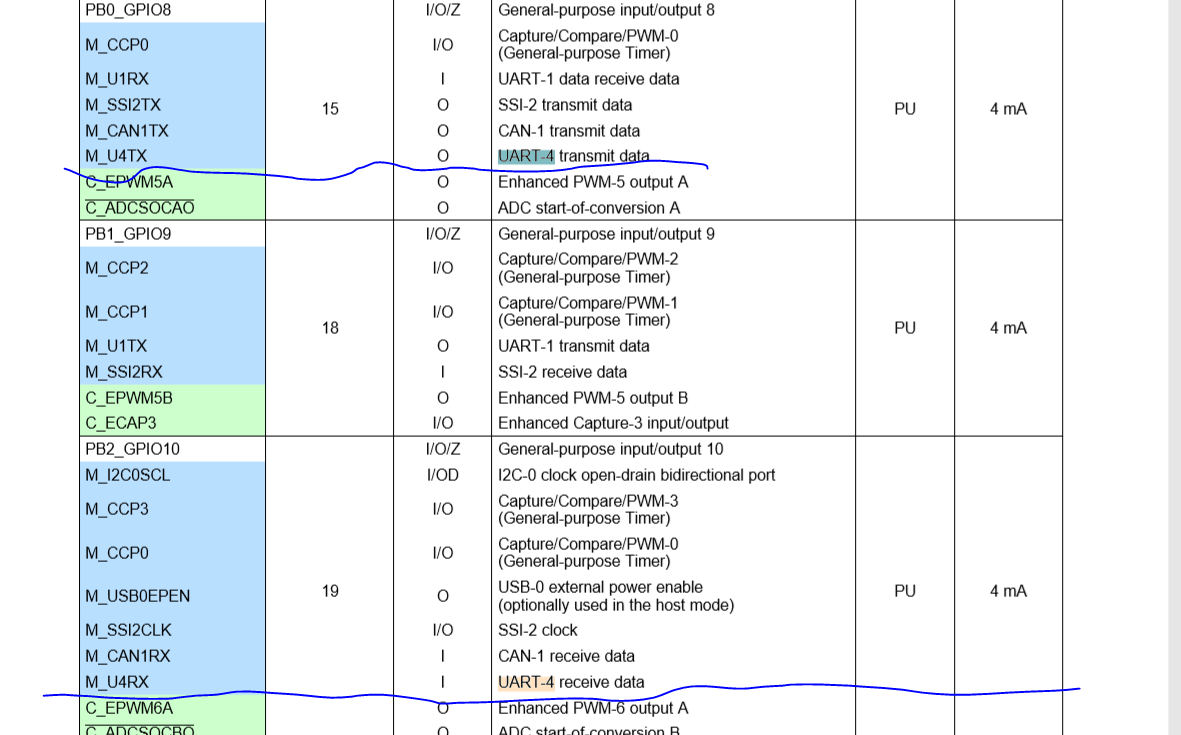
    I'm using ConcertoM3 Evaluation board, do we know where can we probe for UART4 of M3 ? I still need to add the serial protocol on this internal communication, so I'd like to find out how can I put Logical analyzer on TX, RX on UART4?

    Thanks,
    Yinghui
  • Yinghui,

    You need to refer to the F28M35x data sheet to find the pins associated with UART4. The data sheet can be found at:

    http://www.ti.com/lit/sprs742

    I hope this helps.

    - Ken
  • Hi Ken, 

    The data sheet assign the UART4-TX on GPIO8, however, we configure this GPIO for other purpose. Since UART4 and SCI-A are internally connected, if we probe on the SCI-RX, does that mean it'll will be the same as we probe on the UART4-TX ? Please correct if I'm wrong. 

    Thanks,

    Yinghui

  • Yinghui,

    They are not internally connected, but multiplexed. See the Technical Reference Manual:

    http://www.ti.com/lit/spruh22

    Starting on page 337 and see figure on 342.

    - Ken
  • Ken, 

    Thanks a lot. Also I'm wondering do have example or library that we can use UART4 for the internal communication, then echo back the information to UART0, so we can use application that running on the host(laptop) to talk to Concerto M3 as well as control C28?

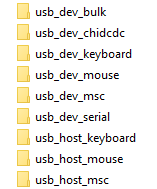
    There are some example in control suite ti\controlSUITE\device_support\f28m35x\v220\F28M35x_examples_Master in the following, but I'm not sure what does it exactly do and how to use those example. Could you please give me some advise or any suggestion? Or maybe point me to other example that transfer UART4 message to UART0 and talk to the host?

    Thanks,

    Yinghui

  • Yinghui,

    The examples in controlSUITE are the only examples that we have for the F28M35x. You can find a description for each example in:

    C:\ti\controlSUITE\device_support\f28m35x\v220\doc\F28M35x-FRM-EX-UG.pdf

    For the folders in your previous post, start on page 61 for a detailed description.

    I hope this helps. If this answers your question, please click the green "Verified Answer" button. Thanks.

    - Ken
  • Ken,

    Still many thanks. I read the F28M35x-FRM-EX-UG.pdf before, but I wasn't sure how the example can work on the evaluation board. Taking two source code as example, one is 4.23 USB Serial Device (usb_dev_serial), the other is 4.24 USB HID Keyboard Host (usb_host_keyboard).

    usb_dev_serial

    In usb_dev_serial example, it mentioned that "The application supports the USB Communication Device Class, Abstract Control Model to redirect UART0 traffic to and from the USB host system". How did we setup the evaluation board to run this example ?

    I attached evaluation board in picture, we use J20: Isolated JTAG USB Interface (xds100v2) to download code through JTAG. But this example mentioned an USB communication, does it mean this JTAG USB Interface(xds100v2) ? If I have a Putty running on the host and using this example, does that mean "redirect UART0 traffic to and from the USB host system"?

    It also mentioned that "WindowsVistaandWindows7canbefoundinMWare/windows_drivers" , do we really need to install those driver to run this example ? Also we use Windows10 now, not sure it's still working. 

    usb_host_keyboard

    it mentioned "demonstrates how to support a USB keyboard attached to the evaluation kit board", how did we setup or connect the keyboard to evaluation board ? Will this example works if I just have an console app software running on host, or maybe just Putty, will it work ? 

    It also mentioned that "NOTE: The Concerto controlCARD has a hardware errata that will prevent this example from working correctly. A VBus Error interrupt is accidentally generated which confuses the USB stack. To fix this remove R230 on the back upper left size of the controlCARD (near the USB connector) and replace it with a short or 0 ohm jumper." 

    Is it still an error for existing evaluation board ? Do we need to follow this instruction to replace R230 with a jumper?

    YZ

  • Yinghui,

    The board has two USB ports. The first one you mentioned is the J20 which is the isolated JTAG USB Interface (xds100v2) to download code through JTAG. The other USB port is J2, which powers the board and "supports USB 2.0 host/device". More information about the board can be found at:

    C:\ti\controlSUITE\development_kits\~controlCARDs\CCF28M35xxHWdevPkg_v3\F28M35xx_InfoSheet_07_18_16.pdf

    - Ken