This thread has been locked.

If you have a related question, please click the "Ask a related question" button in the top right corner. The newly created question will be automatically linked to this question.

CCS/TMS320C6455: Build errors when compiling in CCS V7

Part Number: TMS320C6455


Tool/software: Code Composer Studio

Hello,

Just a heads up, I am new to using CCS.

I am trying to compile with CCS v7 for a TMS320C6455 processor.

I am pasting screenshots to show my process so far, any suggestions or tips on how to get this to build and debug would be great.

Originally the compiler was set to version 8, but it said it didn't support the C6455 and to get an older version. I am trying with compiler version 7.4.23.
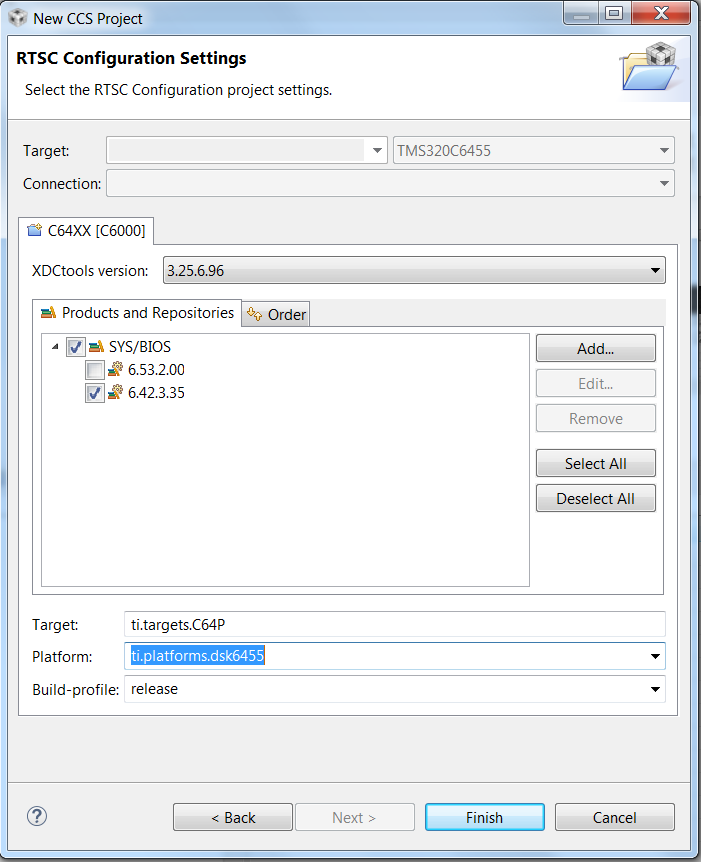


Again, it had issues with the XDCtools version, had to be before 3.30, so here I am trying 3.25.6.96.

Also the sys/bios had to be an older version.
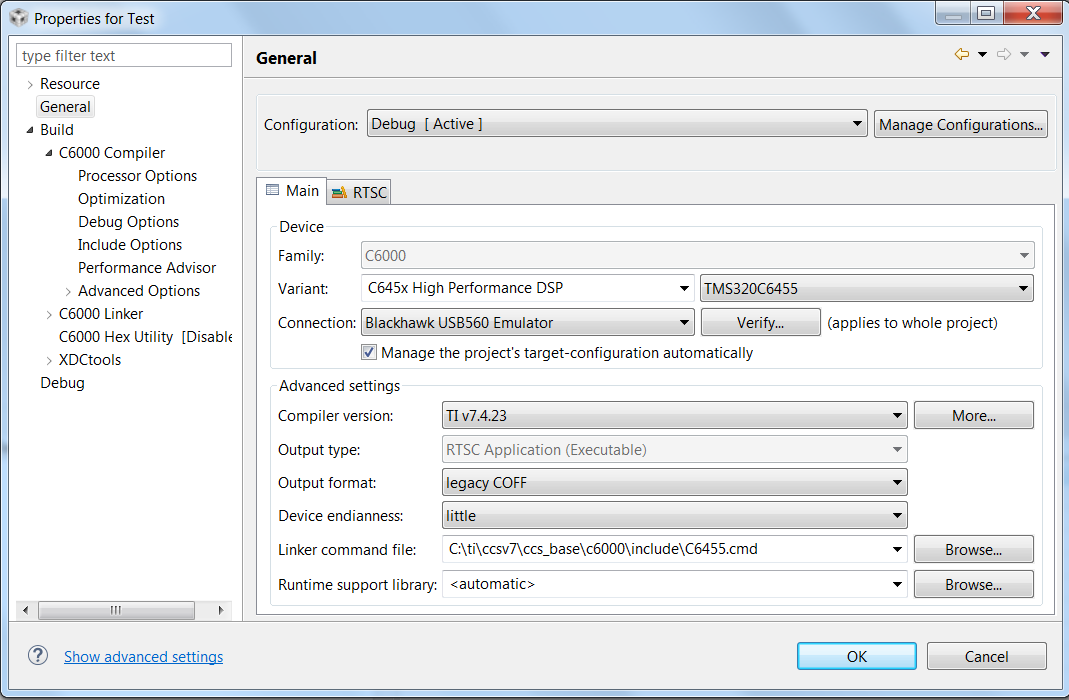


Here I am setting the connection to the BlackHawk USB560 Emulator and setting up the linker to be the C6455.cmd. I tried verifying the connection before and it said it failed. I didn't attach screenshot here but I can if necessary.
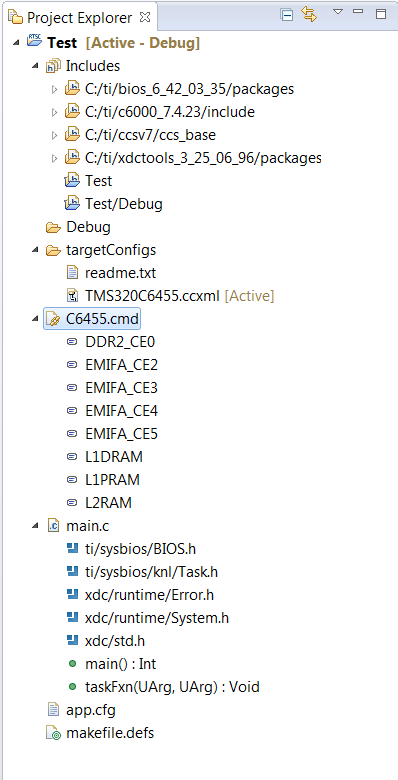


This is just showing what's inside my project to give some insight.
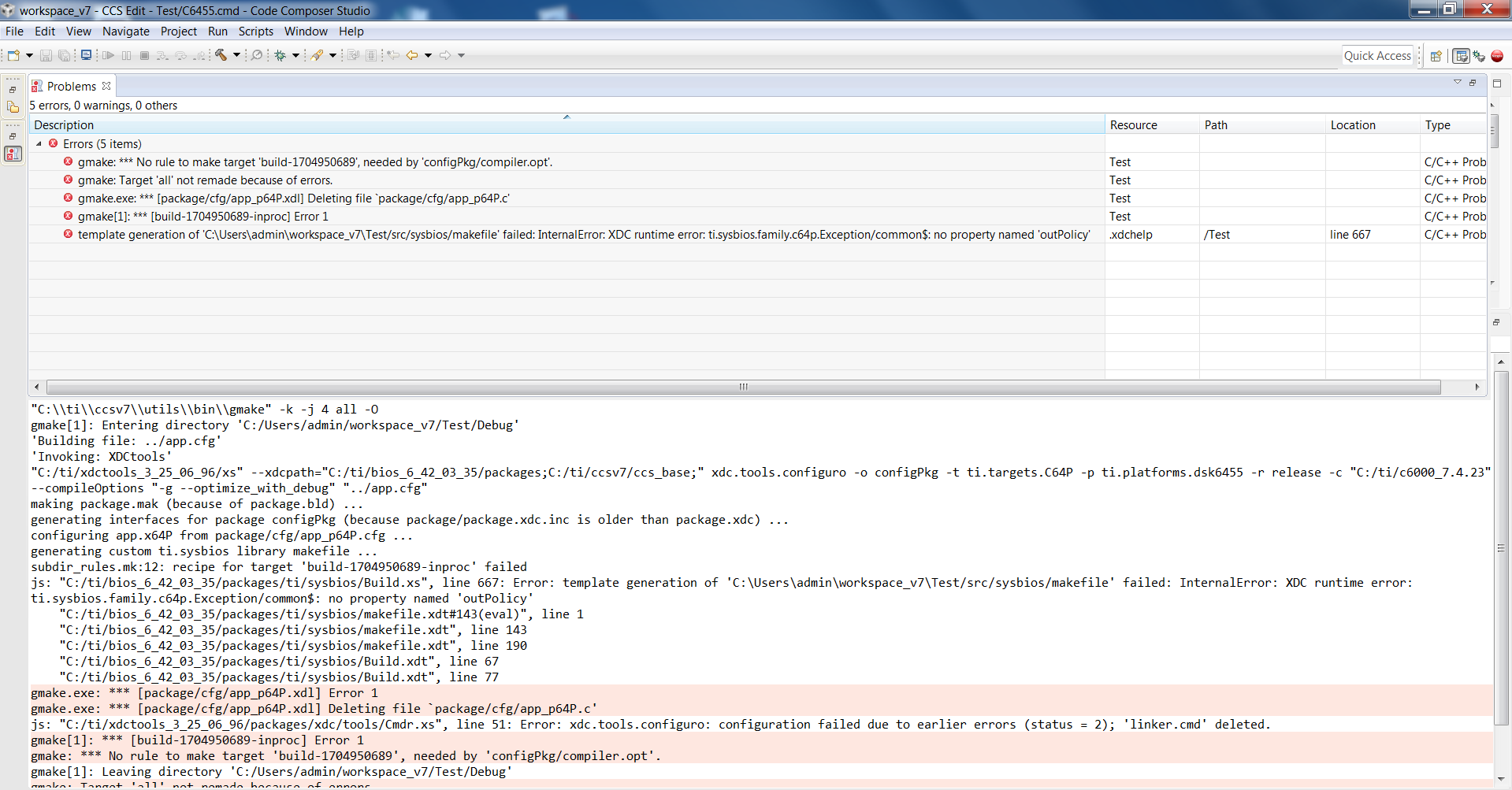


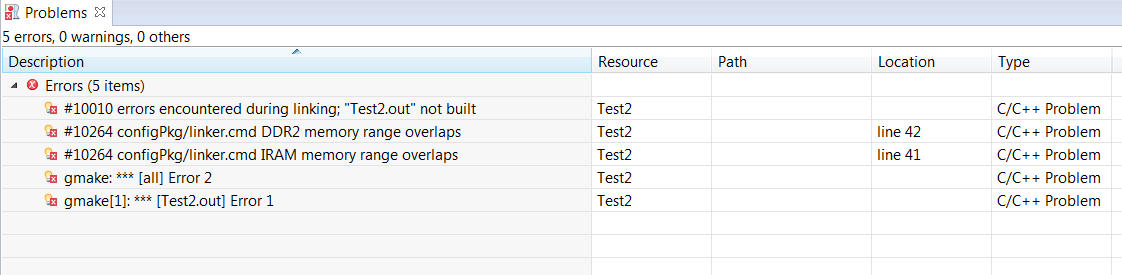
Now this is where I am getting all of these errors. Any idea what's missing?


Thanks!

Georgia Shutt

  • Hi Georgia,

    First, can you try cleaning your project and removing both the Debug and src directories, and then buiild?

    Thanks,
    Janet
  • Hi Janet,

    Yes, I followed those steps and it still produces the same 5 errors as before.

  • Ok, thanks. I'll see if I can reproduce this.
    Best regards,
    Janet
  • Hi Georgia,

    It looks like xdctools 3.25.06 is too old for the version of BIOS you are using.  I got the same error when building with BIOS 4.42.03.35 and xdctools 3.25.06.96.  I was able to build successfully with xdctools 3.32.01.22.  You can find the xdctools downloads here:

    Best regards,

    Janet

  • Hi Janet,

    I wasn't sure if you mean BIOS 4.42.03.35 or 6.42.03.35, but I tried using the XDCtools 3.32.01.22 with BIOS 6.42.03.35 and it gives different errors now. I also deleted the src and debug directories, did a clean project, and built the project again, same errors. Here they are below:

    Any ideas?

    Thanks!

  • Hi Georgia,

    Can you try taking the C6455.cmd file out of your project?  I think it is conflicting with the SYS/BIOS linker command file, that is auto-generated for your project (you can find it in Debug/configPkg/linker.cmd).

    Best regards,

    Janet

  • Hi Janet,

    Thank you for that advice, it now builds without errors. The ultimate goal here is to be able to compile CCS v7 on the C6455. It's my understanding that CCS itself works as an emulator, so that means that it doesn't require the physical emulator to be connected in order to be in the debugging stage, right?

    Referring back to my original screenshot from before:

    not shown here, but at the top it says: Target name 'ti.targets.C64P' could not be verified. your project may not build as expected.


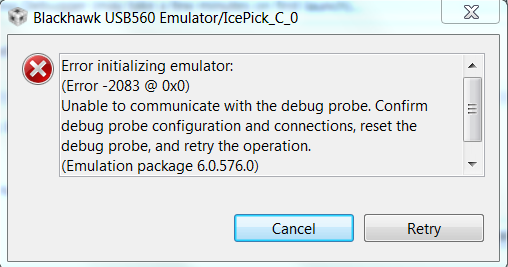
    And after clicking on debug this pops up:

    Is there a step that I am missing or is it possible that the C6455 isn't compatible with CCS V7?

    Thank you for all your help and patience!

    Georgia

  • Hi Georgia,

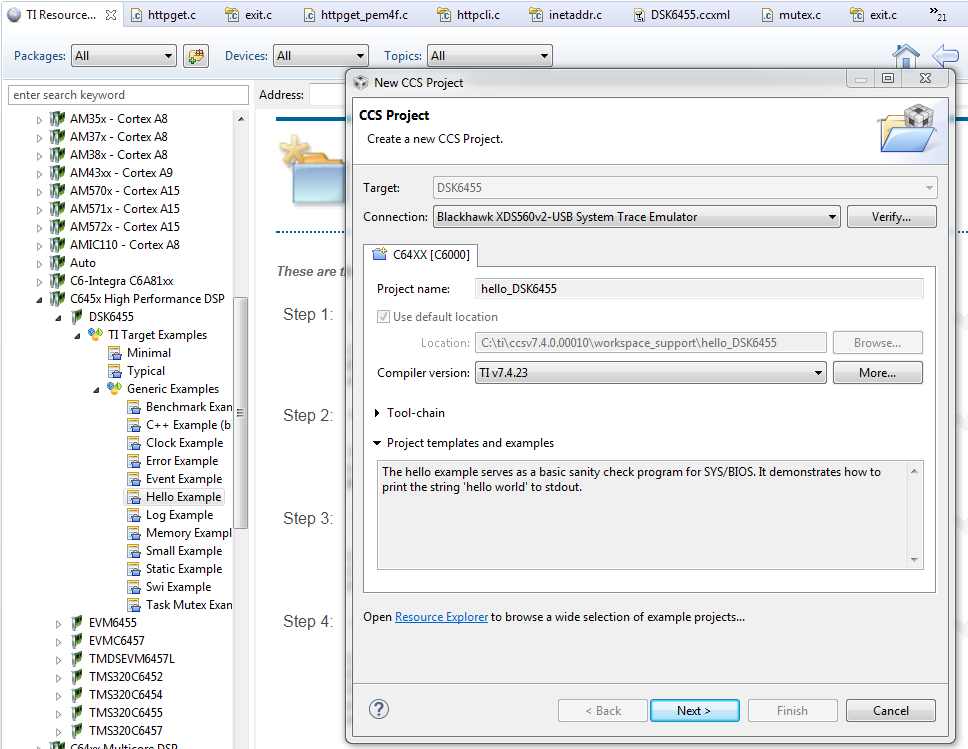
    You need to attach one end of the Blackhawk USB 560 emulator to one of the USB ports on your PC, and the other end to the JTAG header on the board.  I used the TI Resource Explorer (Classic) and navigated to SYS/BIOS -> C645x High Performance DSP -> DSK6455 -> TI Target Example -> Generic Examples.  There, you can choose one of the examples, say the Hello Example, to import.  For the connection, I chose the Blackhawk USB560v2 System Trace Emulator (which is the one I have):

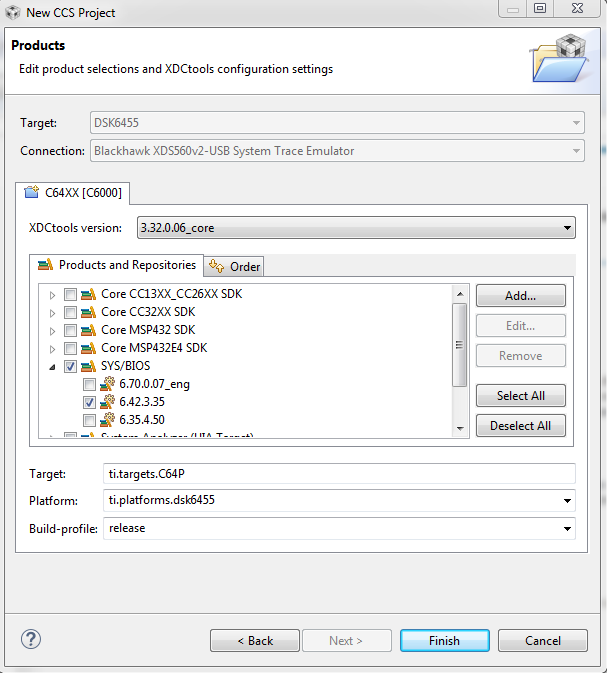
    Click "Next" and make sure to set the BIOS and XDC tools versions correctly:

    Then you should be able to build and debug.  I tried this in CCS7.4, so the DSK6455 is definitely supported.

    Best regards,

    Janet

  • Hi Janet,

    i am curious if it has PC based simulator/emulator, if i dont have a physical hardware or USB?

    Thanks,
    Mohammed

  • Hi Mohammed,

    CCS versions 6 and higher do not support simulators.

    Best regards,

    Janet

  • Hi Janet,

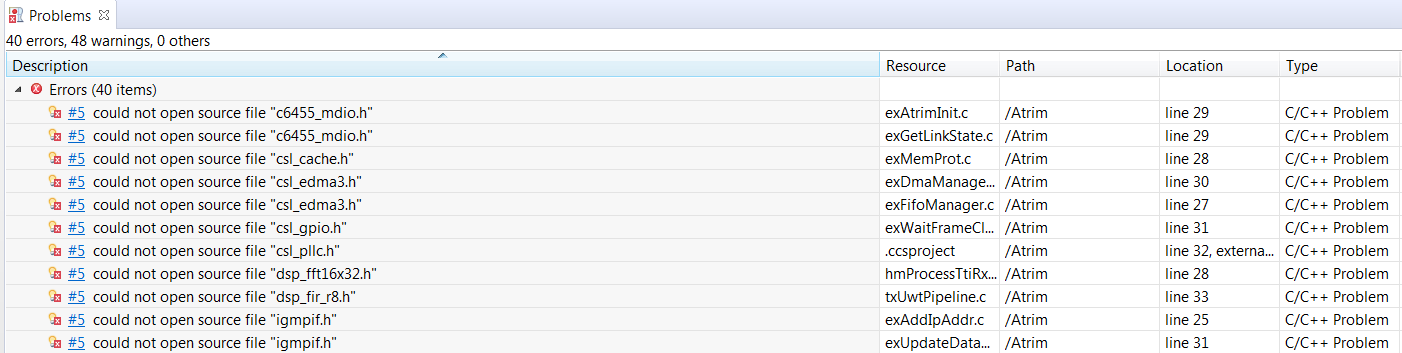
    I now have imported a project as a 'Legacy CCSv3.3 Project' and have some build errors as shown below:

    I found the CSL for the C6455 here: http://www.ti.com/tool/sprc234 but it's not available for download. Is there a way I could get that from TI?

    I think that would help with some of those build errors. If you could offer any insight as to how I could resolve those other errors (whether those are code related or missing components) please let me know.

    Thanks!

    Georgia

  • Thanks Janet, appreciated.

    Just for info,if it helps others;

    Simulator is supported upto CCSv5.4. i am using using simulator on CCS5.4 and do rrst of development on CCS7.4.


    -regards,
    mohammed

  • Hi Georgia,
    I think the version of XDCtools you are building with (3.25) is too old for that version of BIOS (6.42). Can you try building with XDCtools 3.31?
    I will look into where you can find the CSL product.
    Best regards,
    Janet
  • Hi Georgia,
    You will need to open a new thread to ask about the CSL download. Make sure to specify the Device forum rather than Code Composer Studio.
    Best regards,
    Janet
  • Hi Janet,

    Thanks for getting back to me. I'm using XDCtools version 3.32.1.22.I think I just have XDCtools version 3.25.6.96 installed, but can delete if that's an issue.

    I will post to the Device forum for that CSL download.

    Any ides on the other non CSL related errors?
  • Hi Georgia,

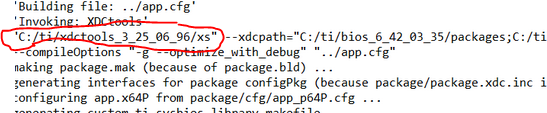
    I saw this in your build line:

    Just check the project properties to make sure you are using the newer xdctools.

    Best regards,

    Janet

  • Hi Janet,

    I think that screenshot was taken previously with my original question, but I still made sure its building the correct XDCtools and it is.

    Thanks!

    Georgia
  • Ok, I see that was from the original post.  I guess the errors you meant were the CSL include files not being found.

    Hopefully, someone on the device forum will know where to find CSL.  I did find this from another forum post:

    Best regards,

    Janet