This thread has been locked.

If you have a related question, please click the "Ask a related question" button in the top right corner. The newly created question will be automatically linked to this question.

CCS setup for DM648 DVDP

Other Parts Discussed in Thread: TMS320DM648

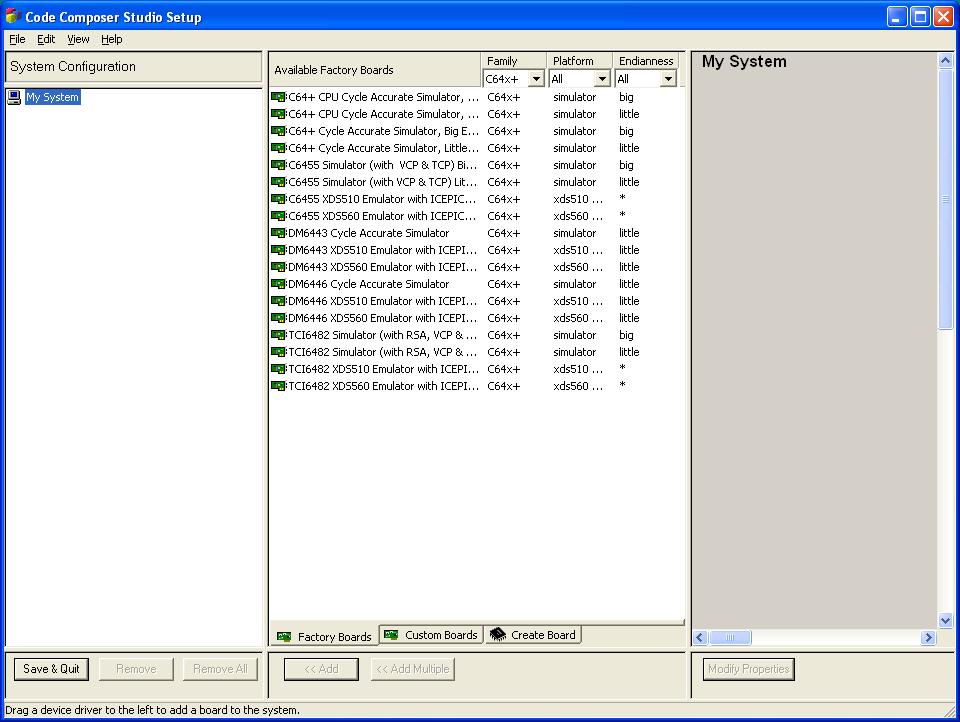
I am a new user of the TMS320DM648, we purchased the DVDPboard which I have set up and it is presently running the demo app in the stand alone mode, following the instruciont of the getting started guide. The next step is to run the demo with the PC host app. For this, the CCS must be set up with either an emulator or a simulator (per the instructions). I do not presently have an emulator, so how do I set up CCS? Attached is the list of options under available factory boards, none of which are what the guide says should be used.

After creating code for my application, will I need an emulator to program the DVDP board (via JTAG)? or can the DVDP be programmed through the ethernet connection?

Thank you in advance!

  • Gus,

    Gus Aguirre said:

    For this, the CCS must be set up with either an emulator or a simulator (per the instructions). I do not presently have an emulator, so how do I set up CCS? Attached is the list of options under available factory boards, none of which are what the guide says should be used.

    I don't have a getting started guide here with me, but since the DM648 device is essentially a C64x+ device either the Cycle Accurate or the CPU Cycle Accurate simulators can be used. For details on what each simulator supports please check the list in the link below:

    http://processors.wiki.ti.com/index.php/List_of_Simulator

    Gus Aguirre said:

    After creating code for my application, will I need an emulator to program the DVDP board (via JTAG)? or can the DVDP be programmed through the ethernet connection?

    Yes, you will need a JTAG emulator as the ethernet port does not allow programming the device. Once the board software is installed, some ready-to-run CCS configuration files are included in the directory below:

    C:\Lyrtech\EVMDM648\ccs

    These files can be imported to CCSetup by going to menu File --> Import.

    In any case I suggest updating your CCS to the latest Service Release 12. This way you will have a more complete list of supported devices, as well as bug fixes and other updates.

    Hope this helps,

    Rafael

  • Thank you, its all running.

    Another question if you could please answer,

    the TMS320 DSP/DIOS User's Guide (SPRU423F) recommends as follows:

    "Before you read this manual, you should follow the "Using DSP/BIOS"

    lessons in the online


    Code Composer Studio Tutorial"

    I found a CCS tutorial from 2000 (SPRU301C), is this the latest for CCS v3.3?

    I see that there is also one for CCS v4.