This thread has been locked.

If you have a related question, please click the "Ask a related question" button in the top right corner. The newly created question will be automatically linked to this question.

Compiler: I have a new problem when I want to install Code Composer Studio.

Tool/software: TI C/C++ Compiler

Hi,

I have installed CCS  for many times but recently I have been faced two new problem while I was installing CCS on two different PCs. Would you please help me? How could I fix it?

Image from Problem #1

Image from Problem #2
  • Hi Hossein,

    #1 - I'm just guessing here, but it looks like you may not have extracted the offline installer from the zip file. If that's correct, please unzip before running. If not, what version are you trying to install? If it's version 5, please zip up the contents of C:\Program Files (x86)\InstallJammer Registry\ccsv5 and post here. 

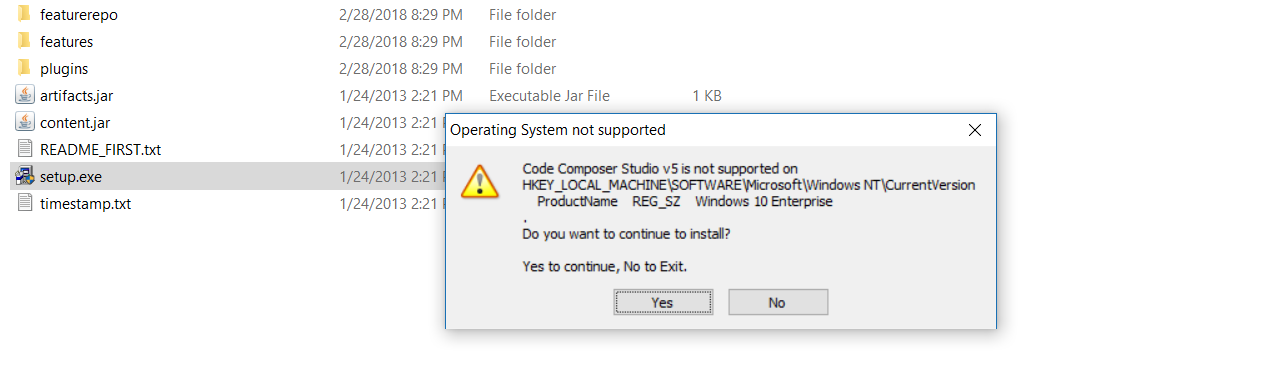
    #2 - CCS v5 is not supported on Windows 10. CCS has a new 7.4 release available.

    Danish

  • Hi Danish,

    I am interested in your fast and detailed answer. Thank you.

    #1- Please look at attached file.

    #2- I don't think this would be related to Windows version, because I have installed CCS on Windows 10 and used it properly for building projects, debugging and programming ICs. I 'd like to now your opinion about this. If you are sure so how I  has not been faced any problem related to this matter.

    2437.60556FE5-C1A1-4061-8DF8-FFB8393BAE2D.rar

  • In addition to last post I have replied to you, would you please say what is the name of offline installer which you mentioned I should extract it from zip file. What is its exact name?
  • Hi Hossein,
    You can download the offline installer from processors.wiki.ti.com/.../Download_CCS - just look for the offline installer link.
    Please make sure the files are all extracted from the zip file. You may also need to unzip it on the c:\ drive. This is a very old installer and has a few quirks.

    For #2, it's just warning you that it's not supported, it does allow you to continue to install.

    I would recommend that you delete the contents of the folder C:\Program Files (x86)\InstallJammer Registry and try each install. If you still have problems, please zip up the logs and attach them here for us to analyse.
    Thanks,
    Danish
  • Hi Danish,

    Thank you for giving me your time.

    All of my next questions\comments are related to matter #1.
    1-You said me, I may need to unzip the file on C:\ driver. Does this really work? I'll do this and sent the result back to you.
    2-Please take a look at .rar attached file. It contains the content of the folder C:\Program Files (x86)\InstallJammer Registry.
    3-You have recommended that I should delete the content of that folder and try each install. Would you please tell me more about what I should do after deleting the folder? What does this mean "try each install" ?

    0724.ccsv5.zip

  • Sorry, I should have been more clear.

    The C:\Program Files (x86)\InstallJammer Registry folder contains all log files created at the time of running installers. So if you run more than one time, the logs get harder to read, which is why I suggested removing the files before running the installer.

    If you're using windows 10, Windows 10 doesn't like files on shares or mounted drives, it wants all the files to be local. Which is why I suggested unzipping the offline installer on the c:\ drive.

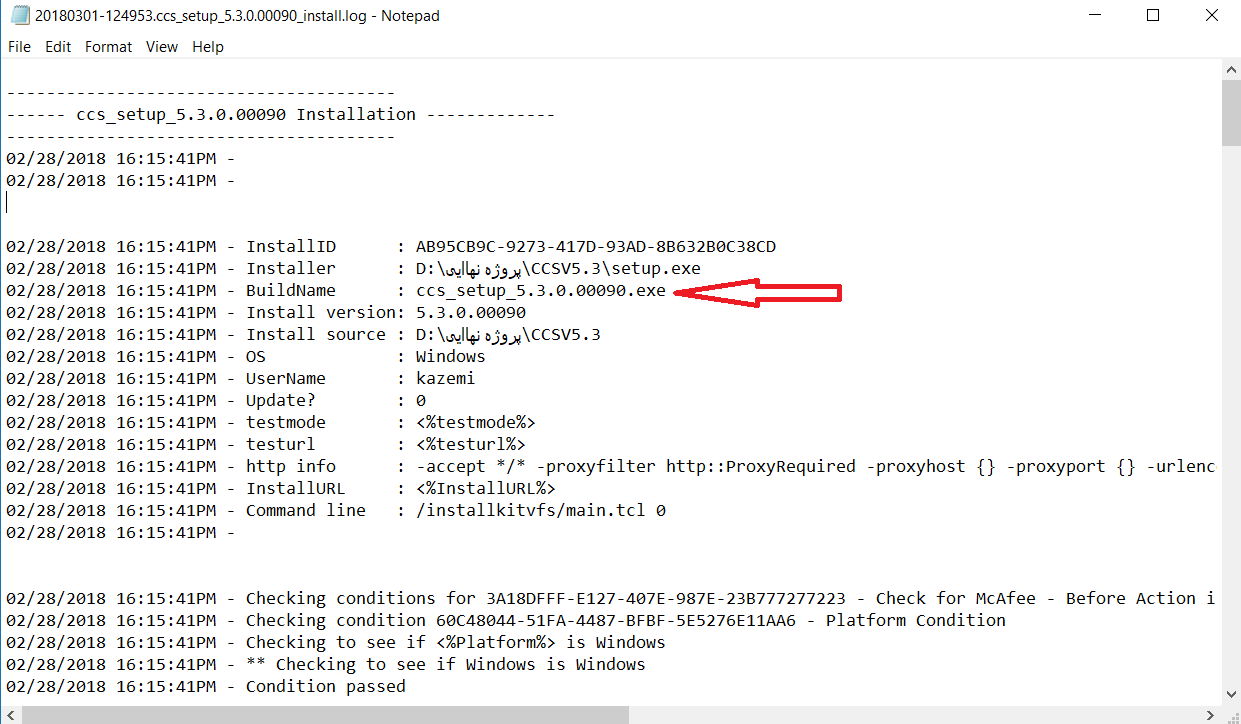
    From looking at the log submitted above, I see that your installer is D:\پروژه نهاایی\CCSV5.3\setup.exe.
    Eclipse can't handle any non-ascii characters in paths. Also, the installer name should be ccs_setup_5.3.0.00090.exe. How is it becoming setup.exe?

    Danish
  • Hi, 

    No, you were clear,

    according to first paragraph 

    The C:\Program Files (x86)\InstallJammer Registry folder contains all log files created at the time of running installers. So if you run more than one time, the logs get harder to read, which is why I suggested removing the files before running the installer.

    I should delete the whole folder or just the files inside it?

    Thank you.

  • Related to your last sentence, 

    I don't agree with you. Please take a look at the image below.The Build Name is OK. It is ccs_setup_5.3.0.00090.exe.

  • Deleting the whole logs folder is ok, it will recreate what it needs to.
    I was just curious as to why the installer was getting renamed (what you're pointing to is it's internal build name).
    You will definitely have to move the installer's complete unzipped package to a folder with ascii characters only. Eclipse can't handle non-ascii characters in the %USERPROFILE% path, the %TEMP% path or the install source path.

    Danish
  • Hi,

    Deleting the whole logs folder is ok, it will recreate what it needs to.

    I have done this and everything is ok.

    I was just curious as to why the installer was getting renamed (what you're pointing to is it's internal build name).

    I have seen similar installer name in the log file of every CCS that I have installed on every system.

    You will definitely have to move the installer's complete unzipped package to a folder with ascii characters only. Eclipse can't handle non-ascii characters in the %USERPROFILE% path, the %TEMP% path or the install source path.

    I have done this and my problem has been fixed.

    Regards,

  • Thanks and Regards