This thread has been locked.

If you have a related question, please click the "Ask a related question" button in the top right corner. The newly created question will be automatically linked to this question.

CCS: Function profiling based only on selected timeframe

Tool/software: Code Composer Studio

Hi,

There is a necessity to do Function Profiling of only selected time frame from the whole captured trace. It is not possible to determine this time frame at trace capturing time, so everything needs to be done in post processing phase.

I found out that I can export only selected/filtered (by time range) part of tdf but only to csv file, which, unfortunately, cannot be used later to generate Function Profiling view.

On the other hand I could not find any way to split the ".tdf" file or even save selected part of trace as *.tdf.

Is there any way (i.e. by means of scripting) to split tdf file with given time/clocks ranges or run Function Profiling with time/cycle range as an input argument? 

I am using CCS  Version: 7.4.0.00015

BR,

Piotr

  • Piotr,

    I haven't had this question before, but did you look into the TD.EXE utility located at the directory below? It can do a lot of manipulation on .tdf files and allows you to isolate specific time frames for post processing.

    /ccsv7/ccs_base/emulation/analysis/bin

    Hope this helps,
    Rafael
  • Hi Rafael,

    Thank you for your reply.

    I didn't find TD.EXE helpful, as I do not see an option to split the *.tdf file into few *.tdf files. I'm assuming that TD.EXE is used mainly to parse data files, but still it is raw data - not statistical summary.

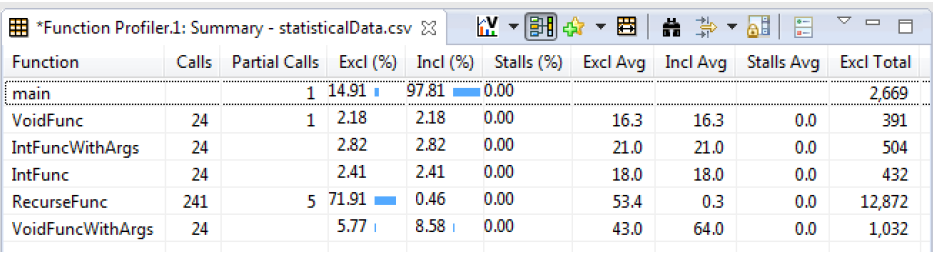
    Maybe my question was not so precise, so I will try to clarify it. I'd like to get below view (or csv file), but only for selected time frame.

    I cannot filter this view by Time.

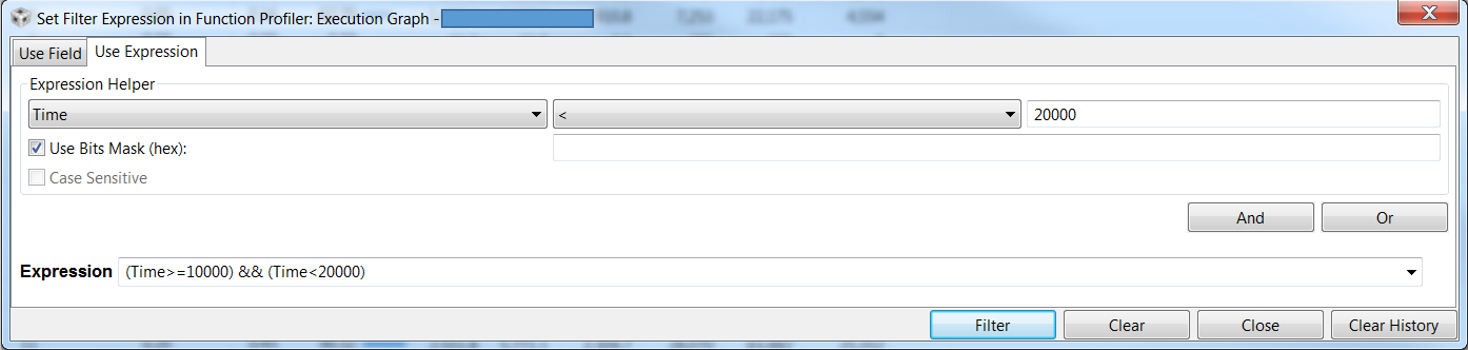
    On the other hand, for instance Execution Graph can be filtered by Time:

    Thanks,

    Piotr

  • Piotr,

    Please apologize for the delay in this reply; unfortunately I could not find a way to filter out information directly from the .tdf file.

    >> I'm assuming that TD.EXE is used mainly to parse data files, but still it is raw data - not statistical summary.
    Your assumption is correct. To make things a bit more complicated, the .tdf file format contains the trace data after compression, thus perhaps explaining the lack of post-processing tools beyond CCS.

    I will try to find additional resources and see if I get any lucky break in performing this processing. I will report back to this thread if I find anything.

    Regards,
    Rafael