This thread has been locked.

If you have a related question, please click the "Ask a related question" button in the top right corner. The newly created question will be automatically linked to this question.

CCS: How to fix this error?


Tool/software: Code Composer Studio

Hi,

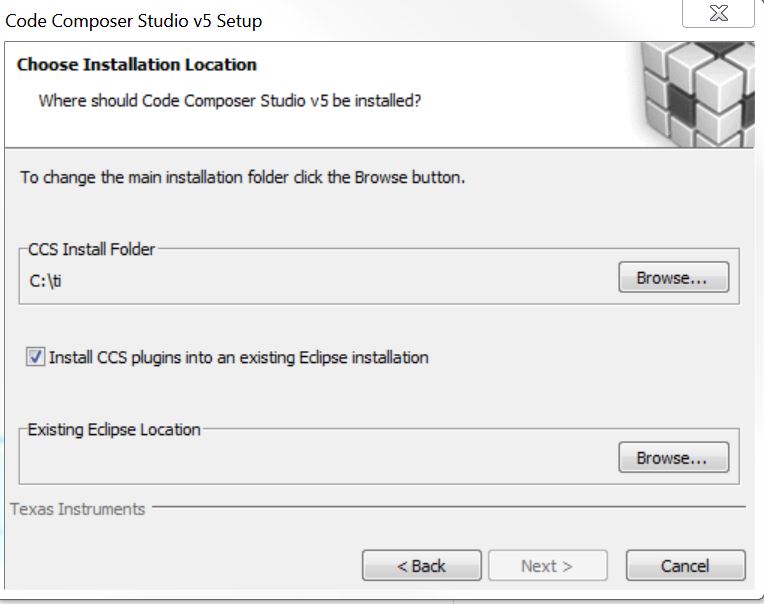
I had asked this question and danish answered me. But I am a little confused. As you can see in the first image bellow, CCS v5.3 could not be installed. When I click on YES icon then in the next page i choose the blank icon "install CC plugins into an existing Eclipse installation.". Then there is nothing to choose and I am not able to continue and click on next icon and start installing CCS.

But what is the reason of confusion?

I was not faced with this problem on some systems but I had this problem on some others. Why? and how to fix it?

Regards

Hossein

  • Hi Hossein,

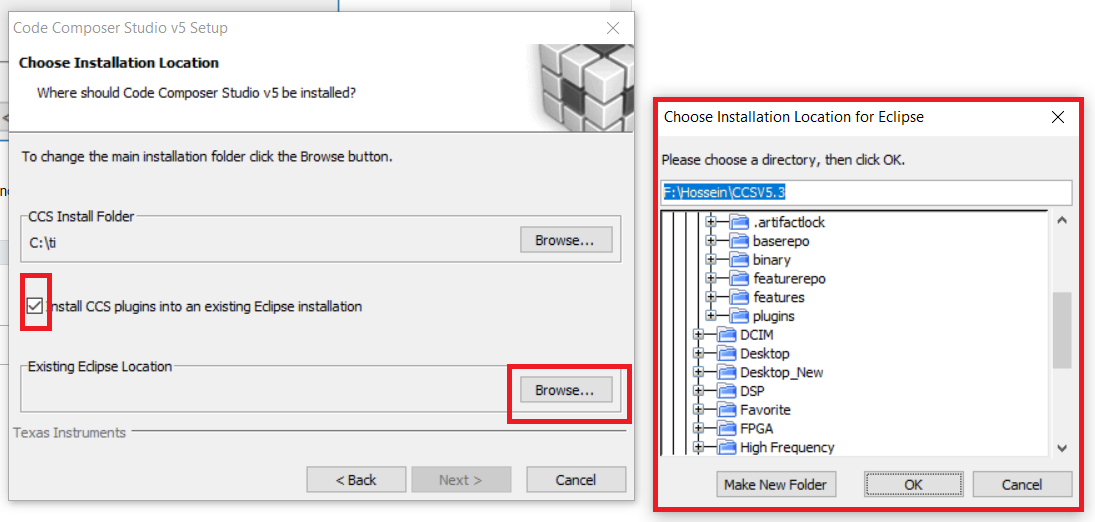
    CCS 5.3 allows users to select an existing eclipse location, for example, if you have eclipse installed in e:\hossein\eclipse, you can browse to it, when you click the check box. See image below:

  • Hi Danish,

    I don't know you may laugh or not?!
    But when I click check box and want to browse installed eclipse, I don't know where to go?!!
    In fact this system belongs to one of my friends and I don't know whether she has installed eclipse or not.

  • I have another related question.

    As you know, there are IDEs for C/C++ programming on computers. IDEs are editors/compilers/ debuggers and .... .
    For example Eclipse IDE for C/C++ developers, Visual Studio, Borland, Dev++ and .... .

    I have a question in mind that what is the relation between CCS and Eclipse? Why installing Eclipse is needed for using CCS? Is CCS an IDE or not? If yes, so what is the role of eclipse?
    I 'll be happy to read any useful wiki page or PDF.

    Thanks.

  • Then ignore that option. CCS will install it's own eclipse. We don't support that option in newer versions of CCS anymore.

    If you can move to CCS 7.4, I'd recommend that. There are a lot more features, etc. 

  • "what is the relation between CCS and Eclipse?". Eclipse is an open source software framework used to build products. CCS is a product that is built upon Eclipse and the associated CDT Eclipse package (C/C++ Development Toolkit). A lot of IDEs for embedded processors are based on Eclipse: CCS, ARM DS-5, mbed IDE, ST TrueStudio...)

    dev.ti.com/.../

    Quite a few years ago we used to support installing our content into an existing Eclipse installation. However version compatibility and updating was a problem so we no longer support that option. Eclipse is included with the CCS installation.


    Regards,
    John
  • Hi John,

    your guide was great.
    Thank you.

    "Quite a few years ago we used to support installing our content into an existing Eclipse installation. However version compatibility and updating was a problem so we no longer support that option. Eclipse is included with the CCS installation."

    Related to your sentence "Eclipse is included with the CCS installation", and what Danish mentioned a post before your post, "We don't support that option in newer versions of CCS anymore. If you can move to CCS 7.4, I'd recommend that. There are a lot more features, etc. " , I found out newer version of CCS includes its Eclipse and there is no need of installing Eclipse. OK, that's right, but this made a new question in my mind.
    The question is that, if Eclipse was not included in older versions of CCS, so when we download the zipped file of for example CCS v5.3 from ti.com, does this file contain Eclipse or not?
    I expect the answer is yes, if I am right, so would you please explain the difference between this and what you mentioned about newer versions more. How can I find the difference better? Please give a little bit more details. Imagine I have Eclipse installed on my system.

  • Hi Danish,

    Thank you for answering my question.

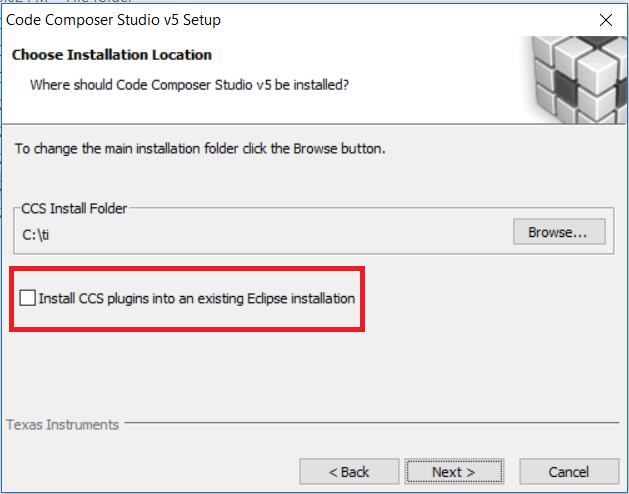
    You said, "ignore that option." OK. Did you mean that I don't mark the checkbox in the image bellow?

    Am I right?

    Related to this matter and because of my curiosity, I want to know three more related things.

    One, If I don't want to ignore this option and mark the checkbox then I should find the existing installed Eclipse on my system. OK? Then I think for myself that If I find the existing installed Eclipse after clicking on BROWSE icon and finding directory of existing Eclipse, it might create some problems. I said it might, because if the existing Eclipse does not match to CCS plugs in there would be some problems and if not everything would be ok.

    Was it true?

    Two, if I ignore this, then a new version of Eclipse will be installed?

    Three, what are the reasons of having Eclipse installed on the system? Having older versions of CCS? Or some other IDEs based on Eclipse? 

    Best Regards,

    Hossein

  • Hossein,

    I apologize for the delayed reply, but this thread somehow fell under our radar.

    Hossein Forouzani said:

    You said, "ignore that option." OK. Did you mean that I don't mark the checkbox in the image bellow?

    Am I right?

    Yes, it is best to just install CCS standalone. It will install its own version of Eclipse with it.

    Hossein Forouzani said:
    One, If I don't want to ignore this option and mark the checkbox then I should find the existing installed Eclipse on my system. OK? Then I think for myself that If I find the existing installed Eclipse after clicking on BROWSE icon and finding directory of existing Eclipse, it might create some problems. I said it might, because if the existing Eclipse does not match to CCS plugs in there would be some problems and if not everything would be ok.

    Yes, you can check the box and install CCSv5 into an existing Eclipse installation, but it sounds like you are just curious and don't really have strong reason to do it. Also please note that CCSv5 is very old and no longer supported so if you hit any problems, we will not be in a position to support you. 

    Hossein Forouzani said:
    Two, if I ignore this, then a new version of Eclipse will be installed?

    Yes, CCS will install its own version of Eclipse.

    Hossein Forouzani said:
    Three, what are the reasons of having Eclipse installed on the system? Having older versions of CCS? Or some other IDEs based on Eclipse? 

    Some users may already have a version of Eclipse installed, either because they were directly working with it or with some other IDE based on Eclipse. In those instances having the ability to install CCS plugins into the existing Eclipse installation is useful. However as mentioned earlier, we no longer support this option since CCSv6. If you are just starting development with CCS I would strongly recommend going with the latest (and best supported) version CCS v8.