This thread has been locked.

If you have a related question, please click the "Ask a related question" button in the top right corner. The newly created question will be automatically linked to this question.

CCS/MSP430FR2633: unresolved symbol keypadSensor_Params, first referenced in ./main.obj

Part Number: MSP430FR2633

Tool/software: Code Composer Studio

hello,

I working on captivate technology. There are some pre defined functions in captivate technology I am getting the error in code "unresolved symbol keypadSensor_Params, first referenced in ./main.obj". I have refered the code from "https://goo.gl/uUbe7n". 

#include <msp430.h>                      // Generic MSP430 Device Include
#include "driverlib.h"                   // MSPWare Driver Library
#include "captivate.h"                   // CapTIvate Touch Software Library
#include "CAPT_App.h"                    // CapTIvate Application Code
#include "CAPT_BSP.h"                    // CapTIvate EVM Board Support Package
#include "CAPT_Type.h"

#define LED3_P1OUT                                                       (P1OUT)
#define LED3_P1DIR                                                       (P1DIR)
#define LED3_PIN                                                         (BIT0)
#define LED3_ON                                         (LED3_P1OUT |= LED3_PIN)
#define LED3_OFF                                       (LED3_P1OUT &= ~LED3_PIN)
#define LED3_TOGGLE                                     (LED3_P1OUT ^= LED3_PIN)

#define LED4_P1OUT                                                       (P1OUT)
#define LED4_P1DIR                                                       (P1DIR)
#define LED4_PIN                                                         (BIT7)
#define LED4_ON                                         (LED4_P1OUT |= LED4_PIN)
#define LED4_OFF                                       (LED4_P1OUT &= ~LED4_PIN)
#define LED4_TOGGLE                                     (LED4_P1OUT ^= LED4_PIN)

#define LED5_P1OUT                                                       (P1OUT)
#define LED5_P1DIR                                                       (P1DIR)
#define LED5_PIN                                                         (BIT6)
#define LED5_ON                                         (LED5_P1OUT |= LED5_PIN)
#define LED5_OFF                                       (LED5_P1OUT &= ~LED5_PIN)
#define LED5_TOGGLE                                     (LED5_P1OUT ^= LED5_PIN)


#define keypadSensor    BTN00

void updateLEDs(void);//(tSensor *sensor);//(void);
void my_button_callback(tSensor* pSensor);
extern tButtonSensorParams keypadSensor_Params;

void main(void)
{
	//
	// Initialize the MCU
	// BSP_configureMCU() sets up the device IO and clocking
	// The global interrupt enable is set to allow peripherals
	// to wake the MCU.
	//
	WDTCTL = WDTPW | WDTHOLD;
	BSP_configureMCU();
	__bis_SR_register(GIE);
	GPIO_setAsOutputPin(GPIO_PORT_P1,GPIO_PIN0|GPIO_PIN7|GPIO_PIN6);
	MAP_CAPT_registerCallback(&BTN00, &my_button_callback);
	//
	// Start the CapTIvate application
	//
	CAPT_appStart();
	//
	// Background Loop
	//
	while(1)
	{
	    CAPT_registerCallback(&BTN00, &my_button_callback);
		__no_operation();
		CAPT_appSleep();
		
	} // End background loop
} // End main()
void updateLEDs(void)
{
    

    if ((keypadSensor.bSensorTouch==true) && (keypadSensor.bSensorPrevTouch==false))
    {
        if (keypadSensor_Params.ui16DominantElement == 0x00)
        {
            LED1_OFF;
            LED2_OFF;
        }
        else if (keypadSensor_Params.ui16DominantElement == 0x01)
        {
            LED1_ON;
            LED2_OFF;
        }
        else if (keypadSensor_Params.ui16DominantElement == 0x02)
        {
            LED1_OFF;
            LED2_ON;
        }
        else if (keypadSensor_Params.ui16DominantElement == 0x03)
        {
            LED1_ON;
            LED2_ON;
        }
        else
        {
            LED1_OFF;
            LED2_OFF;
        }
    }
	else
	{
		LED1_OFF;
		LED2_OFF;
	}	
}
void my_button_callback(tSensor* pSensor)
{
    if((pSensor->bSensorTouch == true) && (pSensor->bSensorPrevTouch == false))
    {
        // BUTTON PRESSED

        updateLEDs();//(0x00);
        LED1_OFF;
        LED3_OFF;
        // DO SOMETHING ...
    }
    else if((pSensor->bSensorTouch == false) && (pSensor->bSensorPrevTouch == true))
    {
        // BUTTON RELEASED
        LED1_OFF;
        LED2_OFF;
        LED3_ON;
        // DO SOMETHING ...
    }
}

  • Hello Gourav,

    I tied to build your code and the only error I got was " identifier "BTN00" is undefined". 

    I see you have #define keypadSensor    BTN00  in your code and there is no need to define keypadSensor as BTN00.

    What I did is removing this #define keypadSensor    BTN00  and changed the call back register function to MAP_CAPT_registerCallback(&keypadSensor, &my_button_callback); 

    And I was able to build your code with no errors.

    If you still have problems build the code please let me know.

    Thanks,

    Yiding

  • Hello Yiding ,

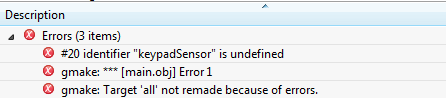
               I have corrected my code as per your suggestion. But still I am getting the keypadSensor undefined and if I include it i am still getting error. Errors are as follows .

    By commenting the #define keypadSensor                                                                   By un-commenting keypadSensor

  • Hello Gourav,

    Could you please share with me your CCS project so I can help you debug the errors you are experiencing?

    Thanks,

    Yiding

  • /* --COPYRIGHT--,BSD
     * Copyright (c) 2017, Texas Instruments Incorporated
     * All rights reserved.
     *
     * Redistribution and use in source and binary forms, with or without
     * modification, are permitted provided that the following conditions
     * are met:
     *
     * *  Redistributions of source code must retain the above copyright
     *    notice, this list of conditions and the following disclaimer.
     *
     * *  Redistributions in binary form must reproduce the above copyright
     *    notice, this list of conditions and the following disclaimer in the
     *    documentation and/or other materials provided with the distribution.
     *
     * *  Neither the name of Texas Instruments Incorporated nor the names of
     *    its contributors may be used to endorse or promote products derived
     *    from this software without specific prior written permission.
     *
     * THIS SOFTWARE IS PROVIDED BY THE COPYRIGHT HOLDERS AND CONTRIBUTORS "AS IS"
     * AND ANY EXPRESS OR IMPLIED WARRANTIES, INCLUDING, BUT NOT LIMITED TO,
     * THE IMPLIED WARRANTIES OF MERCHANTABILITY AND FITNESS FOR A PARTICULAR
     * PURPOSE ARE DISCLAIMED. IN NO EVENT SHALL THE COPYRIGHT OWNER OR
     * CONTRIBUTORS BE LIABLE FOR ANY DIRECT, INDIRECT, INCIDENTAL, SPECIAL,
     * EXEMPLARY, OR CONSEQUENTIAL DAMAGES (INCLUDING, BUT NOT LIMITED TO,
     * PROCUREMENT OF SUBSTITUTE GOODS OR SERVICES; LOSS OF USE, DATA, OR PROFITS;
     * OR BUSINESS INTERRUPTION) HOWEVER CAUSED AND ON ANY THEORY OF LIABILITY,
     * WHETHER IN CONTRACT, STRICT LIABILITY, OR TORT (INCLUDING NEGLIGENCE OR
     * OTHERWISE) ARISING IN ANY WAY OUT OF THE USE OF THIS SOFTWARE,
     * EVEN IF ADVISED OF THE POSSIBILITY OF SUCH DAMAGE.
     * --/COPYRIGHT--*/
    //*****************************************************************************
    // Development main.c for MSP430FR2633, MSP430FR2533, MSP430FR2632, and
    // MSP430FR2532.
    //
    // This starter application initializes the CapTIvate touch library
    // for the touch panel specified by CAPT_UserConfig.c/.h via a call to
    // CAPT_appStart(), which initializes and calibrates all sensors in the
    // application, and starts the CapTIvate interval timer.
    //
    // Then, the capacitive touch interface is driven by calling the CapTIvate
    // application handler, CAPT_appHandler().  The application handler manages
    // whether the user interface (UI) is running in full active scan mode, or
    // in a low-power wake-on-proximity mode.
    //
    // The CapTIvate application handler will return true if proximity was
    // detected on any of the sensors in the application, which is used here
    // to control the state of LED2. LED1 is set while the background loop enters
    // the handler, and is cleared when the background loop leaves the handler.
    //
    // \version 1.60.00.03
    // Released on November 22, 2017
    //
    //*****************************************************************************
    
    #include <msp430.h>                      // Generic MSP430 Device Include
    #include "driverlib.h"                   // MSPWare Driver Library
    #include "captivate.h"                   // CapTIvate Touch Software Library
    #include "CAPT_App.h"                    // CapTIvate Application Code
    #include "CAPT_BSP.h"                    // CapTIvate EVM Board Support Package
    #include "CAPT_Type.h"
    #include "CAPT_Buttons.h"
    #include "CAPT_UserConfig.h"
    
    #define LED3_P1OUT                                                       (P1OUT)
    #define LED3_P1DIR                                                       (P1DIR)
    #define LED3_PIN                                                         (BIT0)
    #define LED3_ON                                         (LED3_P1OUT |= LED3_PIN)
    #define LED3_OFF                                       (LED3_P1OUT &= ~LED3_PIN)
    #define LED3_TOGGLE                                     (LED3_P1OUT ^= LED3_PIN)
    
    
    ///#define keypadSensor    BTN00
    
    void updateLEDs(void);//(tSensor *sensor);//(void);
    void my_button_callback(tSensor* pSensor);
    extern tButtonSensorParams keypadSensor_Params;
    
    void main(void)
    {
        //
        // Initialize the MCU
        // BSP_configureMCU() sets up the device IO and clocking
        // The global interrupt enable is set to allow peripherals
        // to wake the MCU.
        //
        WDTCTL = WDTPW | WDTHOLD;
        BSP_configureMCU();
        __bis_SR_register(GIE);
        GPIO_setAsOutputPin(GPIO_PORT_P1,GPIO_PIN0|GPIO_PIN7|GPIO_PIN6);
        //MAP_CAPT_registerCallback(&BTN00, &my_button_callback);
        //
        // Start the CapTIvate application
        //
        CAPT_appStart();
        //
        // Background Loop
        //
        while(1)
        {
            MAP_CAPT_registerCallback(&BTN00, &my_button_callback);
            if(CAPT_appHandler()==true)                             //check if button is touched???
            {
                LED3_ON;
            }
            else
            {
                LED3_OFF;
            }
            __no_operation();
            CAPT_appSleep();
    
        } // End background loop
    } // End main()
    
    void my_button_callback(tSensor* pSensor)
    {
        if((pSensor->bSensorTouch == true) && (pSensor->bSensorPrevTouch == false))
        {
            // BUTTON PRESSED
    
            updateLEDs();//(0x00);
    
            // DO SOMETHING ...
        }
        else if((pSensor->bSensorTouch == false) && (pSensor->bSensorPrevTouch == true))
        {
            // BUTTON RELEASED
    
            // DO SOMETHING ...
        }
    }
    
    
    void updateLEDs(void)
    {
        uint8_t dominantElement;
    
        if ((keypadSensor.bSensorTouch==true) && (keypadSensor.bSensorPrevTouch==false))
        {
            dominantElement = CAPT_getDominantButton(&keypadSensor);
            if (keypadSensor_Params.ui16DominantElement == 0x00)
            {
                LED1_OFF;
                LED2_OFF;
            }
            else if (keypadSensor_Params.ui16DominantElement == 0x01)
            {
                LED1_ON;
                LED2_OFF;
            }
            else if (keypadSensor_Params.ui16DominantElement == 0x02)
            {
                LED1_OFF;
                LED2_ON;
            }
            else if (keypadSensor_Params.ui16DominantElement == 0x03)
            {
                LED1_ON;
                LED2_ON;
            }
            else
            {
                LED1_OFF;
                LED2_OFF;
            }
        }
    }


  • Hello Gourav,

    I changed line 101:

    MAP_CAPT_registerCallback(&BTN00, &my_button_callback);
    to
    MAP_CAPT_registerCallback(&keypadSensor, &my_button_callback);

    and it build with no error.

    Thanks,
    Yiding