This thread has been locked.

If you have a related question, please click the "Ask a related question" button in the top right corner. The newly created question will be automatically linked to this question.

CCS: error

 Tool/software: Code Composer Studio

hi,

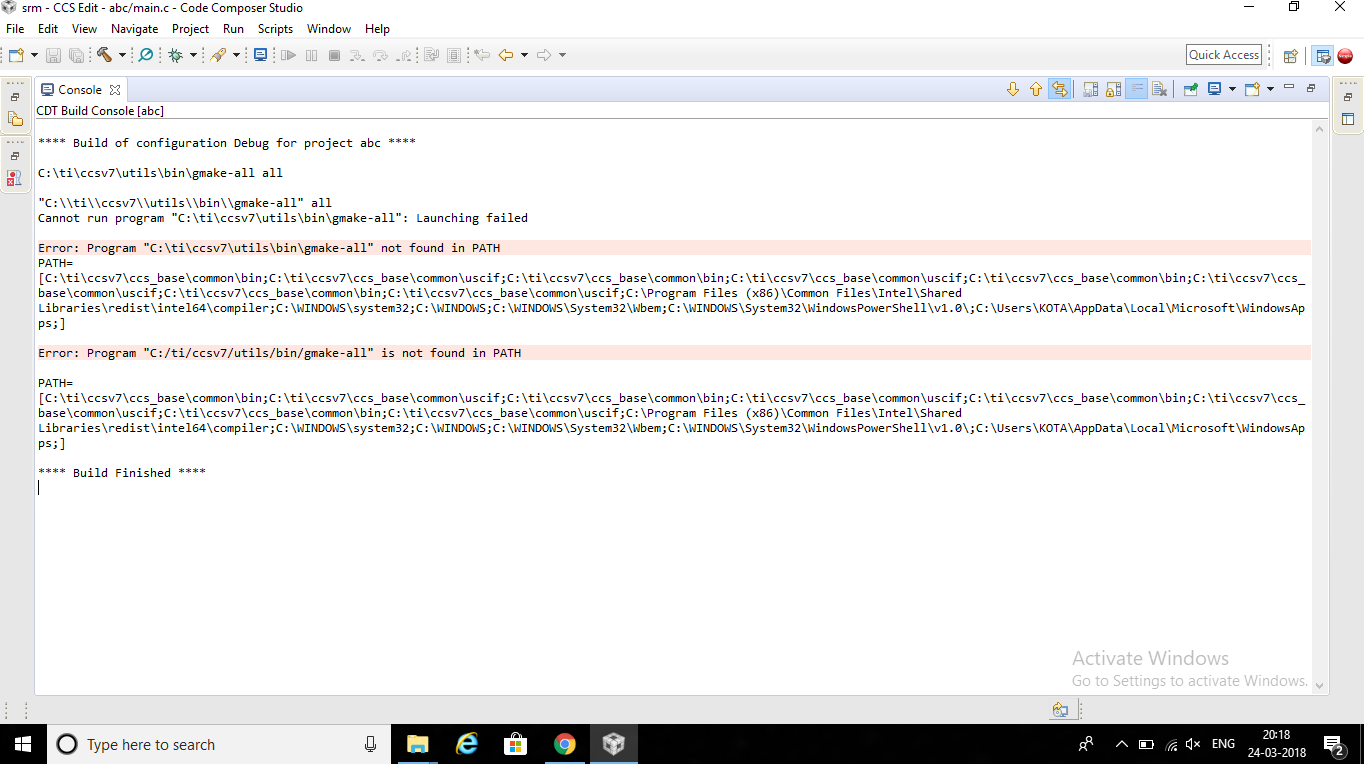
i was using ccs v7 ....i was getting an error, program "make" not found in path....plz help me in rectifying this error

thanks in advance,

likhil

  • Was this project created using the New Project wizard (menu Project->New CCS Project)?

    Your build command looks like this: gmake-all all
    The default CCS build command for most projects created using the project wizard is: gmake -k -j 4

    As you can see your project is calling the executable gmake-all which does not exist in the default  c:\ti\ccsv7\utils\bin directory. If you intend using the gmake in that directory, you would need to change the command from gmake-all to gmake.

    You can do this from Project Properties->Build->Builder tab and adjust the Build command. 

  • Hi sir, I was getting an other error ".h includes itself".... I think the original file should guard against recursive inclusion... so for this i need to modify the .h that come with CCS....i mean .h file should have a guard....i searched in en.wikipedia.org/.../include _guard.....but i didn't find the exact file that which i should include in Clibrary.....can u please send me the file

    thanks in advance,
    likhil
  • Likhil Sai said:
    I think the original file should guard against recursive inclusion.

    the original file DOES have a guard. That is why I am asking to see your version of this header file. You shouldn't have to modify anything by default. Can I see your *.h file in question?

    Also please continue the discussion in the original thread:

    https://e2e.ti.com/support/development_tools/code_composer_studio/f/81/t/675470

    Thanks

    ki