This thread has been locked.

If you have a related question, please click the "Ask a related question" button in the top right corner. The newly created question will be automatically linked to this question.

CCS/TMDXICE110: Not show task window

Part Number: TMDXICE110


Tool/software: Code Composer Studio

The difference in mapping properties of tasks in TI RTOS between CCS7.4 and CCS8.
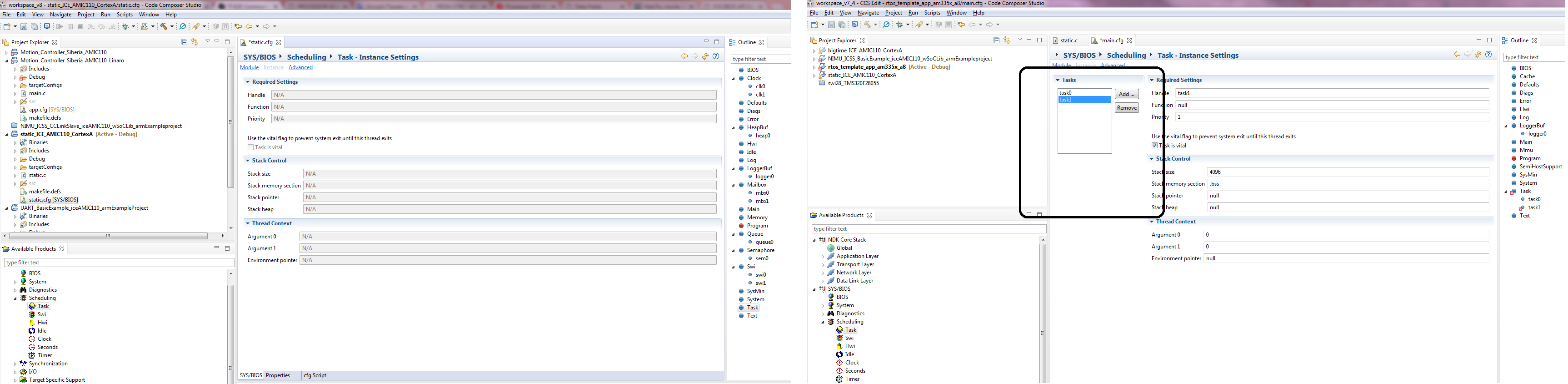
Why is the task window with buttons "add" and "remov" in CCS7.4 is there, but in CCS8 is not present?

  • Kiselev,

    Can you let me know which SDK/BIOS version you are using?  I will try to reproduce.

    In the meantime are you able to right click on task in the Outline view and add a task that way?

    Regards,

    John

  • I use ti-processor-sdk-rtos-am335x-evm-04.02.00.09-Windows-x86-Install.
    As for creating a new task, as you show in the picture above, I can create it and I do it so. I just wanted to know why such a difference in display between the versions of the CCS.
  • Thanks Kiselev. I will set that up. I am on a Mac using an MCU with a different type of SDK. I see something a bit off but not the same. Thus I want to setup what you have. I think I will see the same. Once I can do that I will get a defect filed. CCSv8 did pick up a new Eclipse version and that may be causing an issue here.

    Regards,
    John
  • I am able to reproduce the exact screens you have shown in your initial post. I have filed CCDSK-3146 to track this.

    Regards,
    John
  • Well, I'm glad you could reproduce my situation. Should I worry or can I continue to work with this?
  • I would not worry about it at this time. I don't have a response back from the team yet. It is quite possible that this was an intentional change to make better use of the screen space. Another thing I noticed was that sometimes some of the sections of options where being collapsed on the left hand side. Simply triggering the window to redraw by selecting something else in the outline view or maximizing the window cleared that up for me.

    Regards,
    John