This thread has been locked.

If you have a related question, please click the "Ask a related question" button in the top right corner. The newly created question will be automatically linked to this question.

CCS: CCS7.1 Setup problem on laptop computer


Tool/software: Code Composer Studio

Hi, Dear CCS technical support team members

Now I try to install CCS7.1 on the laptop computer, but failed. please refer the install log files as below(win rar file).

The error information is shown as below, before I install CCS7.1, Windows firewall was shut down and anti-virus software was uninstalled.

The operation system on the laptop is Windows 7 Home Basic service pack1 (2009),  it was also updated to the latest patch.

CCS7.1 Installation package was downloaded from TI website, I am sure the Installation package is not damaged because I downloaded twice.

So I can not find the root cause of  CCS7.1 installation failure.

please check this problem and give me some advice, thank you very much.CCS7.1 install_logs.rar
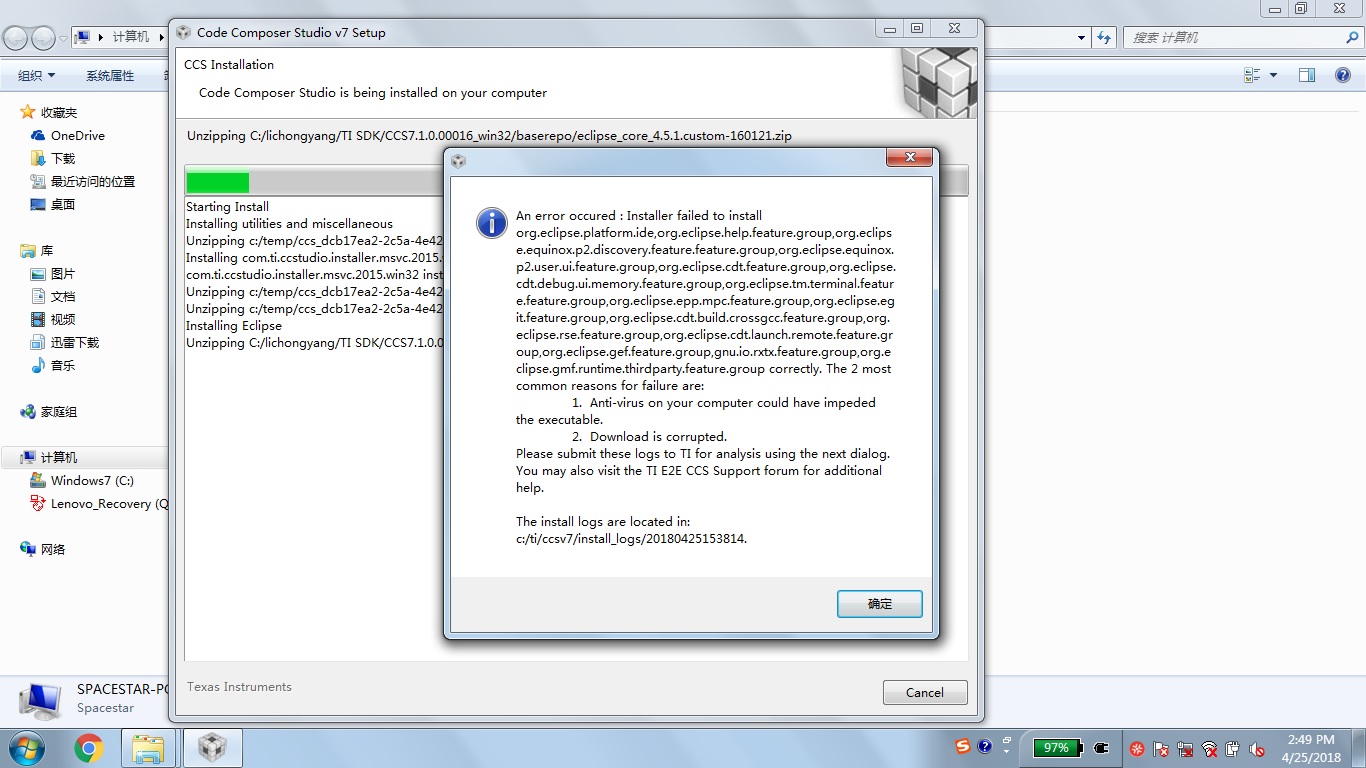
  • Hello,

    Thank you for your installation logs. They were very helpful. We were able to find the root cause of your issue. It appears you have non-ascii characters in your user name. See:

    http://processors.wiki.ti.com/index.php/Troubleshooting_CCSv7#General_tips_for_installing_CCSv7

    Ensure that your Username does not have any non-ascii characters, and that you are installing CCS to a directory that does not have any non-ascii characters .
    A temporary directory using the Username is created during installation, and Eclipse is unable to handle non-ascii characters. If your Username does have non-ascii characters, please create a temporary admin user for installing CCS.


    Thanks

    ki