This thread has been locked.

If you have a related question, please click the "Ask a related question" button in the top right corner. The newly created question will be automatically linked to this question.

CCS/LAUNCHXL-CC2650: Unable to create a semaphore

Part Number: LAUNCHXL-CC2650


Tool/software: Code Composer Studio

Tool/software: Code Composer Studio

Hi there,

I am following the TI-RTOS basics tutorial on SimpleLink Academy. For whatever reasons, I am not able to add a semaphore just like how its illustrated in the following link:

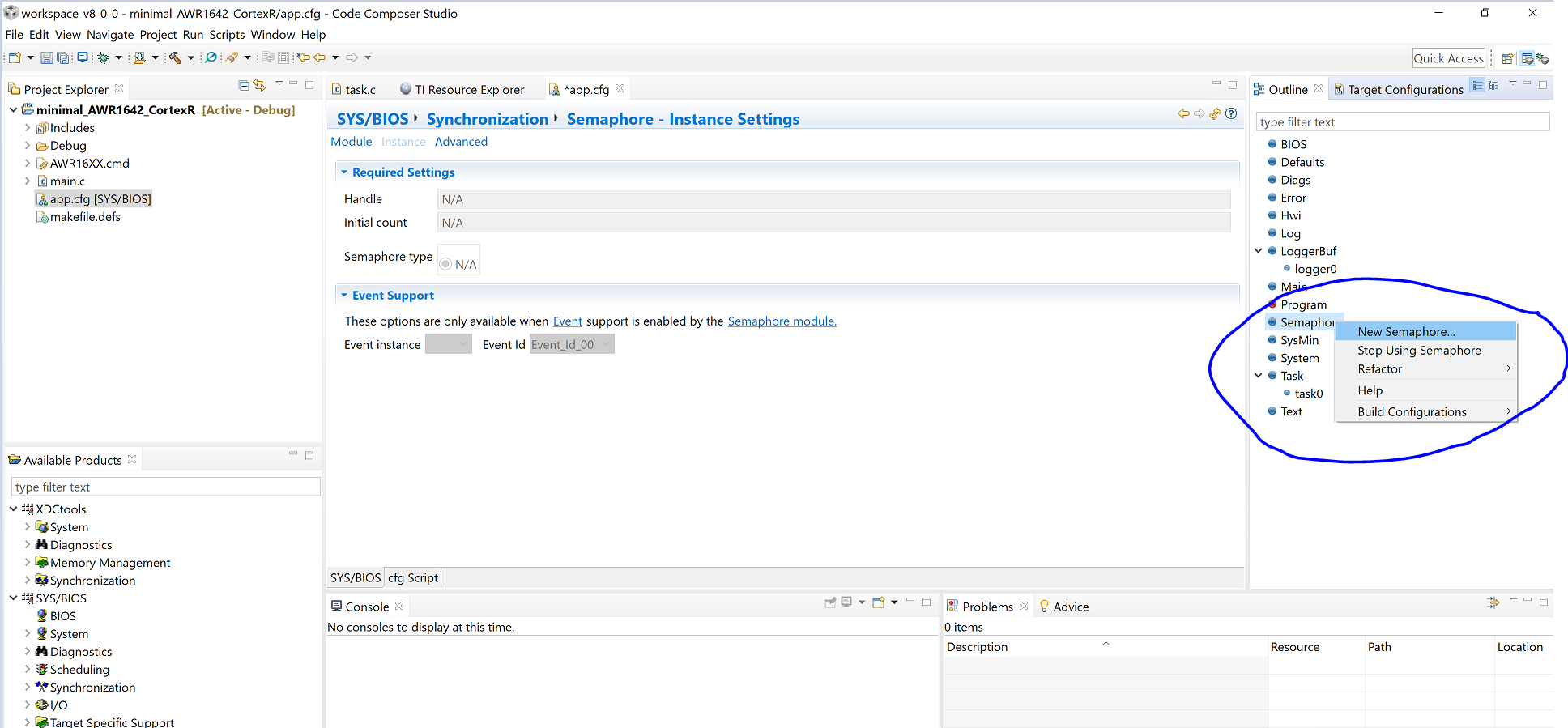
I can't see the window where I can add the semaphore and then change the settings accordingly, if any. All I see is "N/A".

Perspective: CCS SIMPLE

Best,

Azim

  • Hi Azim,

    In order to create a Semaphore instance, you need to right click on "Semaphore" module in the Outline window on the right and click on "New Semaphore..." option in the dropdown menu (See screenshot below). After you have created one or more instance, you can click on any instance so it shows up in XGConf and can configure it.

    Best,

    Ashish