This thread has been locked.

If you have a related question, please click the "Ask a related question" button in the top right corner. The newly created question will be automatically linked to this question.

CCS/EK-TM4C129EXL: CCS v8 'splash screen' displaying different things on different systems...

Part Number: EK-TM4C129EXL
Other Parts Discussed in Thread: CCSTUDIO

Tool/software: Code Composer Studio

Have recently done a 'fresh' install on two different macOS development machines. Both installs seem to boot up just fine, have begun installing packages and updates, etc. Haven't yet moved any development into these environments, but early indications seem AOK, I think(?)

However, the two environments display different splash screens at startup. One displays the expected Texas Instruments Code Composer screen - includes TI logo, etc. The other displays only the native Eclipse startup screen. Don't know what to infer from this, but clearly the environments are subtly different... Mean anything? Does this indicate anything of concern?

Obviously don't care at all from an esthetic point of view (!), but if this suggests any shortcoming in the install or configuration, I'd like to get it sorted.

  • LouEEEE! said:
    However, the two environments display different splash screens at startup. One displays the expected Texas Instruments Code Composer screen - includes TI logo, etc. The other displays only the native Eclipse startup screen

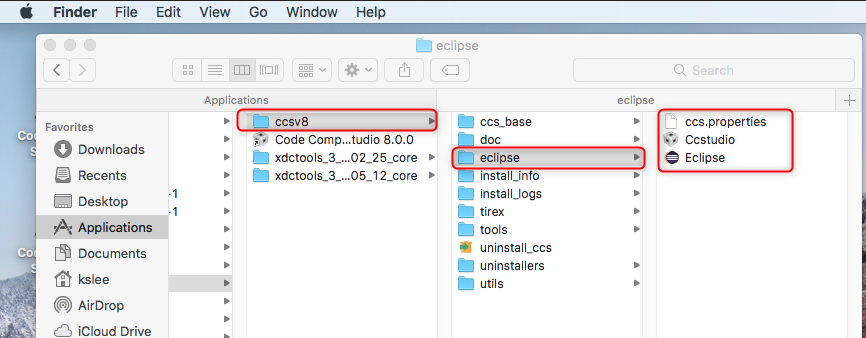
    You would get the native Eclipse splash screen if you launched CCS with the Eclipse launcher: <CCS INSTALL DIR>\ccsv8\eclipse\Eclipse

    The correct way to launch CCS is with the CCS launcher: CCS INSTALL DIR>\ccsv8\eclipse\Eclipse\Ccstudio 

    Please double-check which launcher is used

    Thanks

    ki

  • Hello,
    I haven’t heard back from you, I’m assuming you were able to resolve your issue. If not, please post a reply with an update below (or create a new thread).

    thanks,
    ki
  • Hello Ki, And thanks for your response...
    But I don't have Ccstudio at that path.

    I have both of these in the ccsv8 path (within the Eclipse 'package'):
    /Applications/ti/ccsv8/Ccstudio
    /Applications/ti/ccsv8/Eclipse

    and both boot to the Eclipse splash screen.

  • That doesn't look right. Both apps should be under the ./eclipse subfolder

    To confirm, this is not the case for you?