This thread has been locked.

If you have a related question, please click the "Ask a related question" button in the top right corner. The newly created question will be automatically linked to this question.

CCS/CCSTUDIO: "Updates Available" but Error on update

Part Number: CCSTUDIO


Tool/software: Code Composer Studio

Each time I start CCS 8.0.0.00016 on Windows 10, I receive a message alerting me that updates are available. The Available Updates dialog lists the following:

CCS Flash Content    8.1.0.1297

When I proceed with the update to install all the above items, I receive the following error dialog:

'Updating Software' has encountered a problem.
An error occurred while collecting items to be installed

Details:

An error occurred while collecting items to be installed
session context was:(profile=epp.package.cpp, phase=org.eclipse.equinox.internal.p2.engine.phases.Collect, operand=, action=).
No repository found containing: org.eclipse.update.feature,com.ti.c2000.support.win32,4.2.5.0
No repository found containing: binary,com.ti.c2000.support.win32_root,4.2.5.0
No repository found containing: org.eclipse.update.feature,com.ti.dsflash.win32,8.1.0.1297
No repository found containing: binary,com.ti.dsflash.win32_root.win32.win32.x86,8.1.0.1297

Is there an easy way to resolve this?

Thanks.

  • Hi,

    The repository issue may be due to a glitch on the network or invalid cache data. Can you try the steps shown at item 5 of:

    processors.wiki.ti.com/.../Troubleshooting_CCSv7

    That said, I don't see this component on my CCSv8.0.0.00016 here. Would you mind attaching a screenshot?

    Hope this helps,
    Rafael
  • I followed instructions of item 5 in your posting, but I still have the same behavior.

    I tried to install mmWave support, and it said it couldn't do that, but wanted to update CCS Flash Content. Some items in the Install New Software dialog appeared to be duplicated until I checked the box to show only items applicable to the target environment. Does it determine the target environment from current project settings, or? My current project is one I created by importing an existing makefile project to get the benefits of code indexing. It doesn't build correctly, and I don't know if it indicates the target environment as expected.

    I attempted to attach screenshots of the Available Updates and Problem Occurred dialogs, but the Post button didn't allow me to post my reply. I will try again without the screenshots. I can obviously work around this issue. However, it would be nice to correct any errors in my installation if it is easy to do so, plus avoid the update warning if possible.

    Thanks.
  • Hi,

    I just received confirmation that this particular update is shown due to a bug that made its way in CCSv8.0.0 - it should have only be shown in CCSv7.4.0.

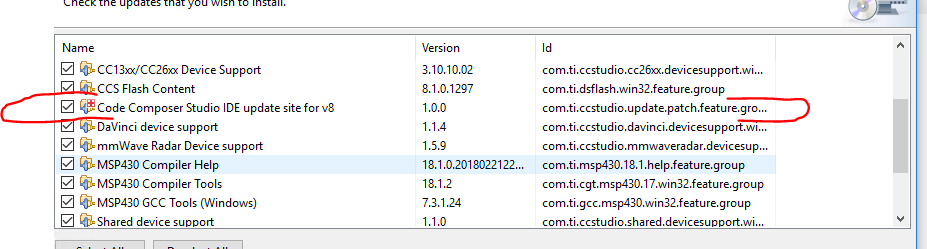
    To remove this particular update from showing up, please select and install the update shown below:

    I apologize for the inconvenience,

    Rafael

  • Thanks for that information. I do not see the CCS IDE update circled above in the list of possible files to update. I have performed all available updates except the CCS Flash update that does not complete. I also tried going to add new software, and selected the CCS updates repository, but the option above did not appear. Where can I find that?
  • Hi,

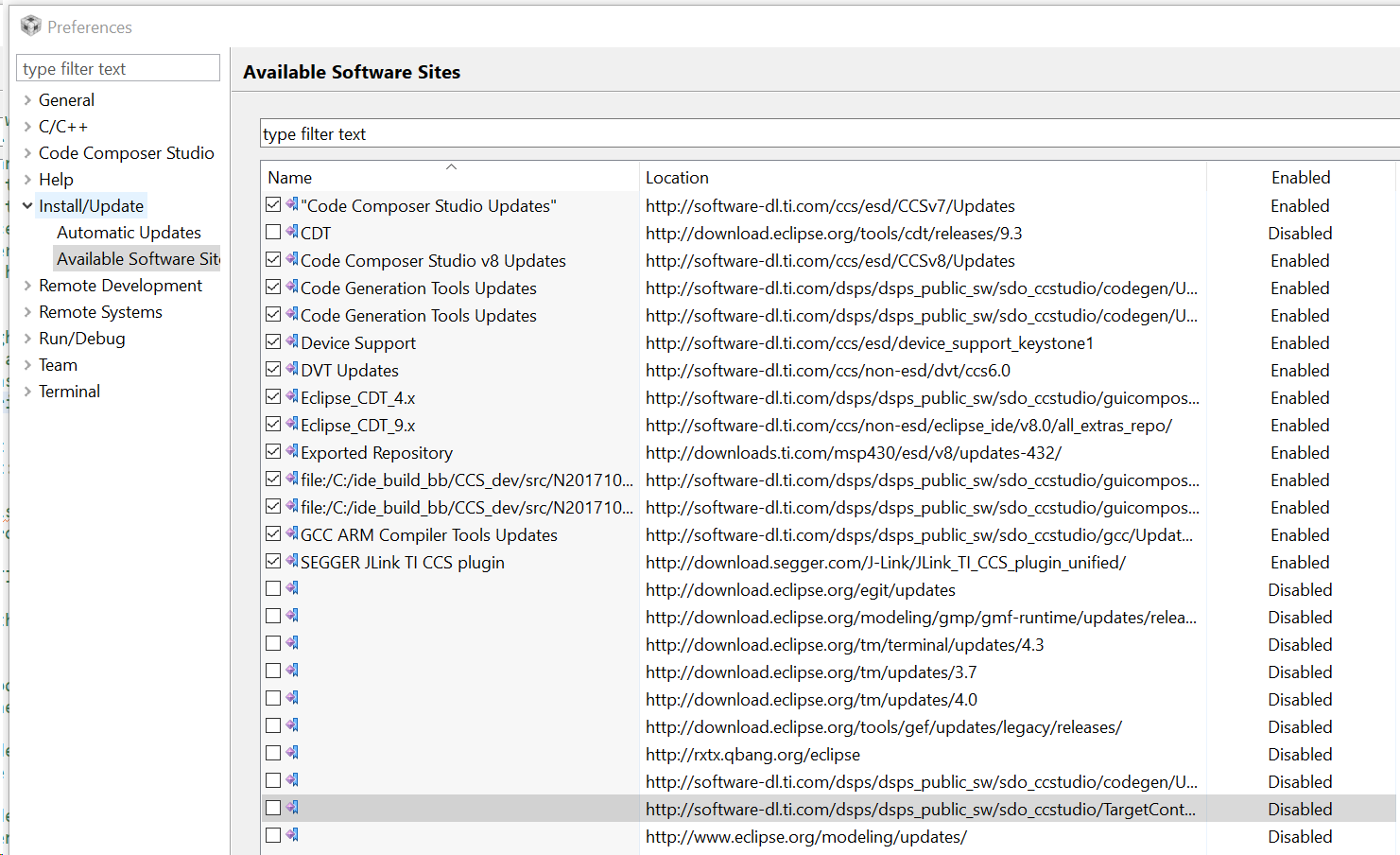
    I was able to apply the update to a different PC. If you go to menu Window --> Preferences and navigate to the option in the screenshot below, can you change the highlighted line to point to the CCSv8 update site?

    That should help you get rid of the invalid update. 

    Hope this helps,

    Rafael

  • When I view that dialog, the highlighted line looks exactly the same as in your post. Is software-dl.ti.com/.../Updates already the expected location for CCS v8 Updates? If so, mine appears to be set correctly and I don't know what else to try. If not, what should I change it to?

    Thanks.
  • Hi,

    I am not sure if you were able to workaround this issue, but unfortunately I can't precisely tell what is happening in your case.

    I suspect that some sort of temporary files may be getting in the way, which is usually solved by going through step 4 of the troubleshooting tips below:
    processors.wiki.ti.com/.../Troubleshooting_CCSv7

    Apart from this I don't know what may be happening in your case. The update should not show for you after the change.

    I apologize for the inconvenience,
    Rafael
  • Thanks for the additional suggestion. I tried following step 4 of the link you provided, but it did not help.

    I tried applying the CCSv8 Service Release Windows version 8.1.0.00011, and receive the following error:
    An error occurred while configuring the installed items
    session context was:(profile=epp.package.cpp, phase=org.eclipse.equinox.internal.p2.engine.phases.Configure, operand=null --> [R]com.ti.ccstudio.installer.win32.feature.group 8.1.0.00011, action=com.ti.ccstudio.p2.actions.RunInstallerAction).
    Cannot install, please check c:\ti\ccsv8\eclipse\downloads\ccs_p2_updates.log for more details.

    The log file listed above says:
    general exception Unable to read repository at software-dl.ti.com/.../content.jar.

    Next I attempted to update the CCS Flash Content again and received the following error:
    An error occurred while collecting items to be installed
    session context was:(profile=epp.package.cpp, phase=org.eclipse.equinox.internal.p2.engine.phases.Collect, operand=, action=).
    No repository found containing: org.eclipse.update.feature,com.ti.c2000.support.win32,4.2.5.0
    No repository found containing: binary,com.ti.c2000.support.win32_root,4.2.5.0
    No repository found containing: org.eclipse.update.feature,com.ti.dsflash.win32,8.1.0.1297
    No repository found containing: binary,com.ti.dsflash.win32_root.win32.win32.x86,8.1.0.1297
  • Hi,

    From your previous post I can tell the modifications to set the CCSv8 Update site were successful - the update CCSv8 Service Release Windows version 8.1.0.00011 does not show up if the previous CCSv7 Update site was still present in your system.

    I haven't tried to install this particular patch, which will upgrade your copy of CCSv8.0.0 to CCSv8.1.0. Is that what you really intend to do?

    What is baffling to me is that the CCS Flash content should not appear in the CCSv8 Update site - this is really strange.

    Can you send screenshots of both the Available Software Sites configuration (just like the one I sent before) and the Available Updates again? I think it will be better to understand what is the current scenario.

    One last note: the CCS Flash content update is not applicable to your version of CCS, therefore you should refrain from attempting to install it.

    Regards,
    Rafael
  • Hi,
    There seem to be 2 issues here.
    1. Unable to update to the v8 service release: Please attach the c:\ti\ccsv8\eclipse\downloads\ccs_p2_updates.log here.
    2. The CCS flash content issue: Could you check to see if you have the site software-dl.ti.com/.../Updates anywhere in the location column in Available software sites -> Install/Update sites?
    Thanks,
    Danish
  • I was attempting to perform the v8 service release, thinking it may resolve the other update issue.

    My Available Software Sites window looks odd, since a number of items have blank names and/or are marked Disabled.

    2018-07-17 10:47:53.113: found manifest file c:\ti\ccsv8\eclipse\downloads\ccs_manifest.xml
    2018-07-17 10:47:53.113: copying ccs_update_8.0.0.00016.exe
    2018-07-17 10:47:53.113: in copyFiles, copying utils to downloads
    2018-07-17 10:47:53.113: copyFile: c:\ti\ccsv8\eclipse\utils\ccs_update_8.0.0.00016.exe to c:\ti\ccsv8\eclipse\downloads\ccs_update_8.0.0.00016.exe
    2018-07-17 10:47:53.163: copying ccs_update_8.1.0.00011.exe
    2018-07-17 10:47:53.163: in copyFiles, copying utils to downloads
    2018-07-17 10:47:53.163: copyFile: c:\ti\ccsv8\eclipse\utils\ccs_update_8.1.0.00011.exe to c:\ti\ccsv8\eclipse\downloads\ccs_update_8.1.0.00011.exe
    2018-07-17 10:48:15.975: Main: Find file to run c:\ti\ccsv8\eclipse\downloads\ccs_update_8.1.0.00011.exe
    2018-07-17 10:48:15.975: Main: exec cmdargs[0] cmd.exe
    2018-07-17 10:48:15.975: Main: exec cmdargs[1] /c
    2018-07-17 10:48:15.975: Main: exec cmdargs[2] c:\ti\ccsv8\eclipse\downloads\ccs_update_8.1.0.00011.exe
    2018-07-17 10:48:15.975: Main: exec cmdargs[3] --list-updates
    2018-07-17 10:48:15.975: Main: exec cmdargs[4] true
    2018-07-17 10:48:15.975: Main: exit code 0
    2018-07-17 10:48:17.511: general exception Unable to read repository at http://software-dl.ti.com/ccs/esd/CCSv8/CCS8.1.0.00011_win32/featurerepo/content.jar.
    

  • If you disable the first one, you should stop getting the Flash update. I'm not sure what the two code gen and targetcontent links are actually pointing at since the text is cut off, but you can generally ignore the disabled ones, CCS turns off updates to these deliberately.
  • I did disable the first entry relating to ccs7, and that did stop the prompt for the Flash update, which is great.

    Is it normal that so many entries have no name indicated?

  • Glad to hear that.

    Yes, it's normal, the names are part of eclipse's configuration, but can be left out, which is what you're seeing. 

    Danish

  • Thanks - this resolves the issue.