This thread has been locked.

If you have a related question, please click the "Ask a related question" button in the top right corner. The newly created question will be automatically linked to this question.

CCS/TMS320F28375S: CCSv6.1.2 Linker error

Part Number: TMS320F28375S
Other Parts Discussed in Thread: TMS320F28379S

Tool/software: Code Composer Studio

The previous thread:  CCS/TMS320F28379S: The oldest CCS IDE and CGT for TMS320F28375Shttps://e2e.ti.com/support/development_tools/code_composer_studio/f/81/p/703297/2592866#2592866

https://e2e.ti.com/support/development_tools/code_composer_studio/f/81/p/703297/2592866#2592866

The CCS ver is 6.1.2. 
The CGT ver is 6.4.6.

Hello,
Could you please advise how to resolve my customer's build error?

Findings:

There is a linker error. Please find it in the screenshot-1.

The path to [rts2800_fpu32.lib] seems invalid.

This parameter are there bacause my customer copied the file from
[C:\ti\ccs612\ccsv6\tools\compiler\ti-cgt-c2000_6.4.6\lib] to project folder.
This would be not a fatal problem.

A concerned finding would be the drive letter in the error line is invalid.
"error: cannot find fil "-lC:/PcPlatform/..."

Next we find an invalid parameter or string in the two lines above:
-l""

We tried to find the source of the string -l"" but no findings:
- Project properties >> General >> Linker command file: vacant.
- Project properties >> General >> Runtime support library: none of wrong characters.

Screenshot-1

Screenshot-2
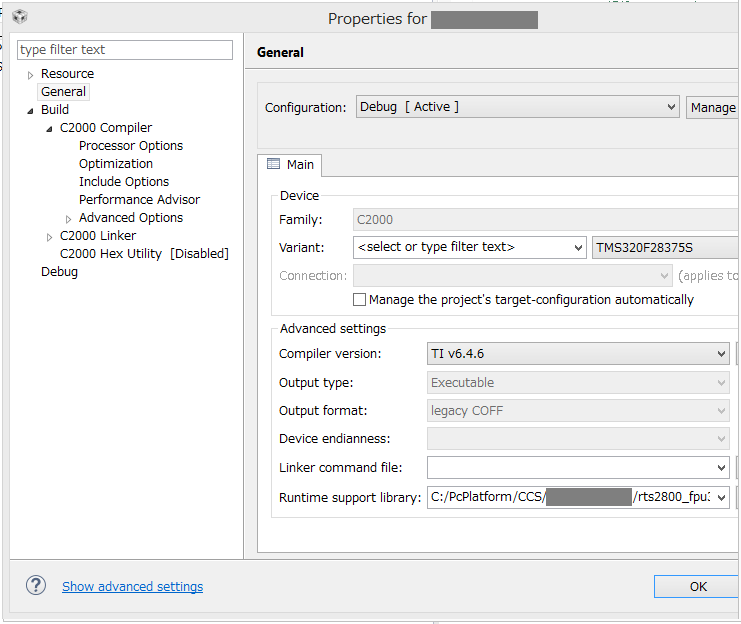
  • Hideaki,

    Is there a reason why they copied the file into the project?  Usually the Runtime support library selection is set to <automatic> and the appropriate library will be built and selected based on the other build options used in the project.

    Anyway lets start by clearing that field.

    The in the linker options lets specify the library and its location.

    I have placed the name of the library in the top box and then the path in the bottom box.  I have used a variable here that is the location of the project as I try to avoid using absolute paths in a project.  You mentioned that they copied the file to the project.  If the file was copied to the root folder of there project then the variable I have here will work.  I get that variable by clicking on the green + icon to add a path.  Click on the workspace button and then selecting my project.

    For reference the name of the variable used is: ${workspace_loc:/${ProjName}}

    Regards,

    John

  • John,
    I appreciate your solution. Very kind.
    My customer is trying it. Please wait for the next Tuesday.

  • Was the customer able to try this out?

    Regards,
    John