This thread has been locked.

If you have a related question, please click the "Ask a related question" button in the top right corner. The newly created question will be automatically linked to this question.

CCS/TMS320F28379D: error #10263 and #10099-D program will not fit into available memory

Part Number: TMS320F28379D
Other Parts Discussed in Thread: CONTROLSUITE

Tool/software: Code Composer Studio

Hello,

I'm facing some problems with the timed_led_blink_cpu01 example from CONTROLSUITE. I'm trying to modify it to write on the RAM each time the timer ends its counter.

The old examples had a *.cmd file on it, where we could modifty the RAM address, but when I build the timed_led_blink_cpu01 example there is no cmd anymore.

So i've added in Project -- Properties -- General-- Linker command file, and I add the 2837x_RAM_lnk_cpu1.cmd and with no more modificaitons.

When I compile there are 66 errors.

60 is the same: #10263 and #10264 (on the added file) 

and finally  #10099-D program will not fit into available memory.

How could I add the .cmd file and modify it in 2837xD examples ?

Thank you in advance,


Izabela.

  • Izabela,

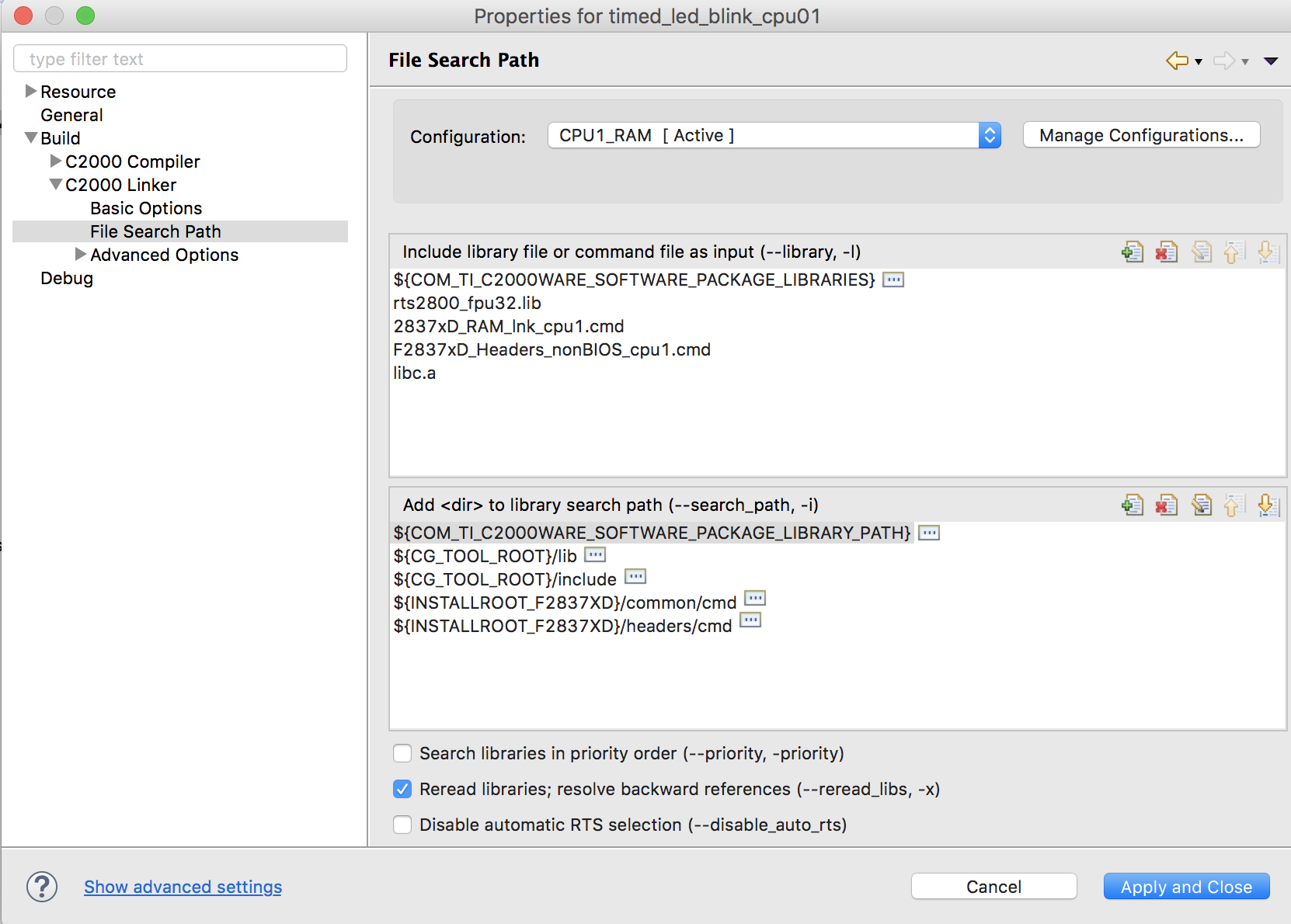
    I just imported the example.  For me it builds fine.  Looking at the build output I see that it uses 2 linker command files:

    -l2837xD_RAM_lnk_cpu1.cmd -lF2837xD_Headers_nonBIOS_cpu1.cmd

    I can see these listed in the linker build options here:

    The file you are looking to modify would be located in ${INSTALLROOT_F2837XD}/common/cmd. This is a variable that maps to where you have the C2000 software installed.  You can put your mouse over top of the [...] and it will show you the actual location:

    However I would not advise editing the file there as that would impact all examples that use it.  Instead I would suggest copying the file into your project and then removing the file from the build options (top box in my first screen capture).  This way you can edit the file without impact any other examples.

    Regards,

    John

  • Hi John, thank you for your answer,

    It builds fine for me as well, but since I try to add the .cmd file into my project and build again, it starts all those errors...

    I tried to add both ways: (I'm trying to add 2837xD_RAM_lnk_cpu1.cmd to the file)
    1. using Project -- Properties -- General-- Linker command file
    2. copying the .cmd file to my project folder

    I think this is the file where I can modify my RAM address to my applicaiton, but not sure.

    Regards,

    Izabela.
  • Izabela,

    There is a good article on linker command files here: software-dl.ti.com/.../sdto_cgt_Linker-Command-File-Primer.html

    If you are getting error 10263 then you have multiple linker command files defining the same memory blocks. You will need to remove one of them. If you want to send me your project I can take a look but I suspect that you have one defined in the build options like in my first screen capture and then one in the project itself (with your source files).

    Regards,
    John
  • Thank you for your help.

    I deteled the other one in the build options and it worked fine.

    Regards,
    Izabela.
  • great to hear.