This thread has been locked.

If you have a related question, please click the "Ask a related question" button in the top right corner. The newly created question will be automatically linked to this question.

CCS/CODECOMPOSER: How to obtain all past values of a variable that is in the watch window

Part Number: CODECOMPOSER


Tool/software: Code Composer Studio

Hello,

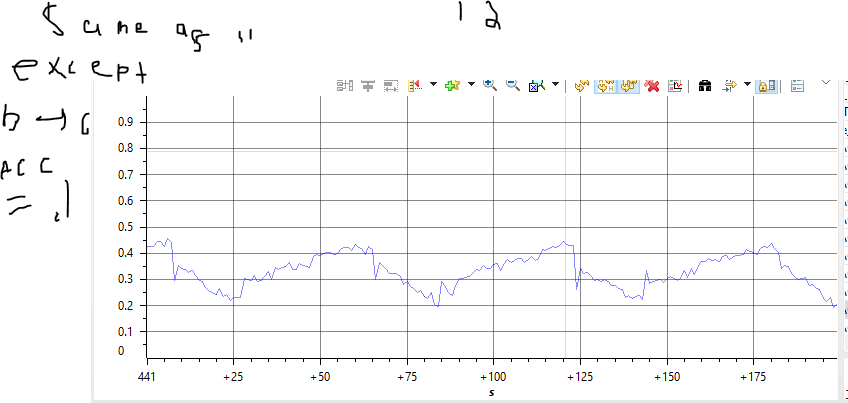
I am using CCS to drive a ACIM. I want to measure parameters such as speed. The current method I have been using is taking snippets of the graph as it "passes by". I have attached an example snippet below.

This works for me except I can only save a small window of the data, in the example below from time = 441s to time = 441 + ~200. The only way around this I see is to keep taking snippets of the graphs as they go by. I want to avoid this because it would be really difficult to do because I want to measure 6 variables (speed, torque, acceleration, jerk, etc,) at the same time and taking 6 snippets simultaneously before the "data passes away" could be difficult and frustrating.

I hope I explained that well. My question is can you view the "entire history" of a variable? from t=0 to t=400s for example. When I view the graph of a variable I want to be able to see its entire history since I started collecting data, not just its "recent history" (the history I can see on a single-time graph).

Please let me know if I need to clarify anything.
  • Hi Andrew,

    You are basically looking for a data variable tracing, which is not supported on C2000 (I assume you are on C2000 based on your prior posts). I suppose one option is to set up a Data Watchpoint to trigger when the address of the variable is written to. Then when the watchpoint is triggered, you can run a GEL expression to write the value out to the console (or even file).

    Thanks

    ki

  • Hi,

    Just adding to Ki's reply, if your system can live with the delays associated with a breakpoint,you can it to halt your system at a given point in your code, update the graphs, and continue to run without manual intervention.

    In order to do that, check the example below:
    processors.wiki.ti.com/.../Graph_Visualization_for_MSP430

    You can open multiple graphs, one per each variable.

    If you need to increase the number of samples displayed (the width of the X axis), you can set the parameter "Display Data Size" on the graph properties to a value greater than 200.

    Hope this helps,
    Rafael
  • Ki-Soo Lee said:
    I suppose one option is to set up a Data Watchpoint to trigger when the address of the variable is written to.

    I just wanted to expand on my suggestion. Note that watchpoints, like HW breakpoints, use up a finite on-chip emulation resource. On C2000, there is a very limited amount of these resources. I'd say that you could only set up one watchpoint at a time... maybe two max .

  • Thank you for the suggestions. I found that expanding the display of the x-axis to be sufficient.

    While we are on the topic of graph properties, can I change the name of the graph window from "single-time 0" to something like "speed"?
  • Hi,

    >> can I change the name of the graph window from "single-time 0" to something like "speed"?
    Unfortunately no. There was an ancient bug report filed to fix that, but technical difficulties at the time rendered this implementation quite troublesome.

    Regards,
    Rafael