This thread has been locked.

If you have a related question, please click the "Ask a related question" button in the top right corner. The newly created question will be automatically linked to this question.

CCS/MSP432E401Y: MSP432E401Y

Part Number: MSP432E401Y

Tool/software: Code Composer Studio

Hi,
I have MSP432E401Y Launch Pad, this board has inbuilt XDS-110 on-board emulator and just trying to write the startup code in code composer studio by configuring the system clock, initially i am able to successfully dump the code and able to debug, but after executing the following code
i am unable to Dump the code and debug,

void config_clock(void)
{

unsigned int bitwordaddr;

unsigned int bitbandbase;
unsigned int bitwordoffset;

bitbandbase = 0x400FE000;


/*Configure*/
bitwordaddr = bitbandbase + 0xB0;
*(&bitwordaddr) = SYSCTL_RSCLKCFG_NEWFREQ | SYSCTL_RSCLKCFG_USEPLL | SYSCTL_RSCLKCFG_PLLSRC_MOSC|SYSCTL_RSCLKCFG_OSCSRC_MOSC | SYSCTL_RSCLKCFG_PSYSDIV_M;


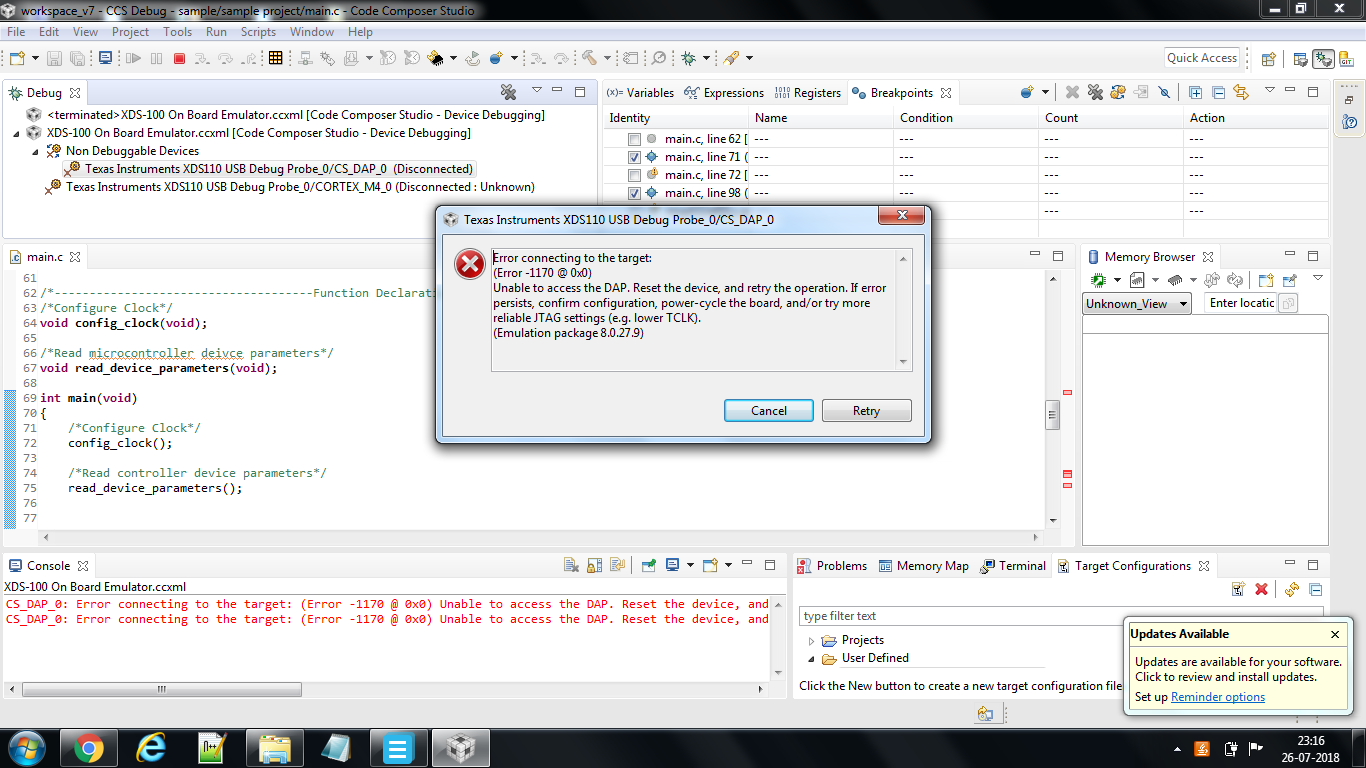
Following Error message in showing

Error connecting the target:
(Error - 1170 @ 0x0)
Unable to access the DAP. Reset the device, and retry the operation. If error persists, confirm configuration, power-cycle the board, and/or try more reliable JTAG settings (e.g. lower TCLK). (Emulation package 7.0.100.0)

I have tried following things
1)Resetted the hardware board multiple times and tried to dump the code
2)Changed the emulator USB cable
3)Changed the JTAG Clock spped from default 2.5Mhz to 100Khz,500Khz and 1Mhz and tested the Test Connection it is working fine, but not able to solve the issue
4)Erased the memory
5)Updated the emulator package

But still i am not able to solve the issue. I am sure that this may not be a hardware problem because when i check for test connection it is successful. 
Please someone help me

  • Charan,

     It's not clear why you are trying to do in configuring the clock this way.  I would recommend using the driverlib calls, which are portable and more easily readable.  I would first look at any of the code examples (i.e. gpio_portp_perpininterrupt.c) The first line in main() in this code is:

    /* Configure the system clock for 120 MHz */
    MAP_SysCtlClockFreqSet((SYSCTL_XTAL_25MHZ | SYSCTL_OSC_MAIN |SYSCTL_USE_PLL | SYSCTL_CFG_VCO_480),
    120000000);

    For more details on how to use the SysCtlClockFreqSet API, see the MSP432E4 driverlib API docs here. Search for System Controller, then SysCtlClockFreqSet().

    -Bob L.

  • Hi Bob,

    Thanks for your reply,

    I am interested  in developing the device drivers for this controller. So i want to initialize the

    system clock and set the clock to my own desired frequency, by accessing the system clock

    register. I want to access the system clock register memory.

    Now i am unable to dump and debug the code.

    Plz help me, i dont want to use the API.

    Regards

    Charan


  • Charan,
    Not sure why you'd want to recreate the device drivers, but if you want to see how TI has done this you can look at the source code at the following directory: (assuming you've downloaded the most recent MSP432E4 SDK)
    C:\ti\simplelink_msp432e4_sdk_2_20_00_20\source\ti\devices\msp432e4\driverlib

    For the SysCtlClockFreqSet() API I mentioned, you can find this in sysctl.c and sysctl.h

    Are you currently able to download one of the SDK examples and run it, or is your LaunchPad completely dead?

    -Bob L.
  • Hi Bob,

    I have downloaded the driverlib and going thru the API. I am not able to dump the code and debug 

    Following Error message is showing

    Error connecting the target:
    (Error - 1170 @ 0x0)
    Unable to access the DAP. Reset the device, and retry the operation. If error persists, confirm configuration, power-cycle the board, and/or try more reliable JTAG settings (e.g. lower TCLK). (Emulation package 7.0.100.0)

    I have tried following things
    1)Resetted the hardware board multiple times and tried to dump the code
    2)Changed the emulator USB cable
    3)Changed the JTAG Clock spped from default 2.5Mhz to 100Khz,500Khz and 1Mhz and tested the Test Connection it is working fine, but not able to solve the issue
    4)Erased the memory 
    5)Updated the emulator package

    But still i am not able to solve the issue. I am sure that this may not be a hardware problem because when i check for test connection it is working successful. 

    Plz guide me how i can resolve the issue.

  • For this error, you can refer to the TI wiki page on solving these issues.  Your list of diagnostic steps indicates you may have been following these steps already.  You may also try to access the DAP directly (see this video on how to do this).

    Another posts addressing this issue on different devices are listed below:

    This post (for CC2650, also a SimpleLink device) - Suggests the following steps as a workaround:

    • Instead of just going for 'Debug', build the project, then launch the target configuration
    • Connect to the target
    • Do a 'CPU Reset', and wait for the CPU to restart and pause during boot
    • While paused, do a 'Load Program'

    If you're still stuck after reviewing these posts, could you provide a screenshot when seeing this error?

    -Bob L.

  • Hi Bob,

    I have followed the things suggested by you, but still i am unable to debug the code. Plz find the attached screenshot.

  • The "check for test connection" you mentioned ensures that _something_ is connected, but you can (obviously) still have some hardware issues. Are you able to try your connection with another LaunchPad? (say, with one of the stock examples).?
    -Bob L.
  • Charan,
    Another question- what version of the SimpleLink SDK are you using? You mentioned that you had "downloaded driverlib", so I wonder if you're using an older drivers install or maybe not using the SimpleLink SDK at all?
    -Bob L.
  • Charan,
    Are you still working on this issue? Haven't heard anything back on your connection troubles. If you've resolved your issue, please respond back. I'll go ahead and close the post if I don't hear back.
    -Bob L.
  • Closing this thread due to lack of response.
    Please re-file if you have new information on this debug.
    -Bob L.