This thread has been locked.

If you have a related question, please click the "Ask a related question" button in the top right corner. The newly created question will be automatically linked to this question.

CCS/EVMK2H: Serial terminal in CCS 8.1.0 under Linux is not displaying newlines correctly

Part Number: EVMK2H
Other Parts Discussed in Thread: BEAGLEBOARD-X15, MSP-EXP432E401Y

Tool/software: Code Composer Studio

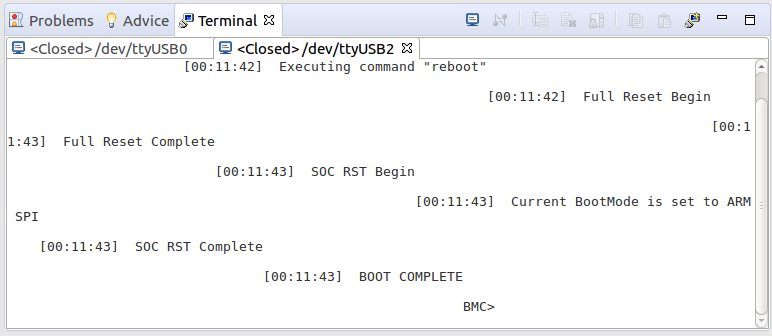
When using CCS 8.1.0.00011 under Ubuntu 16.04 LTS the serial terminal is not displaying newlines correctly in that new lines are not shifted to the beginning of the line, but are indented to the end of the previous line. E.g.:
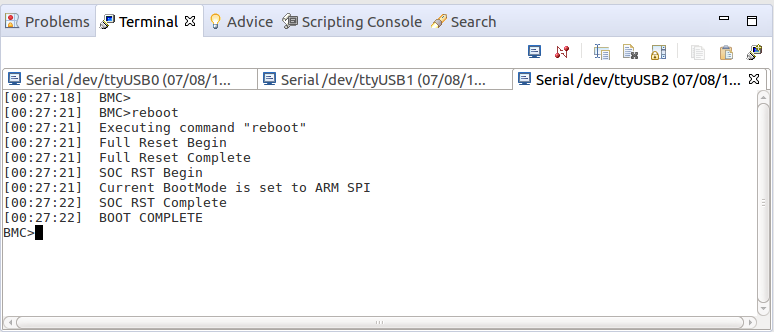
Whereas using CCS 7.4.0.00015 the newlines are displayed correctly. E.g.:
Notes:

a. With CCS 8.1.0 have seen the same problem with multiple targets and different USB to serial converters.

b. I can't find any preferences which control how the serial terminal handles newlines.

c. The problem doesn't appear to be a corrupted workspace, as saw the same problem when created a new workspace in CCS 8.1.0.

d. CCS 8.1.0.00011 is using the following terminal related components:

RXTX End-User Runtime 2.1.8.0_201606281300 gnu.io.rxtx.feature.group RXTX.org
TM Terminal 4.3.0.201706140544 org.eclipse.tm.terminal.feature.feature.group Eclipse.org - Target Management
TM Terminal Serial Connector Extensions 4.3.0.201706140544 org.eclipse.tm.terminal.connector.cdtserial.feature.feature.group Eclipse.org - Target Management

e. CCS 7.4.0.00015 is using the following terminal related components:

RXTX End-User Runtime 2.1.8.0_201606281300 gnu.io.rxtx.feature.group RXTX.org
TM Terminal 4.1.0.201606052351 org.eclipse.tm.terminal.feature.feature.group Eclipse.org - Target Management

(the TM Terminal Serial Connector Extensions is not installed in CCS 7.4.0)

f. If I use the stock Eclipse Oxygen.3a Release (4.7.3a), the same Eclipse version which CCS 8.1.0 is based upon, then the stock Eclipse serial terminal displays the newlines correctly. The stock Eclipse has the same versions of "TM Terminal" and "TM Terminal Serial Connector Extensions" as CCS 8.1.0, but doesn't have the "RXTX End-User Runtime".

  • Chester,

    Despite the comparison seems fair with the previous release or even the standalone Eclipse, how are you exactly issuing the newline character?

    The reason is that I can't see this if I use the \r\n either at the end or the beginning of a new message sent via the UART. I am using a MSP432R401Y launchpad running the uartecho example.

    This Terminal feature is an Eclipse plug-in and I found out there is a release 4.3 compatible with Oxygen.3a. Perhaps it is worth a shot installing it and seeing if the behaviour changes? 

    Update site information is shown at: https://www.eclipse.org/tm/downloads.php

    In the meantime, I will try to "break" my setup here.

    Regards,

    Rafael

  • desouza said:
    Despite the comparison seems fair with the previous release or even the standalone Eclipse, how are you exactly issuing the newline character?

    I will have to check, as it wasn't code I wrote; has been seen with:

    a. The BMC console on a EVMK2H.

    b. The serial console on a EVMK2H with uboot or Linux Kernel output.

    c. The serial console on a BeagleBoard-X15 with uboot or Linux Kernel output.

    desouza said:
    In the meantime, I will try to "break" my setup here.

    On further investigation the problem seems sensitive if some other program has initialised the serial ports before CCS 8.1.0:

    1) In the screen shots in the initial post the sequence was:

    a) After the PC was booted CCS 8.1.0 was the first program used to view the serial ports, and showed the newlines being displayed incorrectly.

    b) The terminals in CCS 8.1.0 were closed, and when opened in CCS 7.4.0 the newlines were displayed correctly.

    c) The terminals in CCS 7.4.0 were closed, when opened in the stock Eclipse 4.7.3a the newlines were displayed correctly.

    d) On receiving your post the stock Eclipse was closed, and when the terminals were re-opened in CCS 8.1.0 the newlines where then displayed correctly.

    2) Rebooted the PC and then used the sequence:

    a) Start CCS 8.1.0 and open the two serial ports on the EVMK2H BMC and console, and the newlines were being displayed incorrectly.

    b) Close CCS 8.1.0. Start CCS 7.4.0open the two serial ports on the EVMK2H BMC and console, and the newlines displayed correctly.

    c) Close CCS 7.4.0. Re-start CCS 8.1.0 and open the two serial ports on the EVMK2H BMC and console, and this time the newlines displayed correctly.

    desouza said:
    The reason is that I can't see this if I use the \r\n either at the end or the beginning of a new message sent via the UART. I am using a MSP432R401Y launchpad running the uartecho example.

    The problem might also be sensitive to which type of USB to serial device is used, will also check with the XDS110 on a MSP432R401Y.

  • desouza said:
    The reason is that I can't see this if I use the \r\n either at the end or the beginning of a new message sent via the UART. I am using a MSP432R401Y launchpad running the uartecho example.

    The problem does seem sensitive to the USB to serial converter used, as shown by the following sequence under Ubuntu 16.04.LTS with Kernel "4.4.0-131-generic #157-Ubuntu SMP Thu Jul 12 15:51:36 UTC 2018 x86_64 x86_64 x86_64 GNU/Linux":

    1) Reboot the PC.

    2) Start CCS 8.1.0 and the UART echo for a MSP-EXP432E401Y displays newlines correctly via the XDS110 back channel UART, with either a "\r\n" or "\r\n" combination.

    3) In CCS 8.1.0 open the serial terminals for the BMC and console port on a EVMK2H, which uses a "Future Technology Devices International, Ltd FT2232C Dual USB-UART/FIFO IC" ID 0403:6010 and the newlines are displayed incorrectly.

    4) In CCS 8.1.0 open the serial terminal to the BeagleBoard-X15 which is via a "Future Technology Devices International, Ltd FT232 USB-Serial (UART) IC" ID 0403:6001 and the newlines are displayed incorrectly.

    5) Close the serial terminals in CCS 8.1.0.

    6) Open the FTDI serial terminals in the stock Eclipse 4.7.3a. The newlines are displayed incorrectly.

    7) Close the stock Eclipse 4.7.3a.

    8) Open CCS 7.4.0 and open the FTDI serial terminals. The newlines are displayed correctly.

    9) Close CCS 7.4.0.

    10) Re-open the FTDI serial terminals in CCS 8.1.0. This time the newlines are displayed correctly.

    11) Close CCS 8.1.0.

    12) Re-open the stock Eclipse 4.7.3a and open the FTDI serial terminals. This time the newlines are displayed correctly.

    Based upon the above, the stock Eclipse 4.7.3a can show the same issue as CCS 8.1.0.

  • Chester,

    I see the same issue as you; my AM572x GPEVM board (which uses a TTL-232R-3V3 cable with a FTDI)  shows the new lines indented, even with TM Terminal  4.3.0.201706140544.

    Just like you, something is being pre-initialized by another software and corrects CCSv8.1.0/Eclipse 4.7.3a. In my case I opened the same serial port in putty and it fixed everything.

    Another snippet of information: the ttyACM? ports work well from the start, while ttyUSB? do not. I compared the output of my AM572x GPEVM and my BeagleBone White (Rev A4, old one) and the latter works from the start.

    At this point there is certainly something strange with how the Terminal handles the CR/LF coming straight from a plain UART and from a "Modem" (reference here).

    I will keep investigating what may be happening; the Eclipse Target Management project page has a link to find bugs previously reported, but I couldn't find anything relevant. 

    Regards,

    Rafael

  • desouza said:
    Another snippet of information: the ttyACM? ports work well from the start, while ttyUSB? do not.

    Thanks for the link to the information about ttyACM? .vs. ttyUSB? ports.

    With CCS 8.1.0 I also tried with a ttyS? port which is a 16850 based serial port PCIe card, and the ttyS? port also worked correctly from the start.

  • Chester,

    In conversations with other colleagues, they vaguely recall some occurrences of this in the past, but couldn't fully recall what exactly corrected it.

    I then searched around and found several discussions on the web about similar behaviour. One of them is below:

    https://superuser.com/questions/654490/putty-new-line-not-working-properly 

    I then found an unanswered comment from the TM Terminal project at the Eclipse marketplace.

    https://marketplace.eclipse.org/content/tm-terminal 

    Therefore, it seems the issue may be still outstanding. It probably requires an enhancement to allow configuring the properly newline chars. 

    I will keep looking...

    Rafael

  • desouza said:
    In conversations with other colleagues, they vaguely recall some occurrences of this in the past, but couldn't fully recall what exactly corrected it.

    Your mention of handling of newline sequences made me realise in both our failure cases it appears that a carriage return ('\r') from the target has been converted to a newline ('\n'), since there appears two new lines displayed (due to a blank line between the output as well as the column not resetting).

    Looking at the documentation the Linux stty command can display the terminal line settings for a device, and one input setting is:

           [-]icrnl
                  translate carriage return to newline

    Therefore, tried the sequence on the /dev/ttyUSB0 which is a FTDI USB to serial converts which displays the issue:

    1) Reboot PC.

    2) Check the stty state of the device, where icrnl means input carriage returns will be converted to newlines:

    $ stty -F /dev/ttyUSB0 -a
    speed 9600 baud; rows 0; columns 0; line = 0;
    intr = ^C; quit = ^\; erase = ^?; kill = ^U; eof = ^D; eol = <undef>;
    eol2 = <undef>; swtch = <undef>; start = ^Q; stop = ^S; susp = ^Z; rprnt = ^R;
    werase = ^W; lnext = ^V; discard = ^O; min = 1; time = 0;
    -parenb -parodd -cmspar cs8 hupcl -cstopb cread clocal -crtscts
    -ignbrk -brkint -ignpar -parmrk -inpck -istrip -inlcr -igncr icrnl ixon -ixoff
    -iuclc -ixany -imaxbel -iutf8
    opost -olcuc -ocrnl onlcr -onocr -onlret -ofill -ofdel nl0 cr0 tab0 bs0 vt0 ff0
    isig icanon iexten echo echoe echok -echonl -noflsh -xcase -tostop -echoprt
    echoctl echoke -flusho -extproc

    3) Open /dev/ttyUSB0 in CCS 8.1.0, selecting a baud rate of 115200, and newlines are displayed incorrectly. The stty command shows that the baud rate has been changed, but the icrnl option is still enabled:

    $ stty -F /dev/ttyUSB0 -a
    speed 115200 baud; rows 0; columns 0; line = 0;
    intr = ^C; quit = ^\; erase = ^?; kill = ^U; eof = ^D; eol = <undef>;
    eol2 = <undef>; swtch = <undef>; start = ^Q; stop = ^S; susp = ^Z; rprnt = ^R;
    werase = ^W; lnext = ^V; discard = ^O; min = 0; time = 2;
    -parenb -parodd -cmspar cs8 hupcl -cstopb cread clocal -crtscts
    -ignbrk -brkint ignpar -parmrk -inpck -istrip -inlcr -igncr icrnl ixon -ixoff
    -iuclc -ixany -imaxbel -iutf8
    opost -olcuc -ocrnl onlcr -onocr -onlret -ofill -ofdel nl0 cr0 tab0 bs0 vt0 ff0
    -isig -icanon iexten -echo -echoe echok -echonl -noflsh -xcase -tostop -echoprt
    echoctl echoke -flusho -extproc

    4). Close the /dev/ttyUSB0 terminal in CCS 8.1.0.

    5) Open the /dev/ttyUSB0 terminal in CCS 7.4.0. The newlines are displayed correctly. The stty command shows the conversion of input carriage returns to newlines has been disabled, as indicate by the minus sign in front of the option (i.e. -icrnl):

    $ stty -F /dev/ttyUSB0 -a
    speed 115200 baud; rows 0; columns 0; line = 0;
    intr = ^C; quit = ^\; erase = ^?; kill = ^U; eof = ^D; eol = <undef>;
    eol2 = <undef>; swtch = <undef>; start = ^Q; stop = ^S; susp = ^Z; rprnt = ^R;
    werase = ^W; lnext = ^V; discard = ^O; min = 0; time = 0;
    -parenb -parodd -cmspar cs8 -hupcl -cstopb cread clocal -crtscts
    -ignbrk -brkint -ignpar -parmrk inpck -istrip -inlcr -igncr -icrnl -ixon -ixoff
    -iuclc -ixany -imaxbel -iutf8
    -opost -olcuc -ocrnl -onlcr -onocr -onlret -ofill -ofdel nl0 cr0 tab0 bs0 vt0 ff0
    -isig -icanon -iexten -echo -echoe -echok -echonl -noflsh -xcase -tostop -echoprt
    -echoctl -echoke -flusho -extproc

    6) Close the /dev/ttyUSB0 terminal in CCS 7.4.0. The stty command shows the conversion of input carriage returns to new lines remains disabled:

    $ stty -F /dev/ttyUSB0 -a
    speed 115200 baud; rows 0; columns 0; line = 0;
    intr = ^C; quit = ^\; erase = ^?; kill = ^U; eof = ^D; eol = <undef>;
    eol2 = <undef>; swtch = <undef>; start = ^Q; stop = ^S; susp = ^Z; rprnt = ^R;
    werase = ^W; lnext = ^V; discard = ^O; min = 0; time = 0;
    -parenb -parodd -cmspar cs8 -hupcl -cstopb cread clocal -crtscts
    -ignbrk -brkint -ignpar -parmrk inpck -istrip -inlcr -igncr -icrnl -ixon -ixoff
    -iuclc -ixany -imaxbel -iutf8
    -opost -olcuc -ocrnl -onlcr -onocr -onlret -ofill -ofdel nl0 cr0 tab0 bs0 vt0 ff0
    -isig -icanon -iexten -echo -echoe -echok -echonl -noflsh -xcase -tostop -echoprt
    -echoctl -echoke -flusho -extproc

    7) Re-open the /dev/ttyUSB0 terminal in CCS 8.1.0. This time the newlines are displayed correctly. The stty command shows the conversion of input carriage returns to new lines remains disabled:

    $ stty -F /dev/ttyUSB0 -a
    speed 115200 baud; rows 0; columns 0; line = 0;
    intr = ^C; quit = ^\; erase = ^?; kill = ^U; eof = ^D; eol = <undef>;
    eol2 = <undef>; swtch = <undef>; start = ^Q; stop = ^S; susp = ^Z; rprnt = ^R;
    werase = ^W; lnext = ^V; discard = ^O; min = 0; time = 2;
    -parenb -parodd -cmspar cs8 -hupcl -cstopb cread clocal -crtscts
    -ignbrk -brkint ignpar -parmrk inpck -istrip -inlcr -igncr -icrnl -ixon -ixoff
    -iuclc -ixany -imaxbel -iutf8
    -opost -olcuc -ocrnl -onlcr -onocr -onlret -ofill -ofdel nl0 cr0 tab0 bs0 vt0 ff0
    -isig -icanon -iexten -echo -echoe -echok -echonl -noflsh -xcase -tostop -echoprt
    -echoctl -echoke -flusho -extproc

    Therefore, the problem appears to be that the terminal in CCS 8.1.0 is no longer disabling the input translation of carriage return to newline, which is something CCS 7.4.0 did.

    There are some other settings, such as opost, echoctl and echoke which CCS 7.4.0 changes compared to CCS 8.1.0, but haven't investigated the impact of those options.

  • Chester,

    Thanks for the good summary; I will see how easy it would be to file a bug report on the opensource project.

    Regards,
    Rafael