This thread has been locked.

If you have a related question, please click the "Ask a related question" button in the top right corner. The newly created question will be automatically linked to this question.

CCS/CCSTUDIO: CCS console with serial port connection

Part Number: CCSTUDIO
Other Parts Discussed in Thread: TEST2

Tool/software: Code Composer Studio

CCS Team,

I am using CCSv8 console window with a serial port connection.  It works.  Problem is I cannot change the baud rate of the console window once I open it.  Nor can I open a new connection with the same name (trying to change the baud rate that way).  CCS won't let me.  It is also keeping the names of past used connections and won't let me reuse the names:

test, test1, and test2 are my names.  I can't get rid of them in the list (so as to reuse the names and not have an ever growing list of names).

Any suggestions?

Thank you,

David

  • Hi David,
    How did you get to that dialog in your screenshot? I typically use the Terminal view (View -> Terminal). That does not look like it.

    Thanks
    ki
  • Hi Ki,

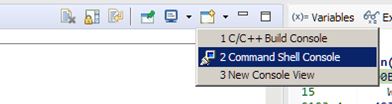
    I got that screenshot from the Console window:

    then choose Command Shell Console:

    It seems to be about the same as the view->Terminal.  Terminal is better though as it isn't storing the names of the window in a list.  I can just open a new one when I need it.

    I guess I'm set.  thanks.

    - David