This thread has been locked.

If you have a related question, please click the "Ask a related question" button in the top right corner. The newly created question will be automatically linked to this question.

CCS/MSP432P401R: CCS Cloud showed fatal error while building for the header file location

Part Number: MSP432P401R

Tool/software: Code Composer Studio

Hi, guys. I'm trying to use the CCS cloud to develop codes for my MSP432 Lauchpad V2.

I copied the basic blink example. However, it showed this error when I tried to build a project.

Also, this error is shown when I press "Target - Connect COM port - baud rate = 115200".

So my questions are,

1) How can I set paths to read those TI/custom header files in order to compile and build?

2) I do see my  "Texas Instruments Debug Probes - XDS100 Class Data Port / XDS100 Class Debug Probe" from my Windows 7 desktop after I connect my lauchpad via USB.

However, I get that COM port error. What should I fix to solve this problem?

-Kind regards

  • Hello David,
    You are missing some include search paths in your build properties. You you noticed, modifying the build properties for projects in CCS Cloud is not easily done. I would suggest importing the example directly into CCS Cloud and then modifying the source if needed. The import example will have the correct search paths set up for the SDK.

    Thanks
    ki
  • Ki-Soo Lee said:
    The import example will have the correct search paths set up for the SDK.

    Thanks Ki-Soo.

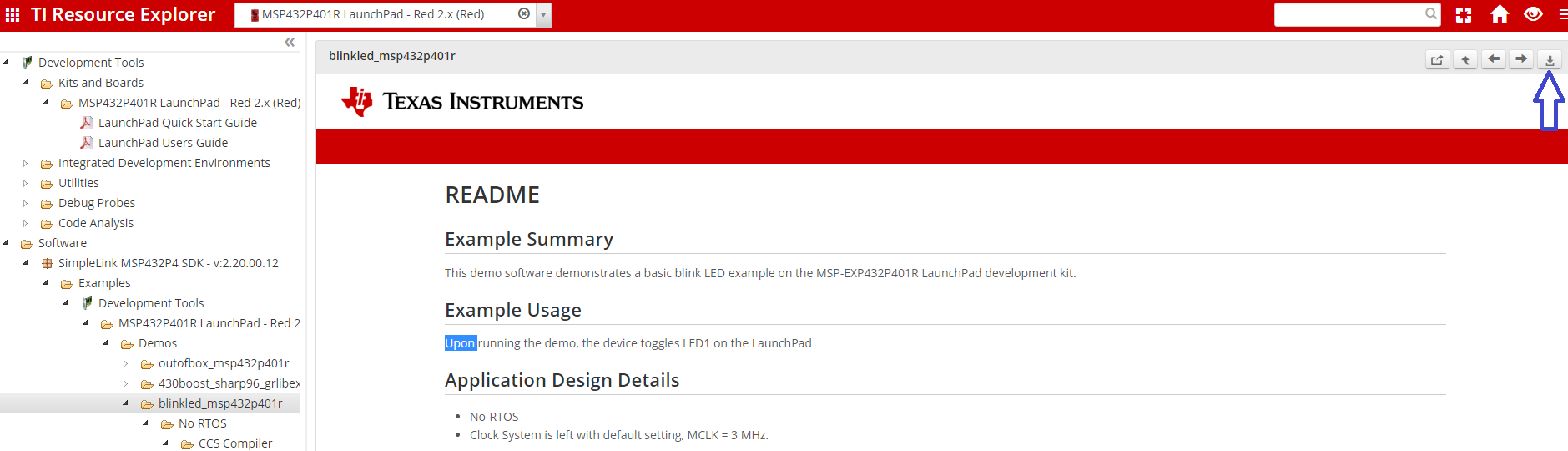
    I only saw the download button. Where can I import these examples to the Cloud?

    Also, I do see my  "Texas Instruments Debug Probes - XDS100 Class Data Port / XDS100 Class Debug Probe" from my Windows 7 desktop after I connect my lauchpad via USB.

    However, I get that COM port error. What should I fix to solve this problem?

  • David__ said:
    I only saw the download button. Where can I import these examples to the Cloud?

    You need to go a bit deeper in the tree to the CCS project:

    Thanks

    ki