This thread has been locked.

If you have a related question, please click the "Ask a related question" button in the top right corner. The newly created question will be automatically linked to this question.

CCS/CODECOMPOSER: Team Pull confusion

Part Number: CODECOMPOSER


Tool/software: Code Composer Studio

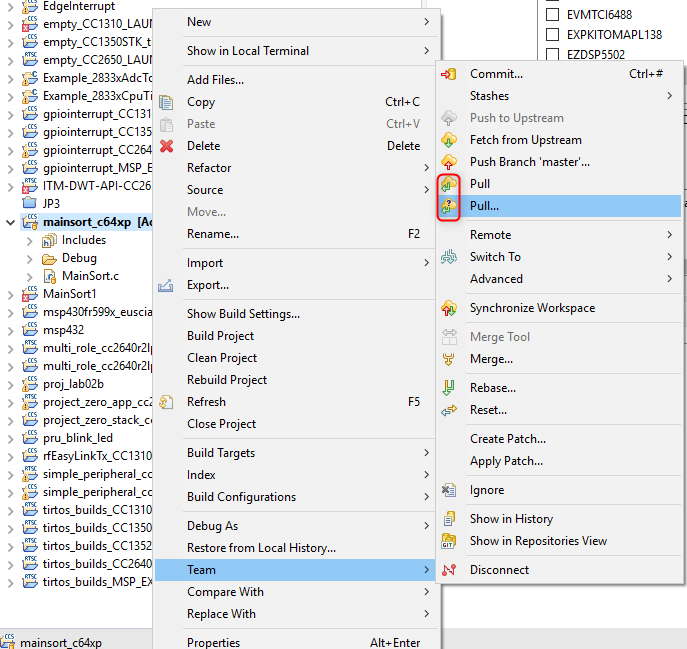
In Code Composer when you right click on the Project Explorer and choose "Team" there are 2 menu items labelled "Pull..."

I know that this is to download updated code from the remote to the local repository.

What is the difference and what are the criteria for choosing one over the other?

  • Hi David,
    I believe see the issue. One of the icons for the "Pull" menu item has a question mark on it while the other does not. I'm not sure what the differences are, glancing at the documentation didn't help. I will dig deeper and try to get you an answer when I am back in the office on Tuesday (Monday is a local holiday here).

    Thanks
    ki
  • Hi David,
    Sorry for the delay. The "Pull" menu item with the question mark will allow you always specify the remote repo, while the "Pull" menu item without the question mark will automatically use the settings specified. Hope that helps.

    Thanks
    ki
  • Hi Ki

    Thanks for the repy

    Sorry to be pedantic but there are 2 menu items, neither with a question mark, rather with/without three periods

    Pull

    Pull...

    However I take your point.

    Pull - goes ahead with preset value for remote host without waiting for Finish

    Pull... Sets up preset values for remote host, waits for user to press Finish

    CCS 8.10 64 bit

  • David Henry52307 said:
    Sorry to be pedantic but there are 2 menu items, neither with a question mark, rather with/without three periods

    Odd... I do see the question mark:

    It may be due to some other configuration setting I have.

    ki