This thread has been locked.

If you have a related question, please click the "Ask a related question" button in the top right corner. The newly created question will be automatically linked to this question.

CCS/CC2650: SimpleLink project can not be compiled

Part Number: CC2650
Other Parts Discussed in Thread: CC2640, CCSTUDIO,

Tool/software: Code Composer Studio

Hi,

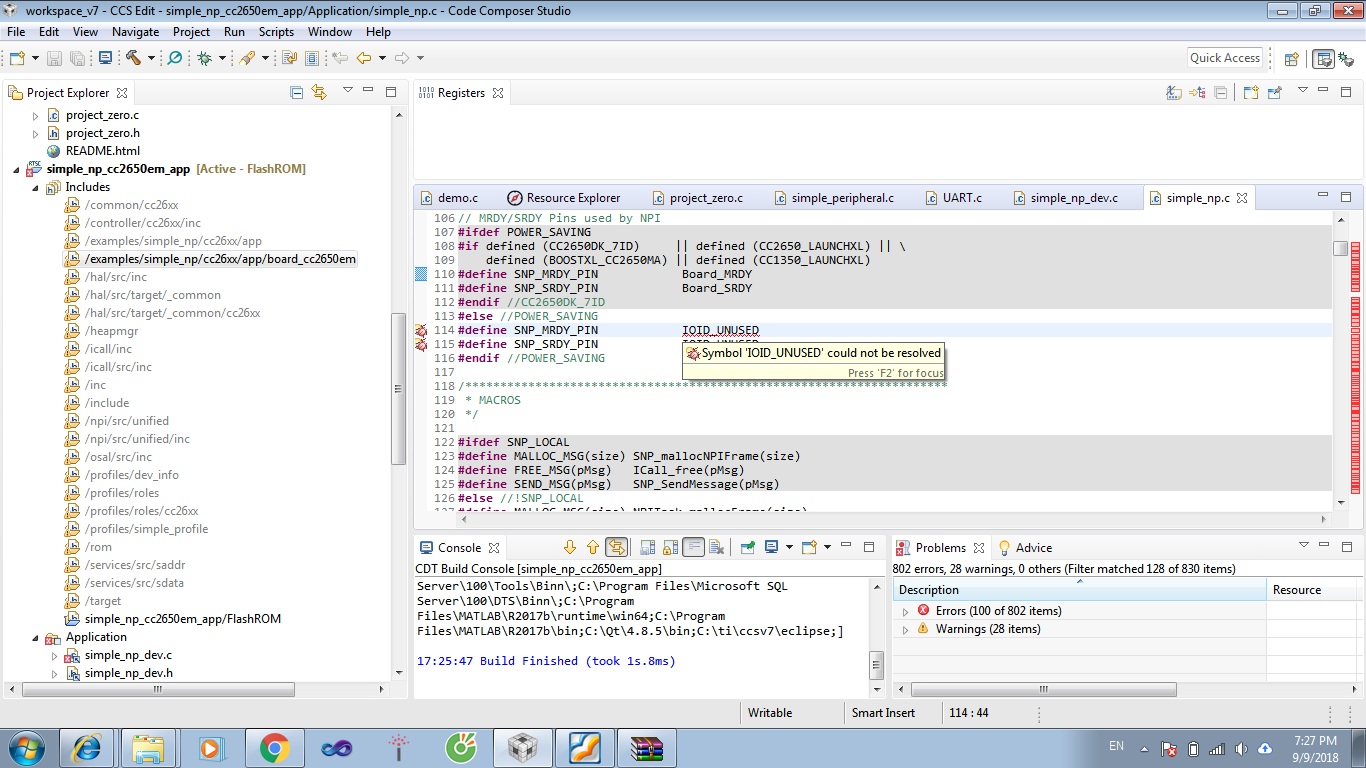
I got the following errors when trying to compile one application (simple_np.c) from the simple_np project. The problem might be the lack of libraries. Most of files in Includes (on the left menu) are shaded. Please advice what I should do. Thank you.
  

  • Hello Minh,

    could you provide a path to your project file?
    It should tell us which sdk, version you are using.
  • Minh,

    Which version of BLE SDK are you using and how did you import the project into CCS?

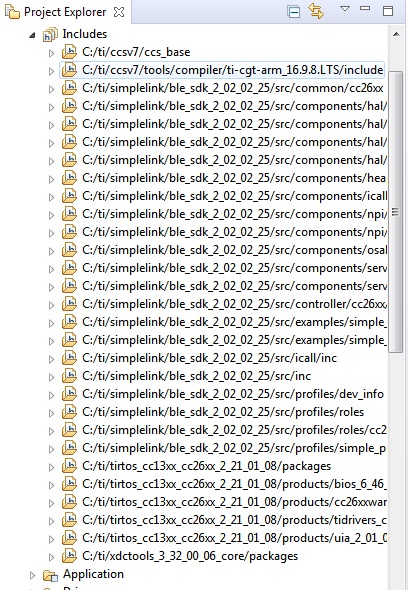
    This is a  screenshot of my Include paths. As you can see, the Includes in your environment are missing the core path to the BLE SDK.


    I would suggest carefully following the procedure (to import and compile an example project) described in section 2.6.3.3 of the CC2640 BLE Software Developer's Guide included in the /docs folder of the SDK installation. It would also be a good idea to import and build in a new workspace. 

    Hope this helps!

  • Hi Tomasz and AartiG,

    Thanks for your advises. You're right, last time I imported the projects not in a correct way. This time I've followed the steps in section 2.6.3.3 of the CC2640 BLE Software Developer's Guide as you recommended, but errors are still there. Please have a look at my steps of importing and building the project so that you can find some mistakes I made. My BLE SDK version is 2.02.02.25. The CCS version is 7.4.0.00015

    1) Import the project simpe_np in the cc2650lp folder. I chose both app and stack projects.

    2) Build these projects: I got the following errors from the app project. The stack project was built successfully.  

    Description Resource Path Location Type
    #10010 null: errors encountered during linking; "simple_np_cc2650lp_app.out" not built simple_np_cc2650lp_app C/C++ Problem
    #10263 FLASH memory range has already been specified cc26x0f128.cmd /simple_np_cc2650lp_app line 78 C/C++ Problem
    #10263 SRAM memory range has already been specified cc26x0f128.cmd /simple_np_cc2650lp_app line 80 C/C++ Problem
    #10264 FLASH memory range overlaps existing memory range FLASH cc26x0f128.cmd /simple_np_cc2650lp_app line 78 C/C++ Problem
    #10264 FLASH memory range overlaps existing memory range FLASH_LAST_PAGE cc26x0f128.cmd /simple_np_cc2650lp_app line 78 C/C++ Problem
    #10264 SRAM memory range overlaps existing memory range SRAM cc26x0f128.cmd /simple_np_cc2650lp_app line 80 C/C++ Problem
    gmake: *** [all] Error 2 simple_np_cc2650lp_app C/C++ Problem
    gmake[1]: *** [simple_np_cc2650lp_app.out] Error 1 simple_np_cc2650lp_app C/C++ Problem

    The includes path of the app project: 

    Please advice. Thank you very much.

  • Hi Minh Lam,

    I imported simple np to CCSv8 through Project->Import CCS Project and able to build stack then app. You need to use ARM Compiler 5.2.6. If you do not have this go to Help->Install Code Generation Compiler Tools. Un-check the show latest versions option, then search and install ARM Compiler 5.2.6.

    -kel
  • Hi Kel,

    Thanks for your prompt resonse. I've just installed ARM Compiler 5.2.6 as you suggested, but that did not help. I got the same errors. Again, the stack was compiled successfully. I built the stack and then the app.

    #10010 null: errors encountered during linking; "simple_np_cc2650lp_app.out" not built simple_np_cc2650lp_app C/C++ Problem
    #10263 FLASH memory range has already been specified cc26x0f128.cmd /simple_np_cc2650lp_app line 78 C/C++ Problem
    #10263 SRAM memory range has already been specified cc26x0f128.cmd /simple_np_cc2650lp_app line 80 C/C++ Problem
    #10264 FLASH memory range overlaps existing memory range FLASH cc26x0f128.cmd /simple_np_cc2650lp_app line 78 C/C++ Problem
    #10264 FLASH memory range overlaps existing memory range FLASH_LAST_PAGE cc26x0f128.cmd /simple_np_cc2650lp_app line 78 C/C++ Problem
    #10264 SRAM memory range overlaps existing memory range SRAM cc26x0f128.cmd /simple_np_cc2650lp_app line 80 C/C++ Problem
    gmake: *** [all] Error 2 simple_np_cc2650lp_app C/C++ Problem
    gmake[1]: *** [simple_np_cc2650lp_app.out] Error 1 simple_np_cc2650lp_app C/C++ Problem

    Is there any related to version of CCS? Do I need to install the 8.0 one?
  • Hi,

    This time I imported the whole CCS folder instead of each projects as previously did. Surprisingly I could not import it; the error I got is:

    Error: Import failed for project 'ccs(1)' because its meta-data cannot be interpreted. Please contact support.

    Importing each project was okay although I still could not compile the app project. All simple_np projects were deleted from the current workspace. Maybe this relates to the reason I could not compile the app project?

  • Looks to me that you have mixed up too many things.

    I do recommend:

    1. delete your simple_np* from your workspace(s)

    2. create a new empty workspace for CCSv8 and exit CCS

    3. delete your c:\ti\simplelink\ble_sdk_2_02_02_25

    4. start CCS with a newly created workspace and use Project -> Import CCS Project to import simple_np's

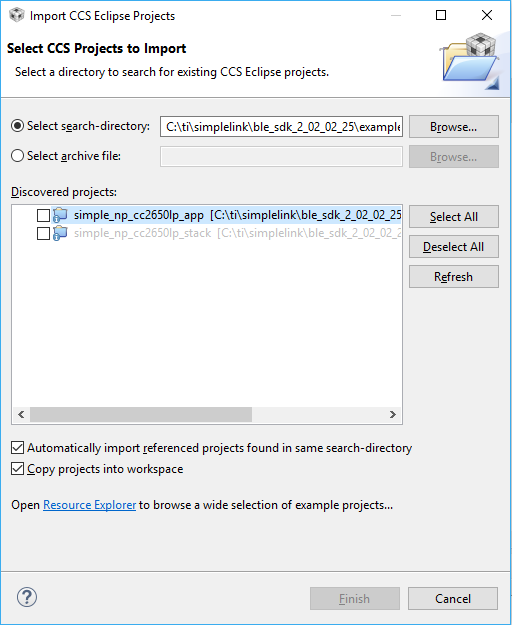
    5. use select all and select two options like on a picture below

    6. build stack and then app

    Always use separate workspaces for different CCS versions.

    Should work.

  • Minh Lam said:
    #10263 FLASH memory range has already been specified cc26x0f128.cmd /simple_np_cc2650lp_app line 78 C/C++ Problem
    #10263 SRAM memory range has already been specified cc26x0f128.cmd /simple_np_cc2650lp_app line 80 C/C++ Problem

    Looking at these messages, it appears that the file cc26x0f128.cmd is being used in the link step, however that file is not part of the simple_np project. So I'm not sure how it got included in the build. 

    This is what the linker step of my build looks like. You can compare it with yours by looking at your build console.

    'Building target: "simple_np_cc2650lp_app.out"'
    'Invoking: ARM Linker'
    "C:/CCStudio_v8.1.0.00011/ccsv8/tools/compiler/ti-cgt-arm_16.9.6.LTS/bin/armcl" --cmd_file="C:/ti/simplelink/ble_sdk_2_02_02_25/examples/cc2650lp/simple_np/ccs/app/../../iar/stack/../../../../../src/config/build_components.opt" --cmd_file="C:/ti/simplelink/ble_sdk_2_02_02_25/examples/cc2650lp/simple_np/ccs/app/../../iar/stack/build_config.opt" --cmd_file="C:/ti/simplelink/ble_sdk_2_02_02_25/examples/cc2650lp/simple_np/ccs/app/../../iar/stack/../../ccs/config/ccs_compiler_defines.bcfg" -mv7M3 --code_state=16 --abi=eabi -me -O4 --opt_for_speed=0 -g --c99 --gcc --define=BOARD_DISPLAY_EXCLUDE_UART --define=CC2650_HOSTTESTAPP --define=CC2650_LAUNCHXL --define=CC26XX --define=Display_DISABLE_ALL --define=GAPROLE_TASK_STACK_SIZE=540 --define=HEAPMGR_METRICS --define=HEAPMGR_SIZE=0 --define=ICALL_EVENTS --define=ICALL_MAX_NUM_ENTITIES=8 --define=ICALL_MAX_NUM_TASKS=4 --define=MAX_NUM_BLE_CONNS=1 --define=MAX_NUM_PDU=6 --define=MAX_PDU_SIZE=251 --define=NPI_USE_UART --define=POWER_SAVING --define=USE_ICALL --define=xBOARD_DISPLAY_EXCLUDE_LCD --define=xSNP_SBL_ENABLE --define=xSWO_DEBUG --define=xdc_runtime_Assert_DISABLE_ALL --define=xdc_runtime_Log_DISABLE_ALL --diag_warning=225 --diag_suppress=48 --diag_wrap=off --display_error_number --gen_func_subsections=on -z -m"simple_np_cc2650lp_app.map" --stack_size=256 --heap_size=0 -i"C:/CCStudio_v8.1.0.00011/ccsv8/tools/compiler/ti-cgt-arm_16.9.6.LTS/lib" -i"C:/CCStudio_v8.1.0.00011/ccsv8/tools/compiler/ti-cgt-arm_16.9.6.LTS/include" --reread_libs --diag_wrap=off --display_error_number --diag_suppress=10247-D --diag_suppress=16002-D --warn_sections --xml_link_info="simple_np_cc2650lp_app_linkInfo.xml" --rom_model --unused_section_elimination=on --compress_dwarf=on -o "simple_np_cc2650lp_app.out" "C:/ti/simplelink/ble_sdk_2_02_02_25/examples/cc2650lp/simple_np/ccs/config/ccs_linker_defines.cmd" "C:/ti/simplelink/ble_sdk_2_02_02_25/src/common/cc26xx/ccs/cc26xx_app.cmd" "./Application/simple_np.obj" "./Application/simple_np_dev.obj" "./Application/simple_np_gap.obj" "./Application/simple_np_gatt.obj" "./Application/simple_np_uuid.obj" "./Application/util.obj" "./Drivers/Display/Display.obj" "./Drivers/Display/DisplayDogm1286.obj" "./Drivers/Display/DisplayUart.obj" "./Drivers/ECC/ECCROMCC26XX.obj" "./Drivers/PIN/PINCC26XX.obj" "./Drivers/RF/RFCC26XX_singleMode.obj" "./Drivers/SPI/SPI.obj" "./Drivers/SPI/SPICC26XXDMA.obj" "./Drivers/TRNG/TRNGCC26XX.obj" "./Drivers/UART/UART.obj" "./Drivers/UART/UARTCC26XX.obj" "./Drivers/UDMA/UDMACC26XX.obj" "./ICall/icall.obj" "./ICall/icall_cc2650.obj" "./ICallBLE/ble_user_config.obj" "./ICallBLE/icall_api.obj" "./NPI/Transport/SPI/npi_tl_spi.obj" "./NPI/Transport/UART/npi_tl_uart.obj" "./NPI/Transport/npi_tl.obj" "./NPI/U_NPI/npi_task.obj" "./NPI/U_NPI/npi_util.obj" "./PROFILES/devinfoservice.obj" "./PROFILES/gatt_uuid.obj" "./PROFILES/gattservapp_util.obj" "./PROFILES/peripheral.obj" "./Startup/board.obj" "./Startup/ccfg_app_ble.obj" "./Startup/main.obj" -l"configPkg/linker.cmd" -llibc.a -l"C:/ti/tirtos_cc13xx_cc26xx_2_21_01_08/products/cc26xxware_2_24_03_17272/driverlib/bin/ccs/driverlib.lib" -l"C:/ti/simplelink/ble_sdk_2_02_02_25/src/rom/common_rom_releases/03282014/common_rom.symbols"
    <Linking>
    'Finished building target: "simple_np_cc2650lp_app.out"'

    As suggested by Markel amd Tomasz, I would recommend starting with a new workspace. Then use the CCS menu Project->Import CCS Project to import the two projects. From your screenshot it looks like you used menu File->Import->Projects from Folder or Archive. That menu should also work fine, however try it using the menu Project->Import CCS Project and see if it helps.