This thread has been locked.

If you have a related question, please click the "Ask a related question" button in the top right corner. The newly created question will be automatically linked to this question.

CCS/TMS320C6748: Using ROV in code composer V8 for C6748

Part Number: TMS320C6748
Other Parts Discussed in Thread: SYSBIOS, CODECOMPOSER

Tool/software: Code Composer Studio

Hello,

We are upgrading our code comoser projets from 5.5 to 8.1. I would like to use new ROV. When I click on CONNECT, I can read message : Working: Memory reader instance created, and after a window : Target is not responding and may need to reset.

What is wrong ?

With code composer v5.5, to debug code in release, we used log_info() in code, then in debug : Tools/RTOS Analyser/RTA raw logs. How can we display messages from log_info() ?

We use cc 8.1, sysbios 6.52.0.12, xdctools 3.50.7.20_core

Thank you

  • Hello,
    I tried the new ROV with CCSv8.1 on a C6748 target. It seems to work fine. It may be a configuration issue on your end. When are you trying to connect ROV? After the BIOS program is loaded and halted?

    Thanks
    ki
  • Hello Didler,

    did you tried a target reset?
    I had many issues running ROV with CCS v8.1 and they were related XDCtools paths, XDCtools updates, etc.
    Having CCS 8.0 installed, I placed CCS 8.1 under c:\ti\ccs810 (second on defaults) and CCS 8.1 has placed XDCtools xdctools_3_32_02_25_core and xdctools_3_50_07_20_core under c:\ti\ccs810 having that packages always within c:\ti.
    CSS v8.1 does not to have the above XDCtools versions outside of an initial installation path.
  • Thank you ki,

    I tried after halting program, after BIOS_start(), it is the same.
    Maybe my installation is not correct ?
    I use a XDS510 USB jtag
    I installed cc V8.1.0.00011 and ti-processor-sdk-rtos-omapl138-lcdk-05.00.00.15-Windows-x86-Install.exe, is that ok ?
  • Didier,
    I will bring this thread to the attention of the BIOS experts.

    Thanks
    ki
  • Thank you Tomasz,

    I already have a codecomposer v5.5 installation in c:\ti.
    I installed codecomposer V8.1 in c:\ti8 (I don't want to disturb v5.5 installation)
    I installed sdk : ti-processor-sdk-rtos-omapl138-lcdk-05.00.00.15-Windows-x86-Install.exe, in c:\ti8_sdk. I understand that this sdk is necessary to work with C6748 target, am I right ?
    In our previous developements (code composer v5.5), we use log_info() and RTA raw logs to display messages. I understand that the only way to do this with codecomposer V8 is using ROV, am I right ?

    Best regards,

    Didier
  • Hi Didier,

    <<< I installed sdk : ti-processor-sdk-rtos-omapl138-lcdk-05.00.00.15-Windows-x86-Install.exe, in c:\ti8_sdk. I understand that this sdk is necessary to work with C6748 target, am I right ?
    I do not know which packages you need to build your s/w. I would avoid installing packages out of c:\ti.

    <<< I understand that the only way to do this with codecomposer V8 is using ROV, am I right ?
    I do not know and I cannot check that right now.
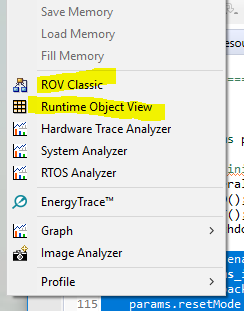
  • CCSv8 has a new version of ROV, but it still provides the old version.  Have you tried both?

    Can you include the complete error message that you are seeing? 

  • Hello Didier,

    during the CCS installation, an installer ask you about the installation path and a the default is c:\ti\ccsv8.
    However, in case of CCSv8.1, a scroll list will show you also c:\ti\ccs810.
    Selecting this path will allow allow you to to install, if you follow this schema, CCS8.x under c:\ti\ccs8x0 without conflicts with other versions.
    Remember to keep separate workspaces for the different CCS versions.
  • Didier,

    Did this get resolved? Please note that the Runtime Object View does not fully support multi-core devices (the ROV classic does).

    Todd

    [10/14 Update: I'm marking this as TI Thinks Resolved since the original poster did not reply]