This thread has been locked.

If you have a related question, please click the "Ask a related question" button in the top right corner. The newly created question will be automatically linked to this question.

CCS/TMS320F28335: TMS320F28335

Part Number: TMS320F28335

Tool/software: Code Composer Studio

Hi

I am using TMS320f28335 Experimenter Kit.I loaded a LED blinking program and it works fine.

1. But suddenly the target has got disconnected and to my surprise i couldnt find xds100 in device manager also.

2. Then I removed the control card and looked device manager, xds100 appears.But as soon as when control card is inserted xds100 disappears from device manager.

3. Even after power on reset, LED(GPIO 34) blinks (i.e With previously loaded program)

  • Hello,

    karthika s said:
    1. But suddenly the target has got disconnected and to my surprise i couldnt find xds100 in device manager also.

    What exactly were you doing in CCS when your target got disconnected? And when you tried to have the debugger connect to the target again, what happened?

    karthika s said:
    2. Then I removed the control card and looked device manager, xds100 appears.But as soon as when control card is inserted xds100 disappears from device manager.

    Are you talking about what is shown in the screenshot below?

    karthika s said:
    3. Even after power on reset, LED(GPIO 34) blinks (i.e With previously loaded program)
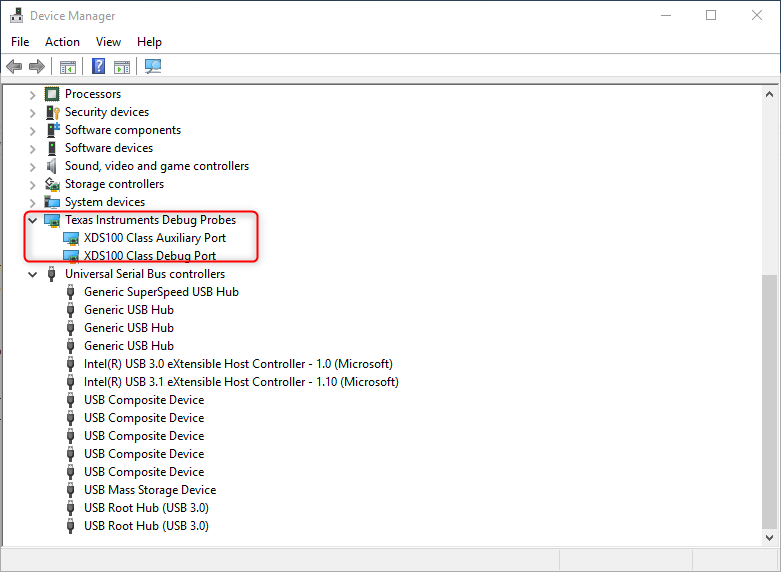
    The program has been flashed on the target and hence will run the program on power up regardless of debug connection

    Thanks

    ki

  • Hi

    Thank you for your time...

    1.What exactly were you doing in CCS when your target got disconnected?

    I pressed Reset Emulator from the CCS

    2. And when you tried to have the debugger connect to the target again, what happened?

    When I tried to connect to target following is the error message

    C28xx: Error connecting to the target: (Error -151 @ 0x0) One of the FTDI driver functions used during the connect returned bad status or an error. The cause may be one or more of: no XDS100 is plugged in, invalid XDS100 serial number, blank XDS100 EEPROM, missing FTDI drivers, faulty USB cable. Use the xds100serial command-line utility in the 'common/uscif' folder to verify the XDS100 can be located. (Emulation package 6.0.407.3)

    3. Are you talking about what is shown in the screenshot below?

    Yes same screenshot as you shown. XDS100 is shown in device manager only without control card and disappears as soon as i place my control card.Kindly help me with this issue!!!

  • 1. When SW2 is given 1111 ( boot from flash) and if device is switched on xds 100 disappears from device manager and here are the results from test connection ...

    [Start: Texas Instruments XDS100v2 USB Emulator_0]

    Execute the command:

    %ccs_base%/common/uscif/dbgjtag -f %boarddatafile% -rv -o -F inform,logfile=yes -S pathlength -S integrity

    [Result]

    -----[Print the board config pathname(s)]------------------------------------

    C:\Users\karthi\AppData\Local\TEXASI~1\CCS\

       ti\0\0\BrdDat\testBoard.dat

    -----[Print the reset-command software log-file]-----------------------------

    This utility has selected a 100- or 510-class product.

    This utility will load the adapter 'jioserdesusb.dll'.

    An error occurred while soft opening the controller.

    -----[An error has occurred and this utility has aborted]--------------------

    This error is generated by TI's USCIF driver or utilities.

    The value is '-151' (0xffffff69).

    The title is 'SC_ERR_FTDI_OPEN'.

    The explanation is:

    One of the FTDI driver functions used during the connect

    returned bad status or an error. The cause may be one or

    more of: no XDS100 is plugged in, invalid XDS100 serial number,

    blank XDS100 EEPROM, missing FTDI drivers, faulty USB cable.

    Use the xds100serial command-line utility in the 'common/uscif'

    folder to verify the XDS100 can be located.

    [End: Texas Instruments XDS100v2 USB Emulator_0]

    *********************************************************************************************************************************************

    2. When SW2 is given 0111 (SCI-A Boot) and if device is switched on xds 100 appears in device manager and here are the results from test connection ...

    [Start: Texas Instruments XDS100v2 USB Emulator_0]

    Execute the command:

    %ccs_base%/common/uscif/dbgjtag -f %boarddatafile% -rv -o -F inform,logfile=yes -S pathlength -S integrity

    [Result]


    -----[Print the board config pathname(s)]------------------------------------

    C:\Users\karthi\AppData\Local\TEXASI~1\CCS\
    ti\0\0\BrdDat\testBoard.dat

    -----[Print the reset-command software log-file]-----------------------------

    This utility has selected a 100- or 510-class product.
    This utility will load the adapter 'jioserdesusb.dll'.
    The library build date was 'Jul 27 2016'.
    The library build time was '18:31:37'.
    The library package version is '6.0.407.3'.
    The library component version is '35.35.0.0'.
    The controller does not use a programmable FPGA.
    The controller has a version number of '4' (0x00000004).
    The controller has an insertion length of '0' (0x00000000).
    This utility will attempt to reset the controller.
    This utility has successfully reset the controller.

    -----[Print the reset-command hardware log-file]-----------------------------

    The scan-path will be reset by toggling the JTAG TRST signal.
    The controller is the FTDI FT2232 with USB interface.
    The link from controller to target is direct (without cable).
    The software is configured for FTDI FT2232 features.
    The controller cannot monitor the value on the EMU[0] pin.
    The controller cannot monitor the value on the EMU[1] pin.
    The controller cannot control the timing on output pins.
    The controller cannot control the timing on input pins.
    The scan-path link-delay has been set to exactly '0' (0x0000).

    -----[The log-file for the JTAG TCLK output generated from the PLL]----------

    There is no hardware for programming the JTAG TCLK frequency.

    -----[Measure the source and frequency of the final JTAG TCLKR input]--------

    There is no hardware for measuring the JTAG TCLK frequency.

    -----[Perform the standard path-length test on the JTAG IR and DR]-----------

    This path-length test uses blocks of 64 32-bit words.

    The test for the JTAG IR instruction path-length succeeded.
    The JTAG IR instruction path-length is 38 bits.

    The test for the JTAG DR bypass path-length succeeded.
    The JTAG DR bypass path-length is 1 bits.

    -----[Perform the Integrity scan-test on the JTAG IR]------------------------

    This test will use blocks of 64 32-bit words.
    This test will be applied just once.

    Do a test using 0xFFFFFFFF.
    Scan tests: 1, skipped: 0, failed: 0
    Do a test using 0x00000000.
    Scan tests: 2, skipped: 0, failed: 0
    Do a test using 0xFE03E0E2.
    Scan tests: 3, skipped: 0, failed: 0
    Do a test using 0x01FC1F1D.
    Scan tests: 4, skipped: 0, failed: 0
    Do a test using 0x5533CCAA.
    Scan tests: 5, skipped: 0, failed: 0
    Do a test using 0xAACC3355.
    Scan tests: 6, skipped: 0, failed: 0
    All of the values were scanned correctly.

    The JTAG IR Integrity scan-test has succeeded.

    -----[Perform the Integrity scan-test on the JTAG DR]------------------------

    This test will use blocks of 64 32-bit words.
    This test will be applied just once.

    Do a test using 0xFFFFFFFF.
    Scan tests: 1, skipped: 0, failed: 0
    Do a test using 0x00000000.
    Scan tests: 2, skipped: 0, failed: 0
    Do a test using 0xFE03E0E2.
    Scan tests: 3, skipped: 0, failed: 0
    Do a test using 0x01FC1F1D.
    Scan tests: 4, skipped: 0, failed: 0
    Do a test using 0x5533CCAA.
    Scan tests: 5, skipped: 0, failed: 0
    Do a test using 0xAACC3355.
    Scan tests: 6, skipped: 0, failed: 0
    All of the values were scanned correctly.

    The JTAG DR Integrity scan-test has succeeded.

    [End: Texas Instruments XDS100v2 USB Emulator_0]

    *************************************************************************************************************************************************************************************

    3.When SW2 is given 1011 (SCI-A Boot) and if device is switched on xds 100 disappears in device manager and test connection result is failed ...

    [Start: Texas Instruments XDS100v2 USB Emulator_0]

    Execute the command:

    %ccs_base%/common/uscif/dbgjtag -f %boarddatafile% -rv -o -F inform,logfile=yes -S pathlength -S integrity

    [Result]


    -----[Print the board config pathname(s)]------------------------------------

    C:\Users\karthi\AppData\Local\TEXASI~1\CCS\
    ti\0\0\BrdDat\testBoard.dat

    -----[Print the reset-command software log-file]-----------------------------

    This utility has selected a 100- or 510-class product.
    This utility will load the adapter 'jioserdesusb.dll'.
    The library build date was 'Jul 27 2016'.
    The library build time was '18:31:37'.
    The library package version is '6.0.407.3'.
    The library component version is '35.35.0.0'.
    The controller does not use a programmable FPGA.
    The controller has a version number of '4' (0x00000004).
    The controller has an insertion length of '0' (0x00000000).
    This utility will attempt to reset the controller.
    This utility has successfully reset the controller.

    -----[Print the reset-command hardware log-file]-----------------------------

    The scan-path will be reset by toggling the JTAG TRST signal.
    The controller is the FTDI FT2232 with USB interface.
    The link from controller to target is direct (without cable).
    The software is configured for FTDI FT2232 features.
    The controller cannot monitor the value on the EMU[0] pin.
    The controller cannot monitor the value on the EMU[1] pin.
    The controller cannot control the timing on output pins.
    The controller cannot control the timing on input pins.
    The scan-path link-delay has been set to exactly '0' (0x0000).

    -----[An error has occurred and this utility has aborted]--------------------

    This error is generated by TI's USCIF driver or utilities.

    The value is '-154' (0xffffff66).
    The title is 'SC_ERR_FTDI_WRITE'.

    The explanation is:
    One of the FTDI driver functions used to
    write data returned bad status or an error.

    [End: Texas Instruments XDS100v2 USB Emulator_0]


  • Sorry for the delayed response

    karthika s said:
    1. When SW2 is given 1111 ( boot from flash)

    This is the default and should work. It could be that your connection is unstable. Are you using the integrated XDS100 on the kit (connected to the USB port on the dock)? Do you have an external probe that you can connect to the 14 pin JTAG header on the dock?

    Thanks

    ki

  • Hello,
    I haven’t heard back from you, hence this issue is being closed. If you wish to continue the discussion, please post a reply with an update below (or create a new thread).

    Thanks,
    ki