This thread has been locked.

If you have a related question, please click the "Ask a related question" button in the top right corner. The newly created question will be automatically linked to this question.

CCS/CC2640: Find and build generated .c files after 'pre-build steps'.

Part Number: CC2640


Tool/software: Code Composer Studio

During my 'pre-build steps' a bunch of files .c and .h files are added to my project structure (those files are required and have their .h included in several parts of my project ), but when I try to build my project, the code composer studio does not build those generated files since the the generated a Makefile does not include my new generated files (during the pre-build steps)

I would like to have those generated files built.

How should I proceed?

  • Hello Leoni,

    could you be a bit more specific?
    How do you add your bunch of .h and .c to the project?
    Looks like that these files are not incorporated to the project.
  • One of my pre-build steps is the instruction for running the "sensor_controller_studio_cli.exe" in my "sc_project.scp" and generate the sensor controller files.

    I wish to generate those files (scif_framework.c, scif_framework.h, scif_osal_tirtos.c, scif_osal_tirtos.h, scif.c and scif.h) during the pre-build step (instead of opening the sensor controller studio).

    I AM able to generate those files, but the code composer studio dont incorporate them to the project during the "pre-build steps"
  • Does anyone know how to force CCS to update its list of .c files after the pre-build steps?

  • Leoni - where are the files being generated? If there are being generated inside the project folder, then they should get automatically added to the build. If there are outside the project folder, then it becomes trickier as the project needs to be told to added them (there are tricks to do this but we can discuss them if the files are indeed outside the project folder)

    Thanks
    ki
  • - The files are generated inside the project folder, inside the "Application" folder.
    - They are automatically added to the build AFTER I try to build once (giving errors, since it does not add the files the the build after the pre-build steps).
    - After trying to build once, if I try to build again, everything goes fine, since the CCS can see the new files and add them to the build. But only AFTER one unsuccessful build.

    I'm trying to add the manual build during the pre-build steps, but I'm struggling with included paths:

    ```
    python ${PROJECT_LOC}/TOOLS/sensor_controller_build/sensor_controller_build.py
    ${CG_TOOL_CL} -mv7M4 --code_state=16 -me -O2 --opt_for_speed=0 -I ${PROJECT_ROOT}/Application/sc_generated_files/scif_framework.c
    ${CG_TOOL_CL} -mv7M4 --code_state=16 -me -O2 --opt_for_speed=0 ${PROJECT_ROOT}/Application/sc_generated_files/scif_osal_tirtos.c
    ${CG_TOOL_CL} -mv7M4 --code_state=16 -me -O2 --opt_for_speed=0 ${PROJECT_ROOT}/Application/sc_generated_files/scif.c
    ```

    It looks like with the right includes I'll be able to manually build those files, but it does not seem to be the right solution.
            * there are tricks to do this but we can discuss them if the files are indeed outside the project folder`
    Could you give solutions on how to properly add those files to the CCS build, or even, those tricks you were mentioning.

  • Leoni Mota Loris said:
    - The files are generated inside the project folder, inside the "Application" folder.
    - They are automatically added to the build AFTER I try to build once (giving errors, since it does not add the files the the build after the pre-build steps).
    - After trying to build once, if I try to build again, everything goes fine, since the CCS can see the new files and add them to the build. But only AFTER one unsuccessful build.

    Ok, I believe I know what is happening. CCS generates the makefiles after you press the build button, but BEFORE the pre-build step runs. Hence while by the time the pre-build step executes, it is too late for the project manager to pick them up for the build (that first time). For the second build, those files are already there so it will be picked up

    One thing that you can do is to add it to the build command pattern for both the compiler and linker. This will make sure that the files are inputted to the build tools after the pre-build step:

    Note that during a build, the active directory is inside the build configuration subfolder (hence the path is relative from there)

    Thanks

    ki

  • my ARM Compiller cmd:
    ${command} ${flags} ${inputs} ../Application/sc_generated_files/scif.c ../Application/sc_generated_files/scif_osal_tirtos.c ../Application/sc_generated_files/scif_framework.c

    my ARM Linker cmd:
    ${command} ${flags} ${output_flag} ${output} ${inputs} ${PROJECT_ROOT}/FlashROM_Debug/Application/scif.obj ${PROJECT_ROOT}/FlashROM_Debug/Application/scif_osal_tirtos.obj ${PROJECT_ROOT}/FlashROM_Debug/Application/scif_framework.obj

    I'm getting a bunch of "WARNING: more than one source file is specified; preprocessor output will be generated for last file only" since the build command will surely try to build those files every time (checking the FlashROM_Debug folder, I can see that I got those .obj in every folder and subfolder).

    But I'm able to build it. Is there a way to add those files at the 'end' of the ${inputs}? Because it will keep generating those warnings and it will create .obj files in every folder and sub-folders.
  • Leoni Mota Loris said:
    I'm getting a bunch of "WARNING: more than one source file is specified; preprocessor output will be generated for last file only" since the build command will surely try to build those files every time (checking the FlashROM_Debug folder, I can see that I got those .obj in every folder and subfolder).

    Hmm. It sounds like the source files that are generated by the pre-build are indeed getting picked up by the project manager. Try removing the source files at the end of the command line for the compiler options but leave the objs in for the linker command line field.

  • Thank you for the suggestion, but removing it from the build caused him to stop building the generated files and generating linker errors (not finding the required .obj's with the symbols in it).

    The problem is that

    ${command} ${flags} ${inputs} ../Application/sc_generated_files/scif.c ../Application/sc_generated_files/scif_osal_tirtos.c ../Application/sc_generated_files/scif_framework.c

    is been called multiple times (as if ${inputs} were a list being iterated and my added files are being added every time it try to compile anything), and it's needed a way to add those generated files at the "end" of the list ${inputs}

  • Do you have any other tip on how to build those sensor controller files without having it built every time? or Something to mitigate those warnings?

  • Ah, ok. Yes you need to specify the source files.

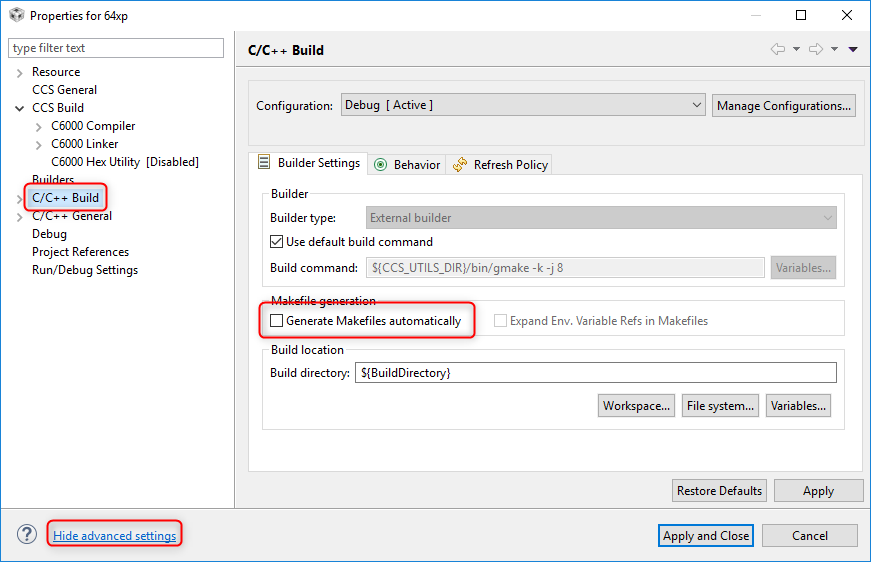
    Another option is to maintain the makefile yourself - either by creating a standard makefile project or using the existing generated makefiles from the CCS project and disabling the option to have CCS generate the makefile.

    The makefiles are generated in your configuration subfolder. The file you want to tweak is "subdir_vars.mk". Add the source and obj files to the lists in that file. If you have a successful build where the files are properly picked up, then you don't need to modify anything here since those files will already be in the lists.

    As for disabling makefile generation:

    Thanks

    ki

  • Hello, At the end I solved it by adding my own custom build procedures at the end of the pre-build steps:

    ${CG_TOOL_CL} ${BUILD_FLAGS} ${SC_INCLUDES} ${PROJECT_LOC}/Application/sc_generated_files/scif.c
    ${CG_TOOL_CL} ${BUILD_FLAGS} ${SC_INCLUDES} ${PROJECT_LOC}/Application/sc_generated_files/scif_osal_tirtos.c
    ${CG_TOOL_CL} ${BUILD_FLAGS} ${SC_INCLUDES} ${PROJECT_LOC}/Application/sc_generated_files/scif_framework.c