This thread has been locked.

If you have a related question, please click the "Ask a related question" button in the top right corner. The newly created question will be automatically linked to this question.

CCS/CCSTUDIO: Update to new Version

Part Number: CCSTUDIO


Tool/software: Code Composer Studio

Hello Support Team,

i am currently useing CCS Version 7.2.

Now i wanted to update it, and install the actual V 8.2

My Problem is now, that I am not able to convert my Projects with V 7.2 to the new Version.

Is there a Guid or something like that, which shows how it can be done?

Thank you very much!

  • Hello Sinisa,

    please use offline installer for CCS8.2 and install it in c:\ti\ccs820 (or like this), should be a dedicated path for 8.2.
    You need to create a separate worksapce for each CCS version.
    Use Project -> Import CCS Projects... from your CCS7.2 workspace.
    Read CCS guide. Always remember what is inside this guide.
  • Hello,

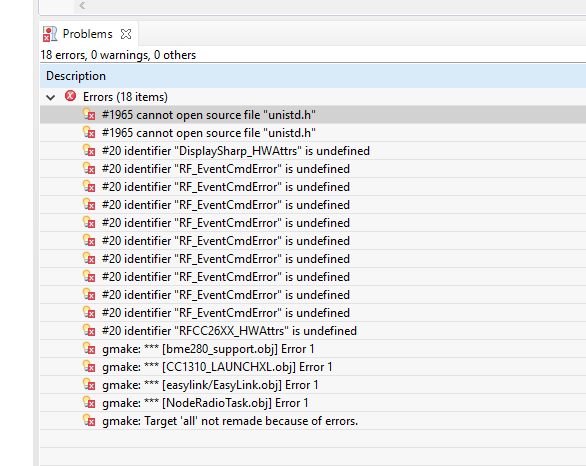
    i tried this, but i have a lot of Errors in my project now. Is there a solution to update it autmatically, or do i have do solve all these error at all my V7 Projects?

    Attached you can find my Errors.

  • Hello,

    are you able to compile your projects using V7?
    Do you have separate workspaces for V7.2 and V8.2?
    Probably you are linking different libraries or you need to update linker paths.
  • Hello,

    now i get an Error while installation.

    Now i deleted the V7 from one PC and install the V8.2 like you told me.

    How do i have to update the linker paths?
    I have saved my whole project over git, so it should be the same libraries, when i download it.
  • Hello,

    <<< Now i deleted the V7 from one PC
    Never delete the installed programs. Always uninstall.
    In your case uninstalling v7.2 is unnecessary.
    Even more, without v7.2 you cannot answer to my first question.
    You can have v8.2 and v7.2 in parallel when using paths like c:\ti\ccs820 and c:\ti\ccs720
    Always keep separate workspaces for the different CCS versions.

    <<< How do i have to update the linker paths?
    Go to Project Properties, check Resource and the paths within the Linker properties.
  • Sinisa Milanovic57 said:
    Is there a solution to update it autmatically, or do i have do solve all these error at all my V7 Projects?

    In general, importing a project created in CCSv7 into CCSv8 should work, but it is dependent on how the original project was created and whether it has any strict dependencies (like the version of SDK required to build it). 

    As suggested by Tom, keep both CCSv7 and CCSv8 installed side-by-side, in different directories. Verify first that your project builds clean with CCSv7. Then import it into a new workspace with CCSv8. It is recommended to not open the CCSv7 workspace directly in CCSv8.

    Make sure that the Simplelink SDK version selected under Project Properties->General->Products tab is the same on both versions. 

    After these steps, if the build still generates errors in CCSv8, compare and analyze the build output in the CCS build console for both versions. At that point, if you require assistance in understanding and fixing the errors, please save off the build log for both versions (working and non-working) and attach them here for us to review.

  • Sinisa,

    when AartiG says: please save off the build log for both versions (working and non-working)
    I understand that you should save Console Window outputs.
    Use Ctrl+A to mark all and Ctrl+C to copy all Console Window output for each case.