This thread has been locked.

If you have a related question, please click the "Ask a related question" button in the top right corner. The newly created question will be automatically linked to this question.

CCS: Not able to Install Code Composer Studio due to Error Message

Tool/software: Code Composer Studio

Dear Forum Members,

Currently i am unable to install Code Composer Studio on my system due to an error regarding the access to an file named css_error_messages.csv.

My system stats are:
Windows 10, Version 1803, Build 17134.345

Running on an Macbook Pro 2012

When installing this is the error message i get:
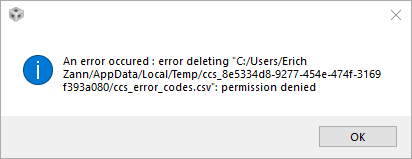
I already tried to disable my firewall and also my anti virus program but this doesnt help anything.

I hope someone can help me with this problem

  • Hello Lucas,

    please download an offline installer,
    disable the network interfaces,
    run the installer with an admin privileges.
  • Ive already tried this method but unfortunately it did not work neither. It seems that my system is blocking the access to some temporary installation files since the error occurs in the appData/local/temp folder
  • Looks to me that it could be Macbook Pro related.
    Please search for CCS and Macbook e2e threads.
  • Lucas,

    Even though you get this error message, are you able to still use CCS after clicking OK on the message dialog?
    I believe your installation itself should be ok in spite of this message. If the installation really did not complete properly, could you try installing CCS 8.1 in a different directory (assuming the error happened with CCS 8.2)?
  • Thanks for your reply but no I just get this error message and then the installer closes for some reason. I cant even send an error report, because somehow the files are corrupted and therefore it is not possible to make a zip file (at least its what the dialog for creating an error report says). 

    I will now try installing an earlier release like CSS 8.1. Maybe this will resolve my problem but anyways i will post an update whether the installation failed or not.

  • So I installed the earlier version (CCS 8.1) and it actually worked for me. So thanks a lot for your advice and have a nice day!