This thread has been locked.

If you have a related question, please click the "Ask a related question" button in the top right corner. The newly created question will be automatically linked to this question.

OMAP-L138, CCS 4.2, Fatal Error during: Initialization, OCS, Control,

Other Parts Discussed in Thread: OMAP-L138, OMAPL138

Hello,

I recently updated to CCS 4.0, and was able to connect to the OMAP-L138 C6748 DSP.  However, I just recently did an update to the latest everything (Software Updates->Find and Install), which makes it CCS 4.2, and I can no longer connect to the DSP.  The error is:

"Error connecting to the target:
Error 0x80002240/-151
Fatal Error during: Initialization, OCS, Control,"


Everything else stayed the same, so clearly something in the update has caused this problem.  I've reviewed a lot of the postings in the E2E forums, with the same or similiar problem, but have not found a clear answer to resolving it.  Any help would be appreciated.

Regards,

Robert

P.S.  After the update, there was no longer a single XDS100 USB Emulator selection, for the connection.  It is now "v1" or "v2" appended to XDS100.  I think "v1" is right, but I've tried both, and received the same error message.

  • Hi Robert,

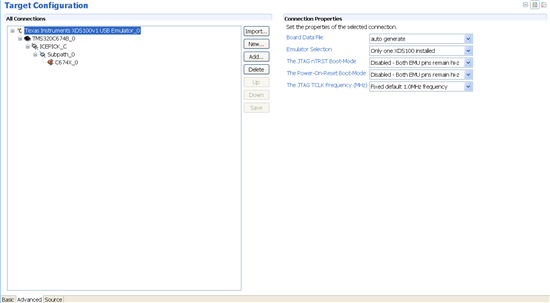
    What does your target configuration file (*.ccxml) look like? I can't seem to reproduce this (I can connect to the DSP).

    Thanks

    ki

  • Hello,

    Please see attached picture showing the target configuration, and let me know if any further information is needed.

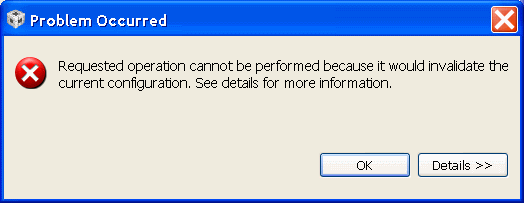
    I could also connect to the DSP, using 4.1, until performing the update to 4.2.  And unfortunately I can't get back to 4.1, since the "Revert to Previous" option is not working.  I've attached a picture of the error received from that as well.

    Regards,

    Robert


  • Robert,

    You need to use xds100 v1 for this board.

    If this connection worked before in a earlier version of CCS but not in CCS 4.2, then you've likely already checked the boot mode pins are set to emulation boot:
    http://processors.wiki.ti.com/index.php/How_to_connect_to_the_OMAP-L138/C6748/AM1808_EVM_board_using_CCS%3F

    You may also want to try deleting your target configuration cache files as described here: http://processors.wiki.ti.com/index.php/Troubleshooting_CCS#Debugger

  • Robert - that looks just like mine also.But CCSv4.2 is connecting fine for me.

    Could you try using a fresh new workspace? And if that does not help, could you try cleaning up some target cache files?

    Thanks

    ki

  • Aarti, Ki,

    Is XDS100V1 supported by the hardware of OMAP-L138 development kit?  Under CCS 4.1, it just had listed XDS100 (not the "v1" or "v2" flavors), which I selected and connected to the target with.  But that option is no longer available with 4.2  ... only XDS100V1 and XDS100V2.  So  I'm wondering if XDS100V1 is actually a different piece of hardware.  I would guess not.

    My boot mode pins were set to the SP1 Flash default mode (BOOT pins all OFF), and I was able to connect like that with v4.1.  I see that  emulation mode has 2 of them set to ON, so I changed them to that.  But even then ... plus selecting XDS100V1, cleaning out all cache, plus trying new workspace, etc ... I am still getting the same error, when trying to connect.

    Thanks,

    Robert

  • Robert said:
    Is XDS100V1 supported by the hardware of OMAP-L138 development kit?  

    Yes. It is an XDS100v1 that is the on-board emulation on the L138 kit. That is the one to use and the one I use that works for me.

    Since the tips did not work, could you generate a debug server log? It will take some additional work but I can't think of what else to suggest:

    http://processors.wiki.ti.com/index.php/Troubleshooting_CCS#Debug_Server_Logging

    Thanks

    ki

  • Ki-soo, Robert,

    Have you tried this procedure with both the OMAP-L138 SOM and the C6748 SOM?

    I am baffled that the EVM would have an XDS100v1 on board and yet still "work" with the OMAP-L based on this table...

    The below implies that with CCS 4.2 and newer I need XDS100v2...if that is not provisioned on the EVM, then how is it that it's working?


    Code Composer Studio v4.x Support (XDS100v1 and XDS100v2 hardware)

    Processor Family XDS100 Hardware Version Code Composer Studio Release/Version Notes
    TMS320C28xx                v1, v2                                                            Code Composer Studio v4.1 and newer No additional SW required for XDS100 support
    TMS320C54xx v1, v2 - as above -
    TMS320C55xx v1, v2 - as above -
    TMS320C674x v1, v2 - as above -
    TMS320C64x+ v1, v2 - as above -
    ARM9 v2 - as above -
    ARM Cortex A9 v2 Code Composer Studio v4.2 and newer
    ARM Cortex A8 v2 - as above -
    ARM Cortex R4 v2 - as above -
  • Dave,

    Dave said:

    I am baffled that the EVM would have an XDS100v1 on board and yet still "work" with the OMAP-L based on this table...

    The OMAPL138 EVM comes with a v1 that allows debugging on the DSP only (either the DSP side of OMAPL138 SOM or the C6748 SOM). Check the page below:

    http://processors.wiki.ti.com/index.php/How_to_connect_to_the_OMAP-L138/C6748/AM1808_EVM_board_using_CCS%3F

    Dave said:

    The below implies that with CCS 4.2 and newer I need XDS100v2...if that is not provisioned on the EVM, then how is it that it's working?

    The table shows the correlation between three parameters: 

    - The core used;

    - The CCS release that started to provide stable support;

    - The required version of XDS100 emulator.

    Therefore, if you need to debug Cortex cores then CCSv4.2 and a v2 are required, but if you have an ARM9 you can either use CCSv4.1 or 4.2 and a v2. In the case of OMAP-L, if you are debugging the C674x core you can use a CCSv4.1 or 4.2 and a v1 or v2.

    Hope this helps,

    Rafael

  • Ki,

    In case you didn't see it, I have sent the debug server log to you as a 'conversation' here.  I look forward to hearing your reply to that.

    Regards,

    Robert

  • Yes I received it. Thanks for sending it and thanks for the reminder. I have forwarded it to the appropriate group for analysis

    Thanks

    ki

  • Hi Robert,

    Engineers took a look at the log but unfortunately the information there was not enough.

    Could you try some of the tests in this wiki topic?

    http://processors.wiki.ti.com/index.php/Debugging_JTAG_Connectivity_Problems

    Using tools like dbgjtag can help validate your hardware connect and JTAG connectivity.

    Thanks

    ki


  • Ki,

    I will do that, but nothing changed in my hardware connect and JTAG connectivity, from when I was able to connect to target, until not able to connect to target.  It was simply an upgrade from 4.1 to 4.2, so I am concerned this will be more fruitless effort.

    Do your engineers know that I also have CCS 3.3 installed on my machine?  It must stay, for support of older products.  Several months ago, we were going to work with the OMAP-L138 with CCS 3.3, and the install did not work, as discussed here:

    http://e2e.ti.com/support/development_tools/code_composer_studio/f/81/p/41109/270672.aspx#270672

    That solution for that required a registry  fix.  I'm concerned that the same thing has happened again: when upgrading, the CCS 4.2 somehow became mixed, or confused, with the CCS 3.3.  JohnS helped me find that fix.  Could you see if he has any ideas for this problem, since it may be similar?

    Regards,

    Robert

  • Ki,

    What is this telling us?

    Regards,

    Robert


    C:\Program Files\Texas Instruments\ccsv4\common\uscif>dbgjtag -f "C:\Program Fil
    es\Texas Instruments\ccsv4\DebugServer\bin\win32\BrdDat\ccBoard0.dat" -rv -Spath
    length

    -----[Print the reset-command software log-file]-----------------------------

    This utility has selected a 100- or 510-class product.
    This utility will load the adapter 'jioserdesusb.dll'.

    An error occurred while soft opening the controller.

    -----[An error has occurred and this utility has aborted]--------------------

    This error is generated by TI's USCIF driver.

    The value is '-151' (0xffffff69).
    The title is 'SC_ERR_POD_OPEN'.

    The explanation is:
    This utility failed to open the adapter for a custom emulator.
    The adapter returned an error.

  • Robert,

    Are you connecting to J21 or J6? There are two mini USB connectors on the board but only J21 is the JTAG emulator.

    The reason I am asking this is because I get the exact same message if I connect my USB cable to J6 - the OMAP-L usb host port.

    Hope this helps,

    Rafael

  • Rafael,

    I am connected to J21 (same one that was working prior to the CCS update).

    Thanks,

    Robert

  • Robert,

    The error message -151 means that our scan manager has failed to make a connection to the FTDI chip in the XDS100 hardware.  This can be caused by any of the following conditions:  The USB connection is faulty.  The FTDI chip is non-functional.  The FTDI drivers are not installed.  The FTDI drivers are corrupted.  The VID/PID numbers for the emulator are wrong.  The setup configuration is trying to connect to an XDS100 with a specific serial number that does not match the one in your emulator.

    Given that this board used to work, I think we can focus on two potential causes:

    Either the VID/PID numbers for the emulator are wrong.  Or the FTDI drivers could have been corrupted during the upgrade.

    I recommend you follow the troubleshooting steps at this Wiki site: http://processors.wiki.ti.com/index.php/XDS100.

    Pay attention to information checking that the PC sees the XDS100 hardware, and that the VID/PID numbers are correct.

    Edward

    P.S.: My money would be on the VID/PID being incorrect, still set at the FTDI defaults.  Earlier versions of the scan manager did not check this, but then that meant we would attetmpt to connect to non-XDS100 FTDI devices by mistake.  We fixed that by enforcing connections only to devices with the correct VID/PID.  That could mean an emulator with bad VID/PID used to work but then no longer works after the update.

  • Edward,

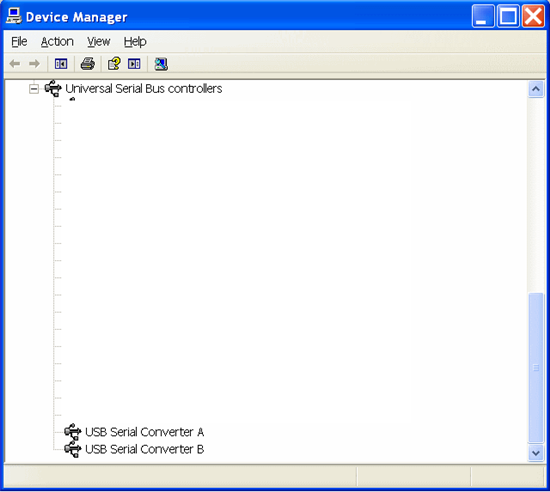
    I had noticed that a bit yesterday, and confirmed today, as shown by the bottom 2 entries of USB controllers on my machine (should be TI XDS100 Channel A and Channel B ):


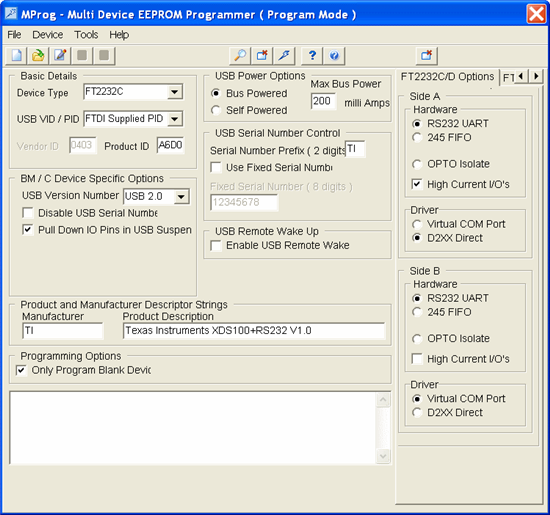
     So I've downloaded Mprog, and the associated .ept file, to reprogram the EEPROM:


    and ran into the following error?


     Regards,

    Robert

  • I've seen that error crop up from time to time even with a good installation and good emulator attached.  Did you try again a few times to see if it'd go away?  If it's constant, then it appears the drivers are corrupted and you'll need to try reinstalling them.  We put the drivers in the ccsv4\common\uscif\ftdi directory.  With the emulator unplugged, you can try right clicking the two .inf files there and choosing the "Install" option (shouldn't matter which first).

    Edward

  • Success :-) (after another attempt at Mprog).  I'm able to connect to target, and run code again.

    Thanks Edward, and all that helped.

    Can we conclude from this that Logic diidn't program the EEPROM correctly, for my  OMAP-L138 board?

    Regards,

    Robert

  • The mostly likely scenario is that the EEPROM had not been programmed at all.  In that case, the FTDI chip uses default values to at least ID itself as an FTDI device. However, given our software at the time wasn't checking, any tests by Logic using our tools wouldn't have caught the problem.

    Edward

  • I filed SDSCM00038607 to track having a better error message so that it is much more obvious what the problem is.

    John

  • I am using logic OMAP experimenter kit


    Error connecting to the target:

    Error 0x80002240/-151

    Fatal Error during: Initialization, OCS, Control, 

    This error was generated by TI's USCIF driver.


    SC_ERR_POD_OPEN <-151>

    This utility failed to open the adapter for a custom emulator.

    The adapter returned an error.


    I have checked the number they seem good but i am not able to connect to the board