This thread has been locked.

If you have a related question, please click the "Ask a related question" button in the top right corner. The newly created question will be automatically linked to this question.

CCS: CCS versions and compiler tree


Tool/software: Code Composer Studio

Hello,

I have started learning TI solutions using MSP432 black and CCS6.2 or similar.
Now I have a few versions of CCS, many compiler versions and environments.

Each CCS version keeps its own compilers under path: C:\ti\ccs820\ccsv8\tools\compiler
or similar to this.

Is there any safe way to install needed compiler versions under one path, lets say c:\ti\cgt\ folder
and reconfigure CCS versions to let them discover these new compiler tool paths?


  • Tom,

    You can download the installers for the majority of our compilers and one of these two links.  The first link just has more recent releases and the second one is the archive:

    With those installers you can install the compiler wherever you like.

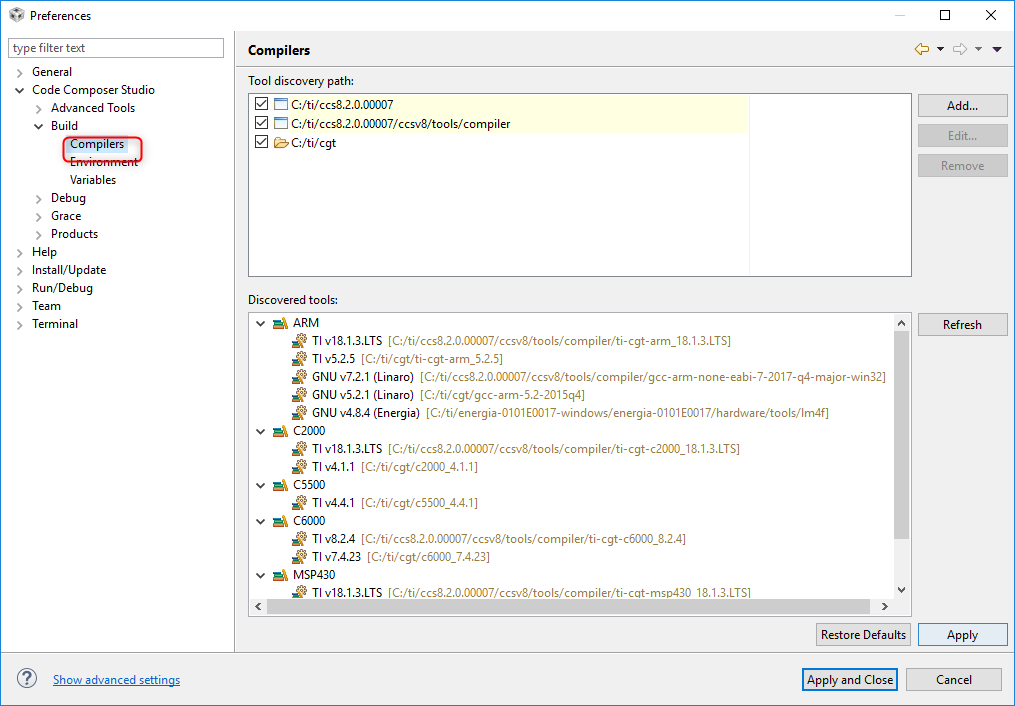
    In CCS you can then use the preferences dialog to specify where you would like CCS to look for compilers:

    The tool discovery path is where it will look and then the bottom part of the dialog is what it has found.

    Regards,

    John

  • It is pity that I missed Preferences -> Compilers window.
    I have raised my question being, may be, too much familiar with software-dl.ti.com/.../download.htm

    How to deal with this one?

  • Tom,

    That post is back from a time when we had free and paid tools and some of our free tools were code size limited. As a result not all of our compilers were available for download.

    The ARM/TMS470 tools are on the download page now: software-dl.ti.com/.../download.htm

    Unfortunately due to our licensing changes over the years there are posts on E2E with dated information.

    Regards,
    John
  • John,

    I need your help!

    I have uninstalled  compilers using uninstallers placed in C:\ti\ccs820\ccsv8\uninstallers.

    Then I have installed needed CGT/compiler tools under c:\ti\CGT

    After restarting CCS8.2 supported "tools" (I do not remember exact word) were not discovered.

    I have restarted CCS8.2 and everything was fine.

    Today, doing support for someone, I needed to move to CCS8.1

    Now, both CCS8.1 and CCS8.2 are unable to discover products/tools installed under c:\ti\CGT dir.

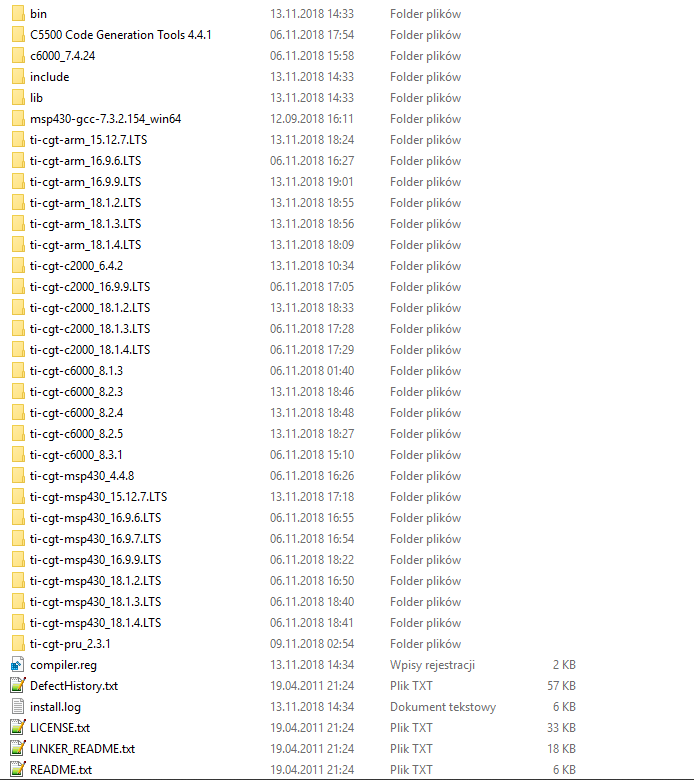
    My c:\\ti\CGT\ is like this:

    uint32_t UART_SetBaudRate(UART_Handle handle, uint32_t baudRate, int chkFlag)
    {
        UARTCC26XX_Object           *object;
        UARTCC26XX_HWAttrsV2 const  *hwAttrs;
        Types_FreqHz    freq;
        uint32_t        baudRateOld, ui32BRDI, ui32BRDF, ui32PERDMACLK, ui32ClkDiv;
        uint32_t        ui32Tmp;
        volatile uint32_t   ui32LCRH1, ui32LCRH2, ui32LCRHtmp, ui32ParMod;
    
        /* Get the pointer to the object and hwAttrs + save baud rate */
        object = handle->object;
        hwAttrs = handle->hwAttrs;
        baudRateOld = object->baudRate;
    
        /* Set new baud rate */
        object->baudRate = baudRate;
        BIOS_getCpuFreq(&freq);
    
        /* System initialization should be checked to get proper values for PERDMACLK & ClkDiv */
        ui32PERDMACLK = freq.lo;
        ui32ClkDiv = 16;
    
        ui32Tmp = ui32ClkDiv * baudRate;
        ui32BRDI = ui32PERDMACLK / (ui32Tmp);
        ui32BRDF = ((((ui32PERDMACLK - (ui32BRDI * ui32Tmp)) << 7) + 1) / (ui32Tmp)) >> 1;
    
        /* Check BRDI & BRDF dividers */
        if (chkFlag)
            if ( (ui32BRDI < 1 || ui32BRDI > 0xFFFF) || ( ui32BRDI == 0xFFFF && !ui32BRDF ) )
                System_abort("Unsupported baud rate\n");
    
        HWREG(hwAttrs->baseAddr + UART_O_IBRD) = (HWREG(hwAttrs->baseAddr + UART_O_IBRD) & ~UART_IBRD_DIVINT_M) | (ui32BRDI & UART_IBRD_DIVINT_M);
        HWREG(hwAttrs->baseAddr + UART_O_FBRD) = (HWREG(hwAttrs->baseAddr + UART_O_FBRD) & ~UART_FBRD_DIVFRAC_M) | (ui32BRDF & UART_FBRD_DIVFRAC_M);
    
        /* Rewrite to LCRH register with no changes. This gent form is used to avoid 'Assignment to itself Error/Warning */
        /* CCS v. 7.4.00015: Window->Preferences->'C/C++'/Code Analysis->Assignment to itself->Severity: change to Warning does not change Error to Warning */
        /* Even more, the statement: */
        /* HWREG(hwAttrs->baseAddr + UART_O_LCRH) = HWREG(hwAttrs->baseAddr + UART_O_LCRH); */
        /* is commented out using '//' however the Error still exist! */
        HWREG(hwAttrs->baseAddr + UART_O_LCRH) = ( HWREG(hwAttrs->baseAddr + UART_O_LCRH) & ~UART_LCRH_PEN_M ) | UARTParityModeGet(hwAttrs->baseAddr);
    
        return baudRateOld;
    }

  • Hi Tom,
    Did you set the tools discovery path to c:\ti\CGT?

    Thanks
    ki
  • Sorry for a misleading link.

    UART_driver_speed_change_CC1310.c

    should be like this: 

    I did a keyboard cleanup with isoprophylen alcohol to satisfy her and help myself, and I went into big troubles.
    Saying troubles I mean:Backspace always on, Page Up always on, etc. and all that after 1 hour without AC power and an even internal accu.

    Cheers!

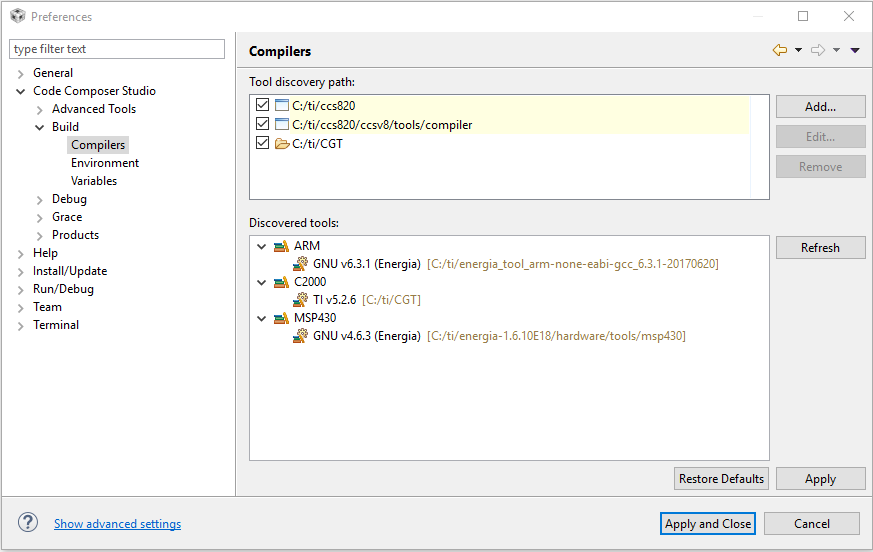
  • Can you provide a screenshot of your CGT discovery dialog?

    Example:

    Thanks

    ki

  • YES, I did that!

  • Ki,

    The second screen looks better a few more compilers which reside in c:\ti

  • Inside your C:\ti\CGT folder, I see some folders like 'bin', 'include', 'lib', and files like 'compiler.reg', etc.

    In your screenshot, I see that only the C2000 compiler (v5.2.6) is being detected.

    What it looks like to me is that C:\ti\CGT is the root install location for the C2000 v5.2.6 compiler (those 'bin', 'include', etc folders and files are for that compiler version). Then it looks like all these other compiler directories was moved in to the C2000 v5.2.6 compiler root folder. This is likely the issue. You basically 'installed' all these other compilers inside an existing compiler installation, which is impacting the discovery. I suggest you create a separate subfolder for your C2000 v5.2.6 compiler inside c:\ti\CGT (like 'ti-cgt-c2000_5.2.6') and move all the associated files and folders for that compiler to that subfolder. Then press the 'Refresh' button and let CCS autodetect the compilers again.

    Thanks
    ki

  • Ki,
    thanks a lot!

    Even 'Refresh' was not needed.
    What a shame :-)