This thread has been locked.

If you have a related question, please click the "Ask a related question" button in the top right corner. The newly created question will be automatically linked to this question.

CCS/MSP432P401R: Including SimpleLink Directory, Where are CCS_BASE_ROOT & PROJECT_ROOT defined

Part Number: MSP432P401R

Tool/software: Code Composer Studio

Hi All

In my efforts to learn the MSP432 I bought one of the books listing in the suggested reading, Programmable Micro controllers by Cem Unsalan.

I am trying to type in and run the program in Listing 6.7.  the first line is:

#include <ti/devices/msp432p4xx/driverlib/driverlib.h>

and I got this error:

>> Compilation failure
subdir_rules.mk:9: recipe for target 'Listing_6p7_A_main.obj' failed
"../Listing_6p7_A_main.c", line 2: fatal error #1965: cannot open source file "ti/devices/msp432p4xx/driverlib/driverlib.h"

So I looked around and found this:

C:\ti\simplelink_msp432p4_sdk_2_30_00_14\source\ti\devices\msp432p4xx\driverlib/driverlib.h

which looked like what the the compiler was looking for.

When I modified the include to:

#include <C:\ti\simplelink_msp432p4_sdk_2_30_00_14\source\ti\devices\msp432p4xx\driverlib/driverlib.h>

I just got more if the same could not find *****.h. So I looked in Project > Properties > Include Files> and found this:

${CCS_BASE_ROOT}/arm/include
${CCS_BASE_ROOT}/arm/include/CMSIS
${PROJECT_ROOT}
${CG_TOOL_ROOT}/include

I am thinking there might be some expected format like:

$(MYSTERY_SIMPLELINK_DIRECTORY)/source

that would be used to add another line to where the compiler looks for include files?

Or maybe when I create the project there is a place to select SimpleLink. I have not found that yet?

Thanks

Chris

  • The definition of those variables can be seen in the below section of the project properties:

    PROJECT_ROOT is lower in the list if you scroll down.

    basically, CCS_BASE_ROOT points to a directory inside your CCS installation. PROJECT_ROOT is the path to the project folder. Neither variable will help with your build errors. You likely need to add 'C:\ti\simplelink_msp432p4_sdk_2_30_00_14\source' to the list of include search paths. 

    Thanks

    ki

  • Hi ki

    Thanks for the information.

    Based on your information I found a project that I had used that had worked with SimpleLink.
    In Work Space: workspacev8
    Project: blinkled_msp432p401r_MSP_EXP432P401R_nortos_ccs
    Navigated to Project > Properties > Include Options and found these lines:

    ${COM_TI_SIMPLELINK_MSP432_SDK_INCLUDE_PATH}
    ${COM_TI_SIMPLELINK_MSP432_SDK_INSTALL_DIR}/source
    ${COM_TI_SIMPLELINK_MSP432_SDK_INSTALL_DIR}/source/third_party/CMSIS/Include

    Navigated to Project > Properties Builds then selected the Variables tab and checked the Show System Variable box and found lines for:
    COM_TI_SIMPLELINK_MSP432_SDK_INCLUDE_PATH
    COM_TI_SIMPLELINK_MSP432_SDK_INSTALL_DIR
    COM_TI_SIMPLELINK_MSP432_SDK_INSTALL_DIR

    I still don’t know where these variables are listed or how they got defined. Did find some stuff on Stack Overflow when searched for Eclipse system variables but looked like it led to another tangent?

    Went back to current workspace and project.
    Navigated to Project > Properties > Include Options clicked on add button in tool bar (folder icon with green ‘+’ sign)
    Clicked Variables but none of the variables shown below were on the list
    COM_TI_SIMPLELINK_MSP432_SDK_INCLUDE_PATH
    COM_TI_SIMPLELINK_MSP432_SDK_INSTALL_DIR
    COM_TI_SIMPLELINK_MSP432_SDK_INSTALL_DIR

    Navigated to Project > Properties Builds then selected the Variables tab and checked the Show System Variable box
    Clicked on Add button and got dialog to create new variable.

    Based on values seen in Work Space: workspacev8, Project: blinkled_msp432p401r_MSP_EXP432P401R_nortos_ccs
    In variable name entered: COM_TI_SIMPLELINK_MSP432_SDK_INSTALL_DIR
    In Value entered: C:\ti\simplelink_msp432p4_sdk_2_30_00_14
    Clicked ‘Apply and Close’
    Note: COM_TI_SIMPLELINK_MSP432_SDK_INSTALL_DIR now shows in bold and I did not have to check ‘Show System Variables’ to see this variable?

    Navigated to Project > Properties > Include Options clicked on add button in tool bar (folder icon with green ‘+’ sign)
    Clicked Variables and now COM_TI_SIMPLELINK_MSP432_SDK_INSTALL_DIR was on the list!
    Selected COM_TI_SIMPLELINK_MSP432_SDK_INSTALL_DIR and clicked ‘OK’
    Added /source to make ${COM_TI_SIMPLELINK_MSP432_SDK_INSTALL_DIR}/source
    Clicked OK then Apply and Close.
    Now able to build project.

    There must be a better way?
    Where is the documentation on this?
  • Chris Humme said:
    I still don’t know where these variables are listed or how they got defined. Did find some stuff on Stack Overflow when searched for Eclipse system variables but looked like it led to another tangent?

    They were likely defined by the MSP432 SDK.

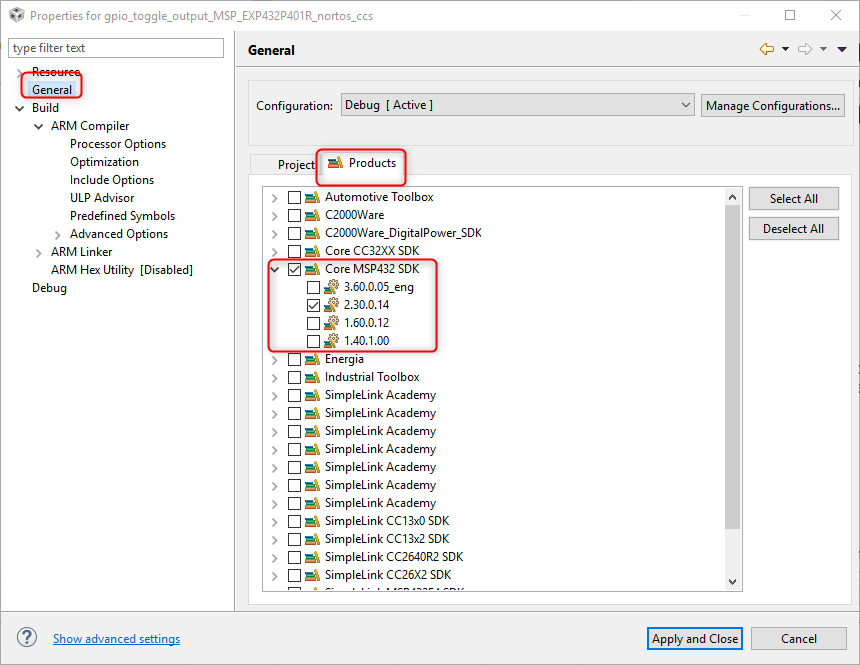
    For example, where I go to the include options and check the paths, I can see that some of those paths came from another package:

    I can check which package by looking that Products tab of the General project properties:

    Hence if you have MSP432 SDK discovered by CCS and the product enabled in the project properties, then the variables should be defined.

    Hope this helps

    ki

  • Hi Ki

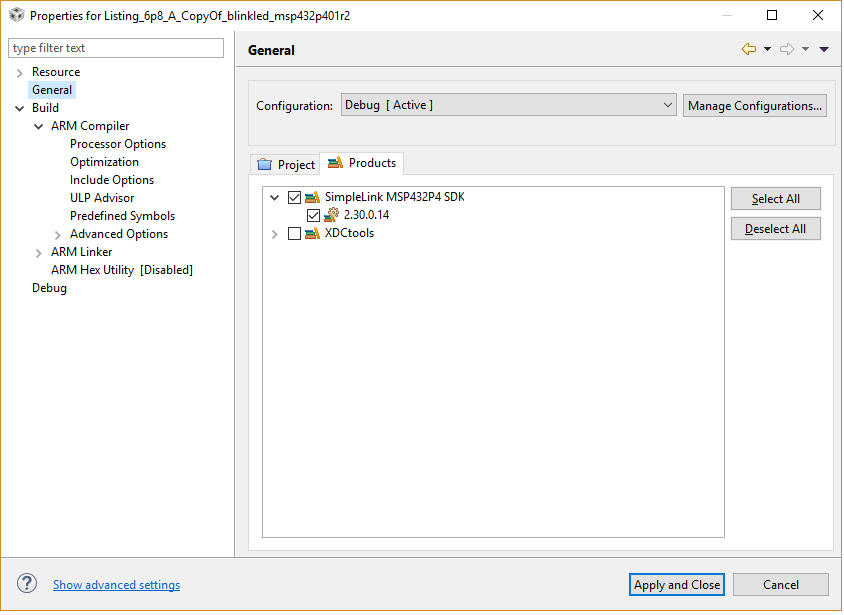
    This is what I have for products

    :

    I do not see any way to add 'Core MSP432'

    I did a web search and all I found was SimpleLink stuff which I seem to have already?

    So is 'Core MSP432 SDK' something different?

    If so where do I find it and how do I get it 'discovered'?

    Thanks

    Chris

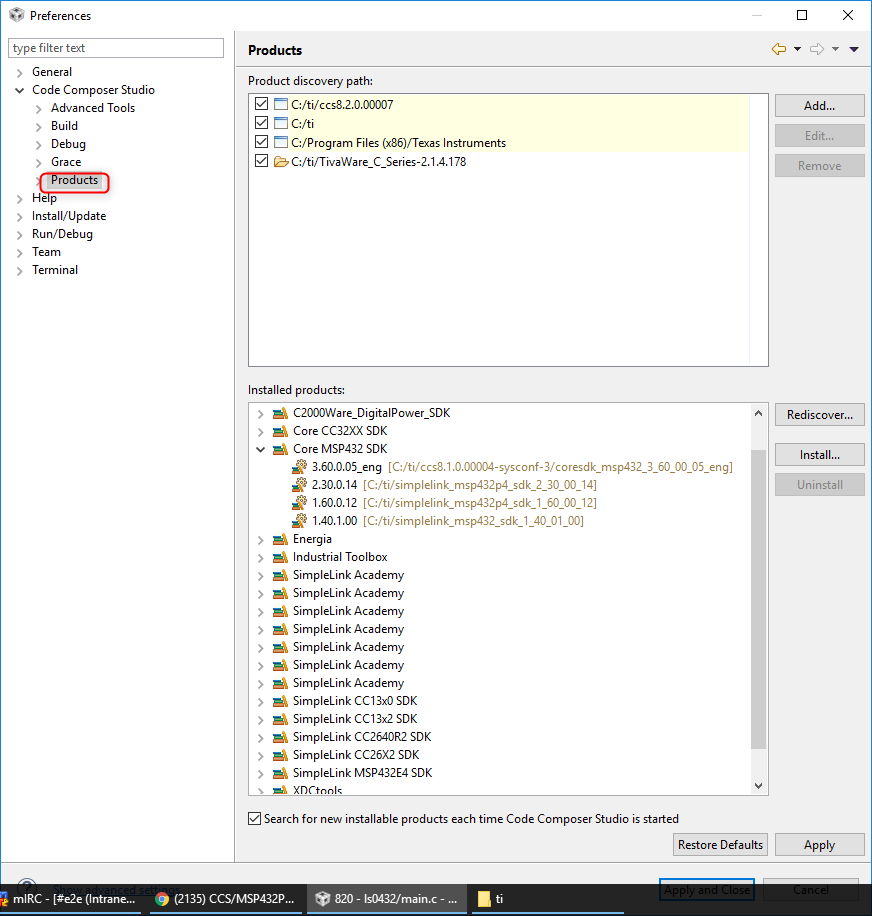
  • That is odd. Can you check the Eclipse preferences for the list of discovered products? Please provide a screenshot like below"

    Thanks

    ki


  • My main PC runs W10-64 and I ma working on reinstalling CCS8 on that PC.

    This screen capture is from a spare PC running fairly fresh install of  W7-32 SP1.

     I could not find CCS_BASE_ROOT or PROJECT_ROOT on either machine.

  • Chris Humme said:
    So is 'Core MSP432 SDK' something different?

    I found out that the 'Core MSP432 SDK' and 'SimpleLink MSP432P4 SDK' point to the same thing. The names sometimes get mixed up, which is confusing, but otherwise not an issue.

    Hence if you have that ether product enabled in your project, the variables should get passed on from the SDK to your project. You will not see it defined in your project since it is coming from the SDK.

    Hope that helps clear things up.

    ki