This thread has been locked.

If you have a related question, please click the "Ask a related question" button in the top right corner. The newly created question will be automatically linked to this question.

CCS: Error initializing emulator: No USB FET was found


Tool/software: Code Composer Studio

I am working with MSP430 family and using CCSV8 but I need to revert back to CCSV4 for some legacy stuff and I encounter the "

Error initializing emulator: No USB FET was found

I think that the dll version might not be backward compatible since I've been using the MSP-FET430UIF for CCSV8 with no problem. How do I make mine work with CCSV4 and is there a way to switch between CCSV8 and CCSV4 seamlessly? TIA

ED

  • CCSv4 used MSP430.DLLv2 with a VCP USB protocol, whereas CCSv5 and later use MSP430.DLLv3 with a CDC USB protocol.

    To be able to use your MSP-FET430UIF with CCSv4 I think you need to follow the Downgrade back to old MSP430.DLLv2 Wiki entry.

  • Hi Chester,

    thanks for answering the question. This page describes all the steps and tools required.

    Regards,
    Stefan
  • Thanks Chester, I looked into START → ALL PROGRAMS → TEXAS INTRUMENTS → MSP-FET430UIF DEBUG INTERFACE → MSP-FET430UIF v3 to v2 DOWNGRADE as described but did not see the  MSP-FET430UIF DEBUG INTERFACE option. Am I missing anything?

    Anyway, there is no "seamless" switch between DLLV2 and DLLV3? I really do need to go back and forth multiple times a day so I appreciate some quick way of doing this.

    ED

  • Hi Ed,

    as the Software architecture of the FET has been completely reworked, this step of up and down grading is required. Unfortunately there is no easier way. If you have to do this several times a day, a possibility would be to work with two FETs one with each setup. That did work very well for me, at some time where i needed this setup as well.

    Regards,
    Stefan
  • snuk said:
    Thanks Chester, I looked into START → ALL PROGRAMS → TEXAS INTRUMENTS → MSP-FET430UIF DEBUG INTERFACEMSP-FET430UIF v3 to v2 DOWNGRADE as described but did not see the  MSP-FET430UIF DEBUG INTERFACE option.

    It looks like CCSv7 and later no longer distribute the v3 to v2 downgrade tool.

    Looking at a CCS 6.2 installation in the ccsv6\ccs_base\DebugServer\drivers there are the following files related to the downgrade:

    V32V2.bat
    UpdateTool.exe
    Uifv3Downgrader.txt

    I ran the V32V2.bat from the CCS 6.2 installation and the MSP-FET430UIF firmware was downgraded to the V2 VCP firmware (I don't have CCS v4 installed so didn't test the downgraded firmware).

    I can't find a download link for the v3 to v2 downgrade tool, so suggest you install CCS 6.2 to get the tool.

  • Hi Ed,

    i hope you could find the tool with installing CCS version 6.2
    I have informed the Tools team that the link on how to get the tool is missing on the wiki page

    Regards,
    Stefan
  • Thanks for the help guys! Another question: Reading the instructions it mentioned something like upgrade is automatic. Is it true that I only need to do the downgrade procedure? When I am ready to use CCSv8 it would just work without doing any driver upgrade?

    Also, are there any major advantages of CCSv8 over CCSv4 for legacy stuff? If the benefits are substantial enough we might try to spend time to convert all our legacy projects to CCSv8, which will be a huge undertaking. 

  • Hi,

    yes, the upgrade is automatically done when you are starting the debugger on CCSv8.

    Regarding the change from CCSv4 to CCSv8: basically it should work out of the box by opening the older project in CCS v8 but sometimes the details can make it complicated depending on which options or parameters and project links are set. But this is something i can not judge here.
    The compiler and tool chain is of course always maintained on the newer version so bug fixes and improvements go in there. So i good step to find out if you should upgrade all your project to CCSv8 might be to check the errata and bug fixes which have been integrated into the new version. So it mainly is on the compiler and linker which makes the big difference.

    Regards,
    Stefan
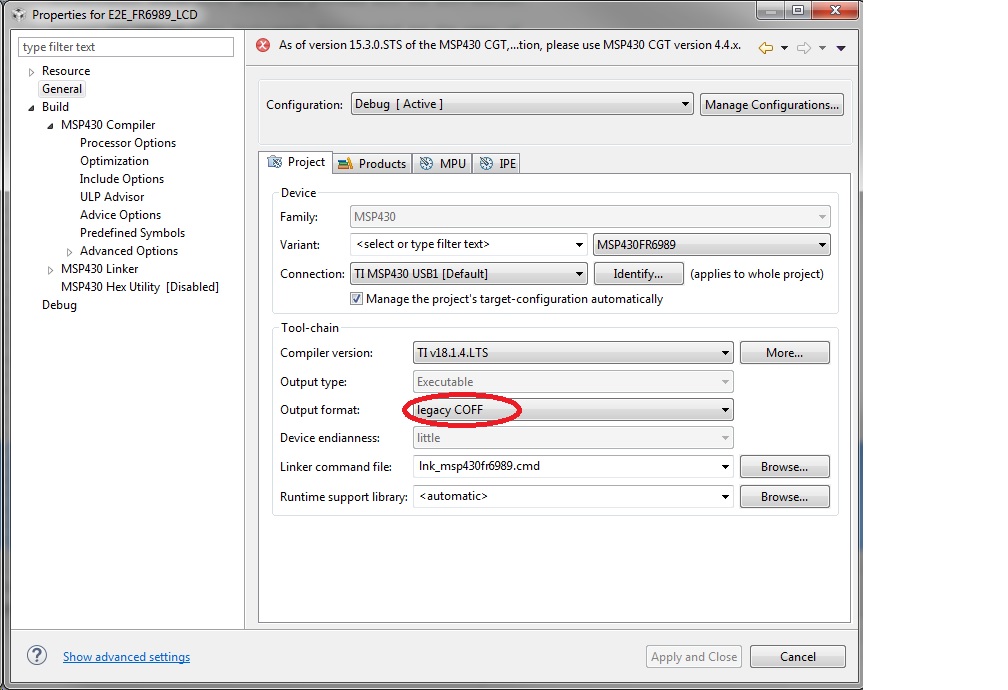
  • Appreciate your help Stefan but I need to correct your statement on older project (CCSv4) should work just by opening it in CCSv8. It does not! It did take a bit of effort for me to convert projects from CCSv4 to CCSv8. The mere difference in "output format" alone (COFF vs eabi) would be a huge headache to deal with. I ended up having to create a new bare project in CCSv8 and port all the code over, then painstakingly re-configure the project files to match with the old one. Moving projects from CCSv4 to CCSv8 is in no way automatic nor easy in my case.

  • snuk said:
    The mere difference in "output format" alone (COFF vs eabi) would be a huge headache to deal with.

    Which version of MSP430 compiler was used in your CCSv4 project?

    If you install the same version of the compiler in CCSv8 that should allow to use your original project without modifications. CCSv8 allows installation of MSP430 compilers back to version 4.0.1. See http://processors.wiki.ti.com/index.php/Compiler_Releases

  • Hi,

    you still can select to use the coff as output format in the project properties

    Regards,

     Stefan

  • Stefan,

    Notice the warning on top of the screen. And you won't be able to click on "Apply and Close" button (grayed out).

    Anyway, I already went through this exercise in this thread:

  • Hi,
    thanks for the update - was not aware that this had been disabled with the newer CGT versions.
    (Looks like a long time i had not used the old COFF format)

    So if you converting to CCSv8 with elf format output and have issues there just let me know.

    Regards,
    Stefan
  • Hi Chester,

    Somehow I missed your reply! We used Code Generation Tool v3.3.3 for the legacy projects. According to your statement we might not be able to use v3.3.3 in the CCSv8 environment.

    Thanks,

    ED

  • snuk said:
    According to your statement we might not be able to use v3.3.3 in the CCSv8 environment.

    I can't find a public download link for compiler v3.3.3

    However, Looking for old MSP430 v3.x compiler says that it is expected a program written for the v3.3.3 compiler will work when built with a v4.0.x compiler (which is available as a CCS download).

  • Hi,

    could you solve the issue or do you have further questions regarding this topic?
    If solved, please select "Resolved" for the post that solved your issue so this thread can be closed out. If you have a different question, please select "Ask a related question" or " Ask a new question".
    Thanks a lot!

    Best regards,
    Stefan
  • Hi,

    I suppose that you were able to move on with your application as you didn't reply anymore, so I'll close this post.
    Please feel free to comment again if you look for further assistance regarding this topic, it will re-open the thread. If you have a different question, please select "Ask a related question" or " Ask a new question".

    Best regards,
    Stefan