This thread has been locked.

If you have a related question, please click the "Ask a related question" button in the top right corner. The newly created question will be automatically linked to this question.

CCS/LAUNCHXL-CC2640R2: CCS auto-complete and intellisense and alternate IDE

Part Number: LAUNCHXL-CC2640R2
Other Parts Discussed in Thread: CC2640R2F, C2000WARE, CC1310

Tool/software: Code Composer Studio

I contacted Ti with the following questions.  They suggested posting on this forum.


I have a few questions about the LAUNCHXL-CC2640R2. 


I’m looking at applications where I think the CC2640R2F would fit.


I’ve worked with other programming/microprocessors in the past (more Atmel based).


I downloaded Code Composer Studio (CCS), and was trying to “test-drive” it a little.


I think it could be inexperience on my part, but CCS didn’t seem to auto-complete well, or have good intellisense.  When I type in a function, it seemed to recognize it was a function (would auto insert an open parenthesis), but did not offer help on what arguments should be passed to the function.  I also does not seem to have intellisense.


I’m kind-of spoiled using visual studio (and similar IDEs), and was wondering if there is a better IDE.  Perhaps I’m not experienced enough with CCS, or there is a better IDE I should try.  I’ve used visual-studio based IDEs for other processors, and thought maybe TI had one.


I would like to avoid cloud-based IDEs (I’d like the IDE to run on my local CPU).  This is due to the fact sometimes I need to work completely off the network.  If needed, I could use a cloud-based IDE, but I think you see the challenges.


Thanks for any thoughts.


  • Hi,

    Sorry for the inconvenience. Unfortunately CC2640R2 SDK only support CCS and IAR.

    If you have question regarding CCS, I would recommend you to post on CCS forum.
    This one I would move to CCS forum and see if TI CCS expert can offer some help or tips to you.
  • Christin,
    we are on the CCS forum.

    Bob,
    be patient and wait for a response from Ki-Soo Lee.
  • Bob,

    It does have the functionality you are looking for but there are cases where it does not work.

    Here is an example from a C2000Ware project.  Note how InitPieCtrl() is coloured.  Based on this I know the code completion features are going to work.  I can start typing the name and hit control space.  It shows me the possible completions as well as the parameter information.

    Here is an example from the CC1310 SDK.  GPIO_write is not coloured so I know something is going on with the source scanner and auto completion is not going to work.

    In that same project (same file even) I have added a function John()

    Here you can see that the auto complete works.  I typed Jo and then control space, it completed it, opened the parenthesis, shows the prototype with parameter info in a tool tip and is even suggesting a completion for the first parameter based on local variables that match the type required.

    When I look at the header file that has GPIO_write in it there is something about it that the scanner does not like:

    So it should work find for your own code but you may have issues with using some of our driver library.  We need to figure that out.

    Regards,

    John

  • Hi John,

    Thanks for posting the example pictures.

    I see what you mean about the scanner not liking some functions calls. Do you know if Ti has plans to improve this?

    I also need to learn to hit Ctrl-Space. As long as I'm wishing, any change Ti would make an option to "auto Ctrl-Space" like other IDEs do?

    Thanks again,
    Bob
  • Bob,

    It will automatically activate in specific scenarios. For example when you type . or -> or ::. It won't auto complete a word automatically. I wish it would show the parameter info automatically when you opened parenthesis. I don't see that changing in the near future as we are dependent on Eclipse for that.

    As far as the scanner not liking when some files are linked that is something that we (TI) need to look into as it may be something we an better configure or better structure in our examples.

    Regards,
    John
  • JohnS said:
    Here is an example from the CC1310 SDK.  GPIO_write is not coloured so I know something is going on with the source scanner and auto completion is not going to work

    Which example was that?

    I tried with the gpiointerrupt_CC1310_LAUNCHXL_nortos_ccs example from simplelink_cc13x0_sdk_2_30_00_20, and CCS 8.2.0.00007 was able to auto-complete from "GPIO_w":

  • For me I see the issue with that example.  I am on Mac though.  

    I will try on Windows on Monday.

    I had another user who was seeing different behaviour on Windows and Linux as well.

    Regards,

    John

  • JohnS said:
    I had another user who was seeing different behaviour on Windows and Linux as well.

    OK, for my test I was running CCS on Ubuntu 18.04.1 LTS.

  • I tried on Windows and I get the same behaviour where for me it is not showing auto-complete. This was using the same GPIO_interrupt example.

    I added the GPIO.h file to my project and it started working. I then removed the file and it kept working. That initial action somehow gets it to scan the correct locations.

    We should have enough info to figure out what is going on here.


    John
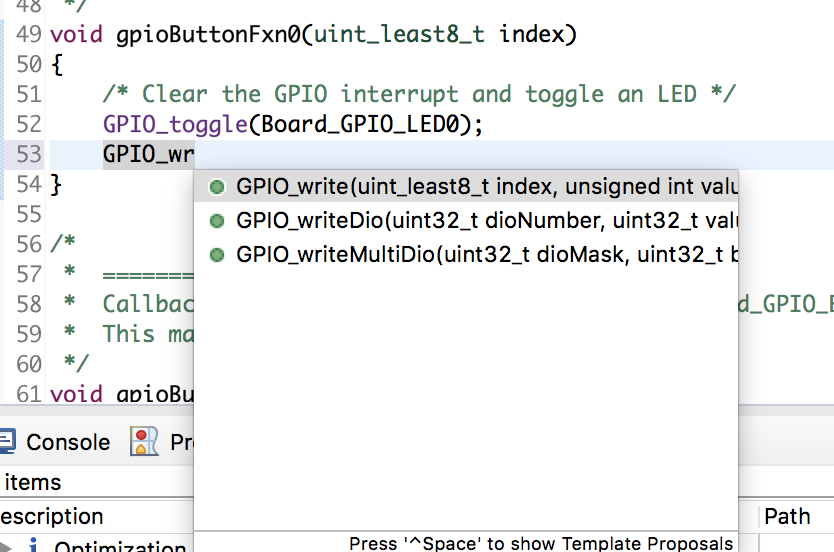
  • I just gave this a try in CCSv8.3 and it is working a lot better for me.  Here I see the completion information for the same functions that were not working for me in 8.2

    The functions are also highlighted correctly in the editor.

    Bob would you be able to give 8.3 a try?

    Regards,

    John

  • Bob,

    I believe this is resolved in CCSv8.3. If that is not the case for you please let me know.

    Regards,
    John
  • Hi John,

    Sorry for take so long to reply. I did not receive notification of updates to this posting until your last one.  I will check my junk/spam filters.

    I updated to 8.3, and see the same results as before.

    When I type

    GPIO_wri  

    I do not see the auto complete as you show.  If I complete "GPIO_write("  it will automatically add the ")".

    I'm running Version: 8.3.0.00009 on Win 7 64 bit.

    Could you send me a link to the sample code you are working with?

    Thanks.

  • Bob,

    I imported the GPIO Interrupt example from the CC2640R2 SDK.

    I know it is going to work as soon as I open the source file as I can see that the other function calls are highlighted.

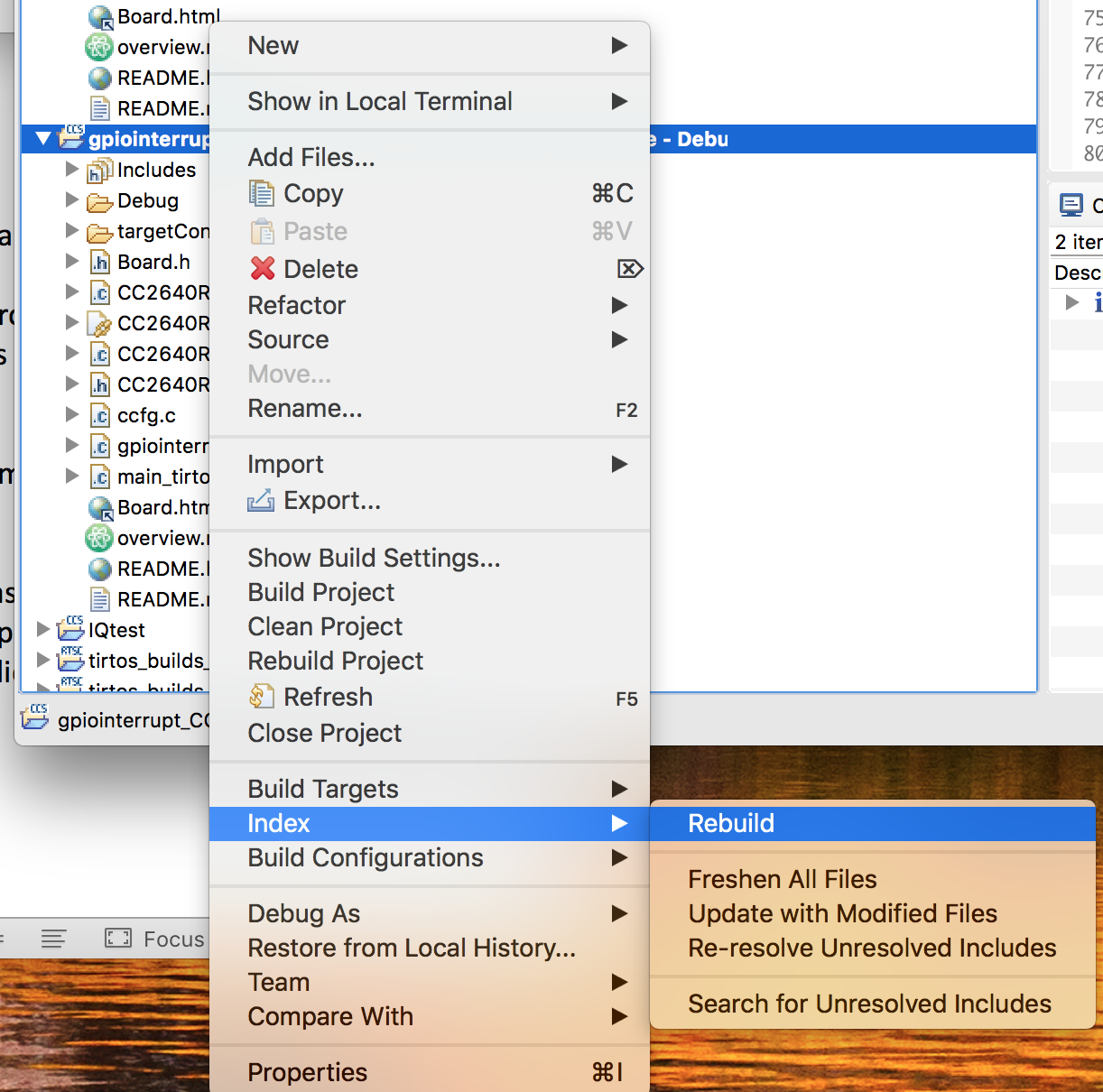
    If this is not working for you try right clicking on the project and select the option to rebuild the index:

    If that still doesn't work one thing I always do when switching to a new version of CCS that may have an impact is that I create a new workspace.  You could try creating a new workspace and then import the same example.  Maybe something in the workspace is corrupted.

    Regards,

    John

  • Hi John,

    Thank you for your reply with the helpful pictures.

    When I downloaded the example you suggested, auto complete works. 

    I need to remember to press Ctrl-Space after typing "GPIO_".  When I press Ctrl-Space, options for "GPIO_" appear.

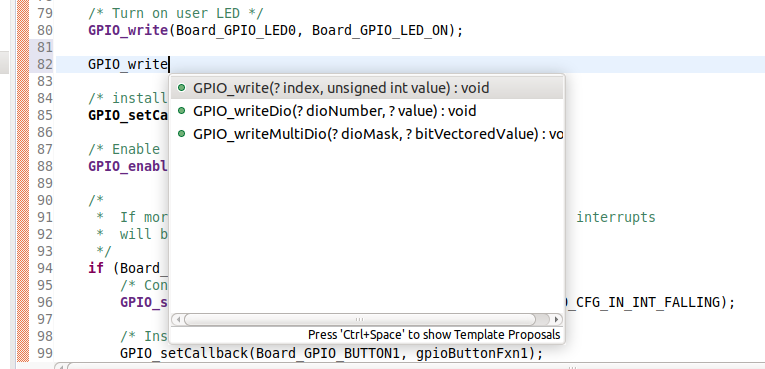
    One other item I noticed that might be helpful for other new-users is putting the cursor over the "GPIO_write".  When I do this a helpful yellow-window pops up to assist defining the function.  I tried pasting a picture of this bellow.

    Thanks again for your patience and help,

    Bob