This thread has been locked.

If you have a related question, please click the "Ask a related question" button in the top right corner. The newly created question will be automatically linked to this question.

Compiler/CCSTUDIO: breakpoint have no effect in source file but in disassembly view

Part Number: CCSTUDIO


Tool/software: TI C/C++ Compiler

Hi, there.

https://imgur.com/a/dEQN9b0

1. This program will go through line 1865

2. I toggle bp at line 1865 in source file(ps: why in debug perspective I always have two consoles? and if I close one of both another one will be closed automatically)

3. Program didn't stop at bp but program actually passed by.

4. This time, I toggle bp at line 1865 in "disassembly view".

5. Program stopped at bp.

Q: breakpoint have no effect in source file but in disassembly view

Thank you.

  • Hello Andy,

    Note that there are two types of basic breakpoints:

    -CCS breakpoints

    -Eclipse CDT breakpoints

    The former must be used for standard CCS JTAG debug for code running on the target

    The latter is used when when debugging Linux applications (via GDB) running on target running Linux OS.

    In your case you want the former.

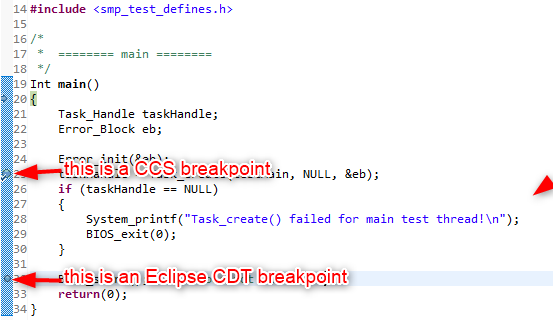
    Hence you need to make sure you are using CCS breakpoints. How to tell them apart? First of all, they look quite different:

    The CCS breakpoint is bigger and has a "checkmark" on it. The Eclipse CDT breakpoint is smaller.

    In your second screenshot, I can see you set an Eclipse CDT breakpoint on line 1865 in the source file. That is why you never reach that breakpoint when you run the target.

    Note the breakpoint set in the disassembly view (4th screenshot) is a CCS breakpoint. Hence why the target halts there.

    Right-click in the editor margin and make sure the breakpoint type is configured for CCS:

    CCS typically defaults to CCS breakpoints unless the project being debugged is a non-CCS type. Which project are you debugging? lwip-1.4.0 does not look to be a CCS project while the others are. If you are debugging lwip-1.4.0, then that explains the behavior you are seeing.

    Thanks

    ki

  • Hi Guru:
    Thank you, you reminded me that I opened lwip-1.4.0 with other option.
    How do I open lwip-1.4.0 with CCS project?
    Import -> CCS project doesn't work for me. screenshot: https://imgur.com/a/NQuUlAx

    The folder lwip-1.4.0 is consisted of many .c files and .h files only, and this folder it's not for project purpose.
    Why I opened lwip-1.4.0 is because of convenience of reading code.
  • My first question is: "is it a legitimate CCS project?"

    If so, then if you hover over the project in the dialog, a tool tip may appear that explains why you cannot import it. Note that you cannot have a project folder of the same name inside the workspace folder. Please check the path of your workspace folder for a project folder of the same name (it does not matter if the project appears in the CCS Project Explorer, there can still be a folder of the same name there).

    Thanks
    ki

  • No, lwip-1.4.0 is not a legitimate CCS project, it's only a folder consisted of a bunch of source and header files.
    The reason I import lwip-1.4.0 is for reading convenience
  • I see. It is there for source code debugging purposes.

    Since it is not a CCS project, it cannot be imported as one. It must be imported as a standard Eclipse project as you have already done.

    Thanks
    ki
  • Thank you.
    This leads another trivial problem.
    I need to set bp by
    1. right-click ->
    2. bp(CCS) ->
    3. hardware bp
    instead of just pressing shortkey F9.

    Is there any way to solve this?
  • For you lwip-1.4.0 project, set it to always default to a CCS breakpoint:

    Note that it will still default to a SW breakpoint unless the debugger memory map is configured so that the memory address where the breakpoint is being set is specified as read only

    Thanks

    ki

  • Thanks!