This thread has been locked.

If you have a related question, please click the "Ask a related question" button in the top right corner. The newly created question will be automatically linked to this question.

CCS: Automatically generated file management


Tool/software: Code Composer Studio

Hello TI officers,

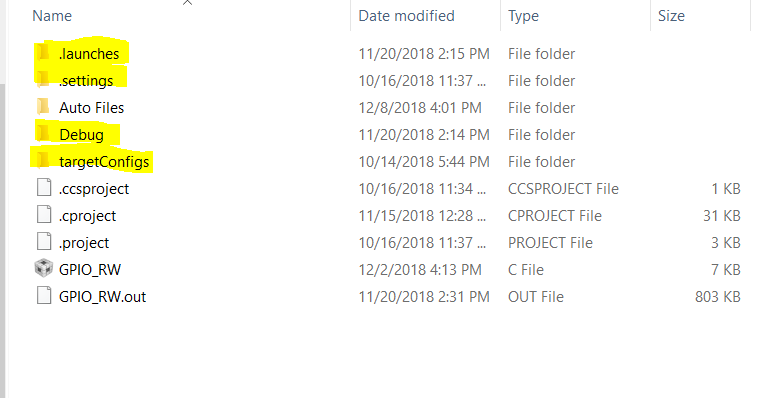
I would like to manage the file structure of a project in CCSv8. I want to organize the project folder so that inside it, I only see necessary files ( project files, source code, .out file). All the other automatically generated files are located inside the "Auto Files" folder, these files are highlighted in the picture. I have been looking in CCS project properties and tried many times but no way did it work well. Can you help me to solve this issue ? 

Regards,
An.
  • Hello,

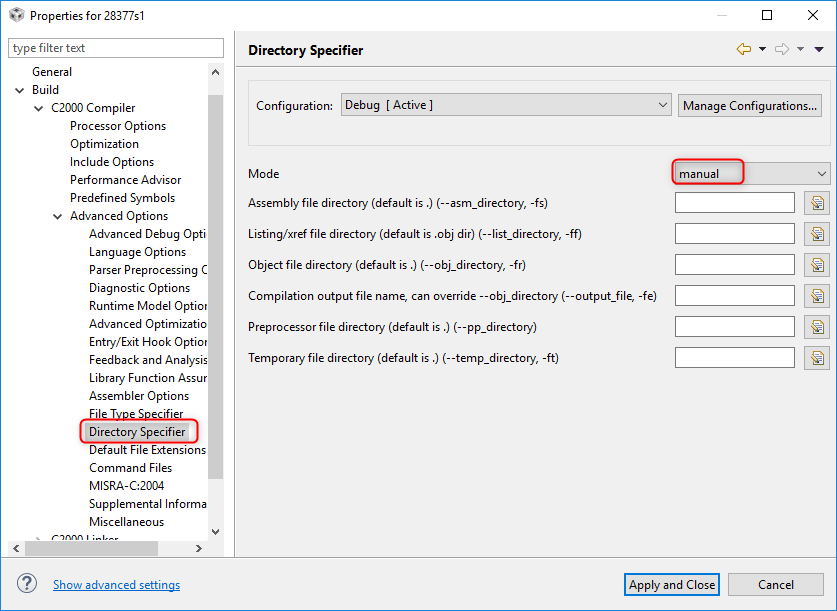
    Looks like you found how to control where the *.out file gets generated. To control the other intermediate file that are generated in the project configuration sub-folder (Debug), check the compiler build option shown below and set the Mode to "Manual" and set the directories for each file type:

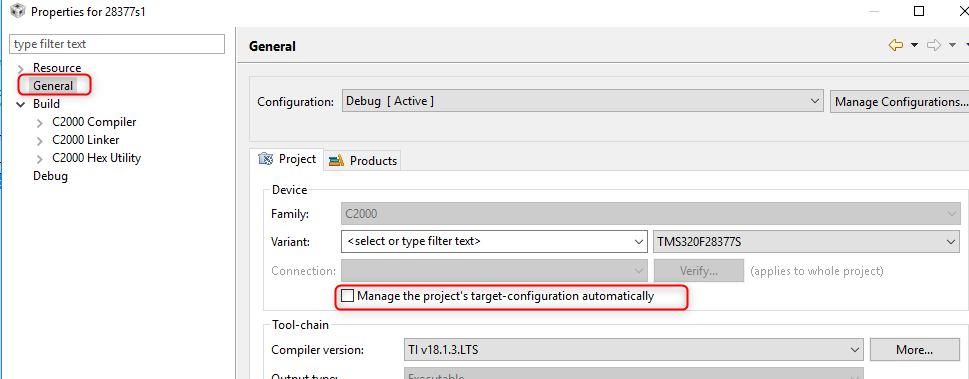
    For the targetConfigs folder, I'd recommend disabling the option to have the project manage the target configuration file so that you can then move it elsewhere and remove the targetConfigs folder

    The other two folders (.launches and .settings) are Eclipse specific folders and I do not believe you can specify a custom location for those.

    Thanks

    ki

  • Thanks Ki. That helps me a lot.