This thread has been locked.

If you have a related question, please click the "Ask a related question" button in the top right corner. The newly created question will be automatically linked to this question.

CCS/CCSTUDIO: TIREX Project Import Issue

Part Number: CCSTUDIO

Tool/software: Code Composer Studio

Hi all,

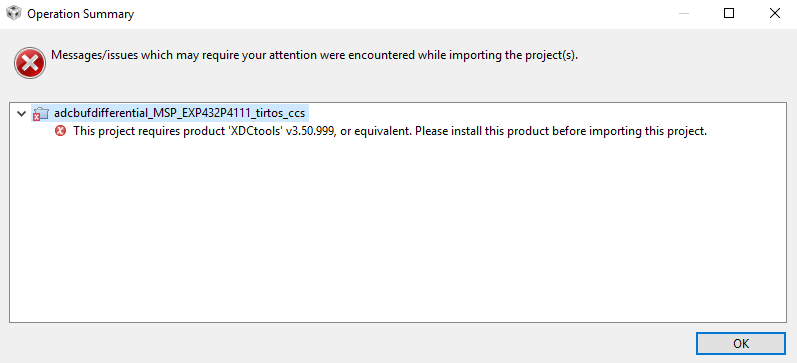
When trying to import a project to the IDE from the Resource Explorer the following error pops up,

asking for XDC Tools.

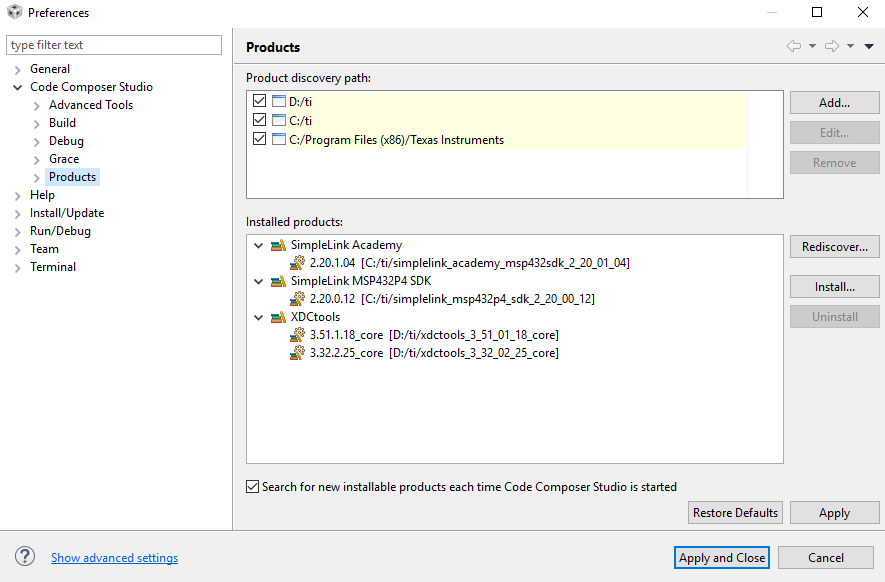
Find a screenshot from the installed products attached.

Regards,

   Robert
  • Robert Worm32 said:

    When trying to import a project to the IDE from the Resource Explorer the following error pops up, asking for XDC Tools.

    Robert,

    This is an issue in CCS 8.3 that we discovered internally yesterday and are working to resolve. In the meantime, here are a few ways to workaround the issue.
    I would suggest using method #1 to have the convenience of future project imports directly from Resource Explorer.

    1) Download and install XDCtools version 3.50.08.24. You can do this in a couple of different ways:

      (a) if you have CCS 8.2 installed on the same machine, that already comes with that version of XDCtools. You can add the path to it by clicking the Add button in the Product Discovery Path shown in the Preferences dialog above. After it is discovered and appears in the Installed Products list, the project should import without errors.
      (b) Install XDCtools directly from this link. Restart CCS and allow it to install the newly discovered XDCtools. After that, the project should import fine.

    2) Import the project by going to CCS menu Project->Import CCS Projects, and navigate to the directory where the example resides. 
    This method of import defaults to using the 3.51.01.18 (newer) version of XDCtools that comes with CCS 8.3, but allows the import to complete.
    One downside is that this method lacks the intuitive browse and navigate capabilities of Resource Explorer, instead you would need to know the exact directory within the SDK to navigate to for each example you want to import. And although the projects do build fine with 3.51.01.18, it is best to stay with the version that the SDK was validated with, which in this case is 3.50.08.24.

    Hope this helps and sorry about the inconvenience caused.