This thread has been locked.

If you have a related question, please click the "Ask a related question" button in the top right corner. The newly created question will be automatically linked to this question.

CCS/CODECOMPOSER: Relative paths for linked files

Part Number: CODECOMPOSER

Tool/software: Code Composer Studio

Hi,

I am working on a project that requires some files to be linked to the project as shown in the option below.
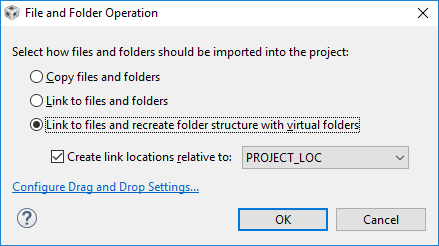
I would like to keep all paths relative, however when I link to a file outside the project I haven’t found a way to build with all relative paths.

This example is what I would like to do:

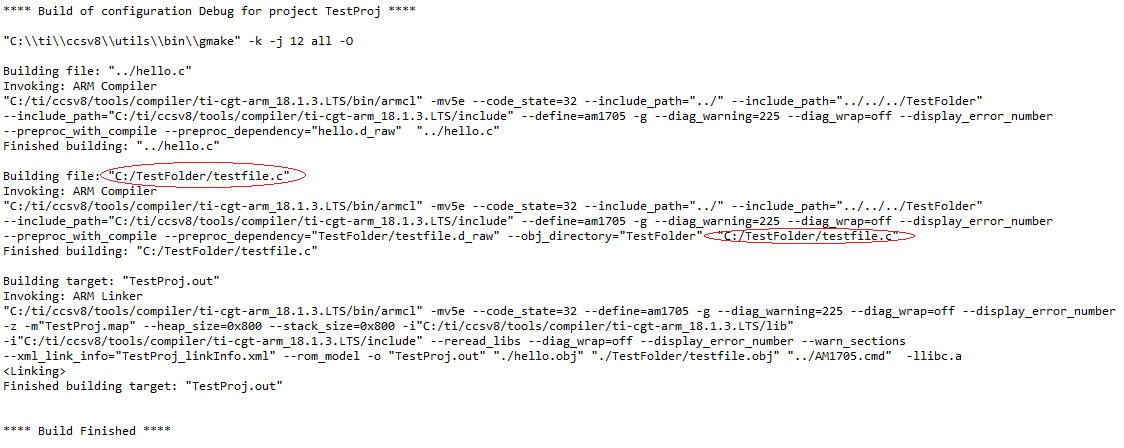
The first line has a relative path to the file, however linking to the file produces the following output:

The first line now has an absolute location (I have also made the PROJECT_LOC relative).

Please could you let me know if this is possible, or if there is another way I could achieve this?

Thank you in advance.

James

  • Hello James,
    could you make Project -> Clean and then post full text of your Console output?
  • James Clayton said:

    This example is what I would like to do:

    In this example, hello.c is actually not a linked file, but is physically within the project directory. The ../hello.c appears in the build command because the build occurs from within the build configuration directory (in this case <project_dir>/Debug). You can confirm this by taking a look at Project Properties->Build->Builder tab. 

    When you "link" a source file to the project, the build command will show it as being accessed using absolute path. However, the source file itself can be a link so it does not have to reside within the project directory. 

    More information about linked source files and the CCS build system in general can be found here.

    Hope this helps.

  • Hi Tom, Hi AartiG,

    Thank you both for your quick responses.

    Tom - Please see below for the full text of the Console output:

    AartiG I require the build command to show it being accessed as a relative path not an absolute path.

    For example in the Console output above C:/TestFolder/testFile.c would be shown as ../../../TestFolder/testFile.c in both places circled.

    Thanks again in advance for the help

    James

  • James Clayton said:

    I require the build command to show it being accessed as a relative path not an absolute path.

    For example in the Console output above C:/TestFolder/testFile.c would be shown as ../../../TestFolder/testFile.c in both places circled.

    The paths to linked resources are created as absolute paths in the Eclipse generated makefile itself. Relative paths are currently not supported by Eclipse as per these web links I found (check here and here). You could try the (unsupported) patch posted on the Eclipse bug link if you wish. The only other way I can think of getting around this is if you were to use your own custom makefile for the build and not the Eclipse managed make build system.