Tool/software: Code Composer Studio
XDS110 is not a recognized part number.
Windows 10 Home
ASUS Laptop with AMD A9 processor.
CCS Version: 8.2.0.00007
ti_emupack_setup_8.0.903.4_win_32
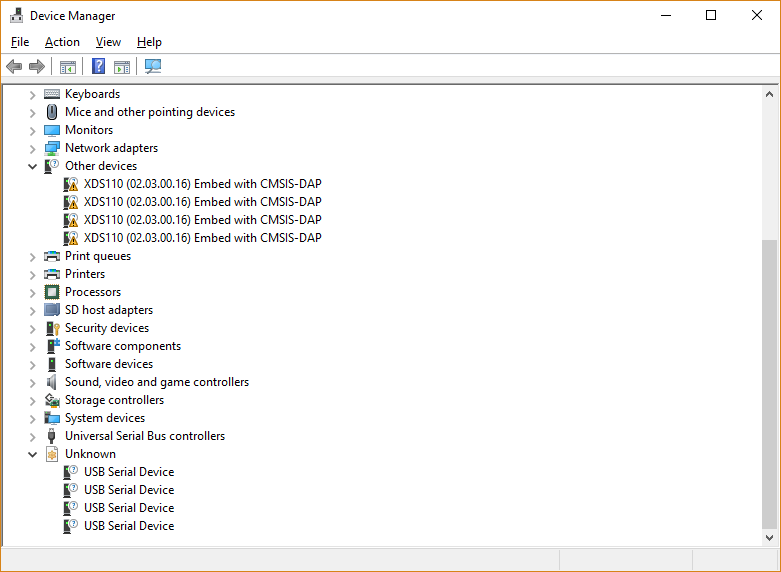
The comport drivers will not install as ports.
I am developing my RF application on CC1310 Launchpad Rev 1.4 and CC1350 LaunchPad Rev 1.3.
I have no problems compiling, downloading and running the examples with the exception of examples outputing "printf" statements to stdout. I can't use any terminal program.
I have searched e2e and google for xds110 and any keyword(s) I felt relevant. I tried suggestions which I thought may resolve the problem.
I have installed and uninstalled CCS and TI emupack several times. I have even scrubbed the registry of all related entries and renamed remnant directories.
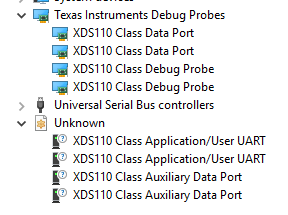
As you can see from the graphic there are devices classified as unknown with ? 's in the icon.
What is shown is for two launchpads connected.
When I select a port in any of the unknown devices, the Device Manager will immediately terminate.
When investigating the driver details they are as follows::
Driver Date: 10/8/2018
Driver Version: 1.9.0.0
Has Problem: <false>
I usually can resolve my problems myself, but this one has me frustrated.
If anybody can help, it would be greatly appreciated
Thank you in advance
Jeff Thon