This thread has been locked.

If you have a related question, please click the "Ask a related question" button in the top right corner. The newly created question will be automatically linked to this question.

CCS/LAUNCHXL-F28069M: CCS Installation Issue

Part Number: LAUNCHXL-F28069M
Other Parts Discussed in Thread: C2000WARE,

Tool/software: Code Composer Studio

Respected Sir,

I was trying to install the CCS 8.3 (latest version) on my PC having  windows 8 OS. When the installation gets finished, I have imported one example code from C2000Ware and trying to build it. While building the example code,  CCS is giving gmake errors. I thought it is in installation issue, so I have uninstalled it and reinstalled still facing the same errors. I have disabled the Quick heal, and Windows defender while installing.

The second thing is that I have simulated one design in MATLAB which is also not running on that PC for hardware. Embedded coder is giving problem related to CCS. The same Matlab design I have run on another PC

and also run on hardware (LAUNCHXL-F28069M).  Embedded coder is generating the code for that simulation. I have imported that code in CCS and debug it, It is running fine with another PC where CCS is installed properly. The another PC is also running the example codes properly. Both PC have same configurations, features, and settings then what will be the problem with 1st PC. I have attached the snapshot of errors kindly find it.
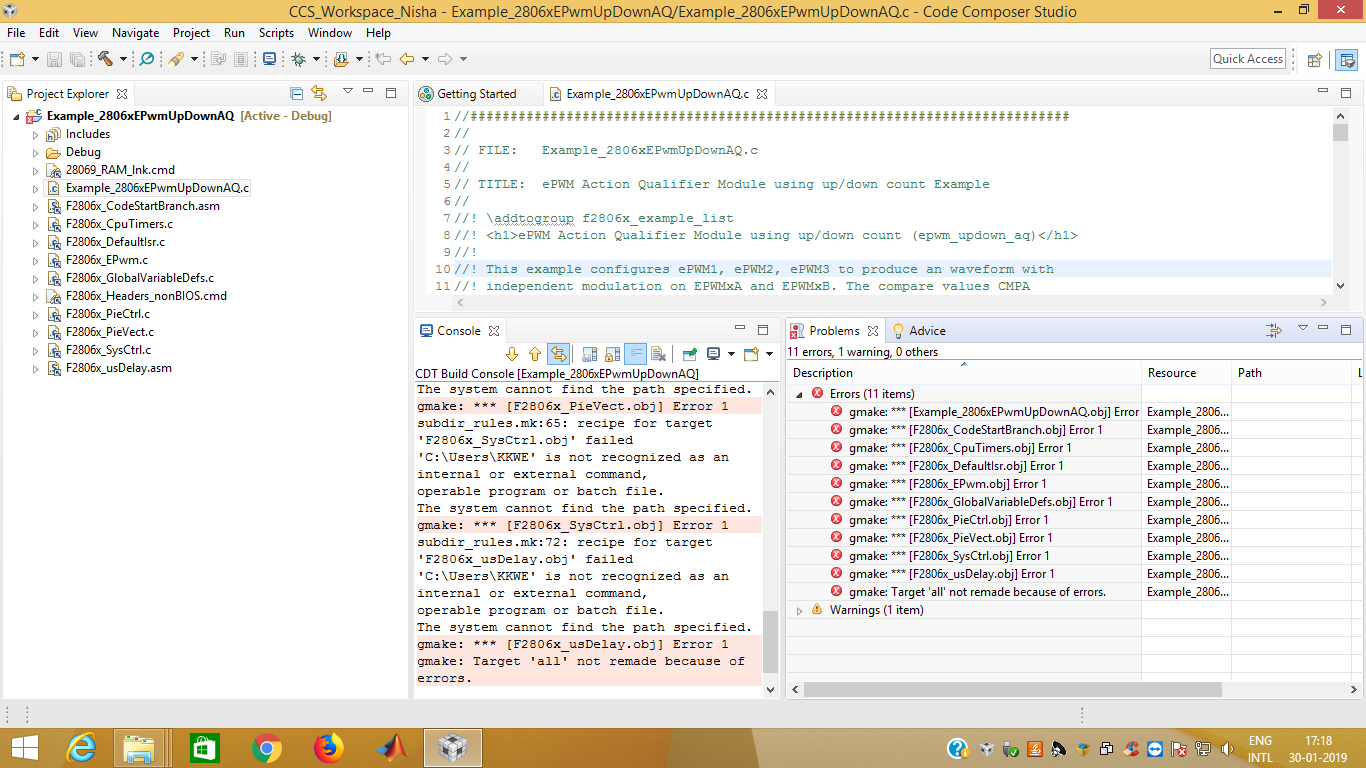
Regards,

Nisha Gosavi

  • As far as the Embedded Coder / MathWorks issue: We currently support CCS thru 8.2, we haven't yet tested 8.3.  Although I would expect 8.3 to work just fine.

    Bets I can tell, the Windows 8 PC can run neither CCS or MATLAB workflows correctly, where they do run correctly on a different PC.  I would guess there definitely is some issue with that PC specifically; either in WIn8 or maybe a bad USB port or something. It doesn't sound like a SW issue; its a PC configuration issue.

    Cheers,

    -Brian 

  • Nisha,

    Looking at the error it appears that there may be a whitespace or some other non-alphanumeric character in the path "c:\Users\KKWE...".
    Is that so? Is that the directory where CCS is installed?

    Please take a look at this FAQ and ensure that all paths (installation, workspace, project paths, etc) avoid non-alphanumeric characters.

    If that alone does not help, also take a look at this article for other things to check for such build errors.

  • Thank You!
    It was the folder name issue. Now its working fine.

    Nisha