This thread has been locked.

If you have a related question, please click the "Ask a related question" button in the top right corner. The newly created question will be automatically linked to this question.

CCS/CCSTUDIO: Code Completion / content assist not working on classes from the c++ standard library

Part Number: CCSTUDIO


Tool/software: Code Composer Studio

Hi

I use CCS 8.3 on Linux Ubuntu 18.04. The content assist function works on user defined classes, but not on those from the std library.

For example:

#include <string>

using namespace std;

string s;

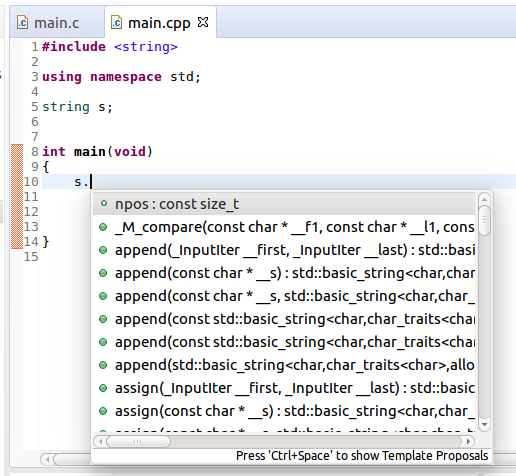
s. <- this should trigger the content assist drop down menu, but there is nothing and Alt + shows only empty proposals. It works fine for my own classes.

Thanks

Peter

  • Hi Peter,
    I assume you are the TI ARM compiler that comes with CCSv8.3 (TI ARM 18.1.4.LTS). If so, try adding the additional include path in the project properties:
    ${CG_TOOL_ROOT}/include/libcxx

    Thanks
    ki
  • Hi ki

    Yes, I am using 18.1.4. but including the path ( in C/C++ General - Paths and Symbols - Includes ) doesn't help with the code completion (no completions are given). In the status bar bottom left , I have in red: No completions available.

    Thanks

    Peter

  • That is odd. When I added that include search path, the suggestions popped up:

    Peter Vittali said:
    including the path ( in C/C++ General - Paths and Symbols - Includes )

    Can you try explicitly adding it to "CCS Build -> ARM Compiler -> Include Options"? While both places should work, I just want to confirm that the correct path shows up there too.

    And this is using the ARM compiler, correct?

    One more thing to try is to rebuild the index (right click on project name -> Index -> Rebuild) after updating the project properties

    Thanks

    ki

  • Hi Ki

    you are right, this works. My problem is due to the fact that I have two kind of projects (inside CCS):

    Type 1:  CCS projects using ARM

    Type 2: normal C/C++ projects using the linux gcc toolchain

    Type 1 is of course what gets loaded on the silicon, Type 2 is platform independent library code that I run through unit tests on the host.

    In my CCS projects ( Type 1), I then create a folder that links to the platform independent library source code (Type 2) since I can't obviously link to a static library created with gcc.

    Code completion works in Type 1 after adding the include you mentioned, it still doesn't work in plain C/C++ projects inside CSS. Since code completion is available in the stock version of Eclipse CDT, it should be available in CSS as well.

    Any ideas how to get code completion to work for plain C/C++ ?

    Thanks

    Peter

  • Peter Vittali said:
    Type 2: normal C/C++ projects using the linux gcc toolchain

    There are a few known issues with the indexer and standard Eclipse CDT projects. Some of them will be fixed in the upcoming CCSv9.0 release (ETA: end of the week). Please give that release a try when it is available.

    Thanks

    ki

  • Hi ki

    Thanks, I will. In the meantime I downloaded Eclipse CDT where code completion and such works fine.

    So I can work on cross-platform library projects with CDT (using C++ unit test frameworks like google test) that I can then reference in CCS projects as linked folders. Not perfect but usable. Looking forward to CCS 9 !

    Kind regards

    Peter

  • Just an FYI regarding CCSv9, I was just informed that the release will slip until next week while we work out some last minute issues.

    Thanks
    ki