Part Number: CC3220SF-LAUNCHXL
Tool/software: Code Composer Studio
Dear Support:
I moved to CCS v9.0.1 to fix a problem I was having with v8.3 where CCS would crash after I downloaded a program to my board on a 2nd attempt. This used to work before, but after an update this problem occurred on all my processors. Definitely not cool and a huge waste of my time. I will think long and hard before doing an update again.
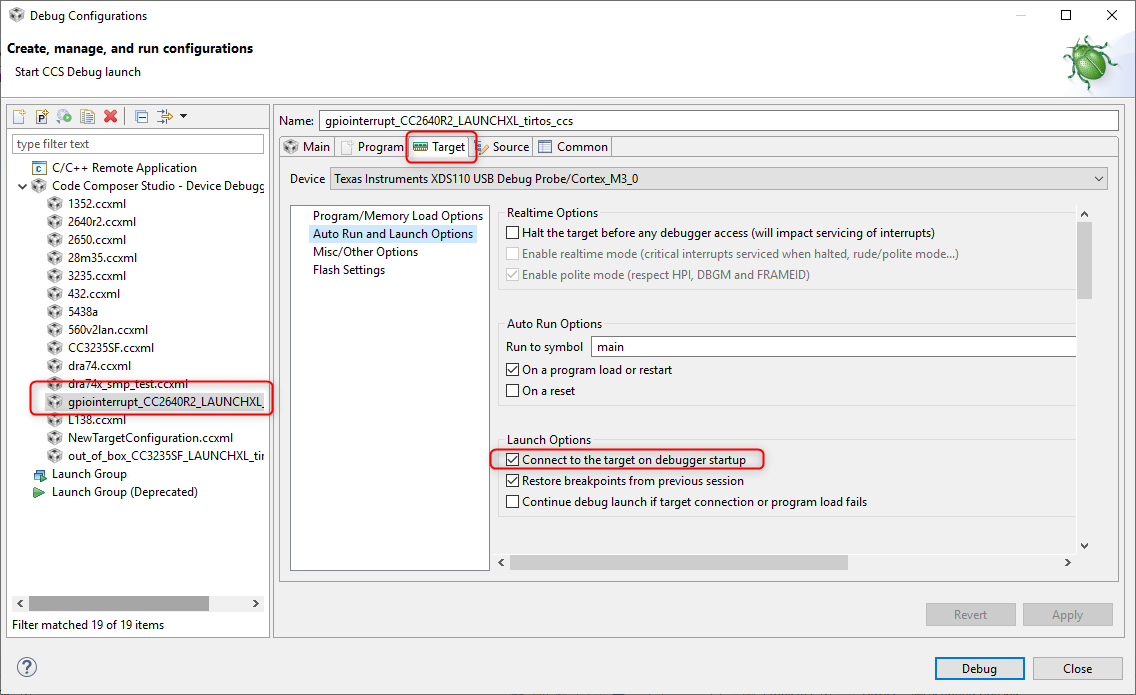
Anyways now with v9.0.1, it fixed this problem I was having with v8.3 only to run into another problem where the debug button no longer works. Now when I press the debug button to download my program and take me to main, I get the following message in the console window of CCS:
Texas Instruments XDS110 USB Debug Probe/Cortex_M4_0 : Target must be connected before loading program.
To get around this problem, I now have to explicitly launch the .ccxml file, connect to the board and then download the program as 3 separate steps instead of this automatically occurring by pressing the debug button. This was working before and then somehow someway it got into this mode and it's doing it on all my Simplelink processors (i.e, CC1352, CC3220, CC3235, etc) now. Do you know what could have caused this and more importantly how to fix it? Please advise.
Thanks,
Tim