This thread has been locked.

If you have a related question, please click the "Ask a related question" button in the top right corner. The newly created question will be automatically linked to this question.

CCS: How to create Intel Hex format file for our specific device


Tool/software: Code Composer Studio

Dear Sir,

We are now using CCS tools for creating Intel Hex format for our specific device (Sorry, we have Part number, but, couldn't select its Part number when create this thread)

So far, we just use .out format to flash the file into device, but, for mass production phase, it requrie Intel Hex format for our writing tool (DTS Insight tool)

Out customers are trying to output Intel Hex format file, but, they also not sure their setting is correct or not.

So they are asking TI recommended method to create Intel Hex format file.

I have some more information, but could you set this thread as secret mode or something?

Thanks and Best regards,

Hasegawa

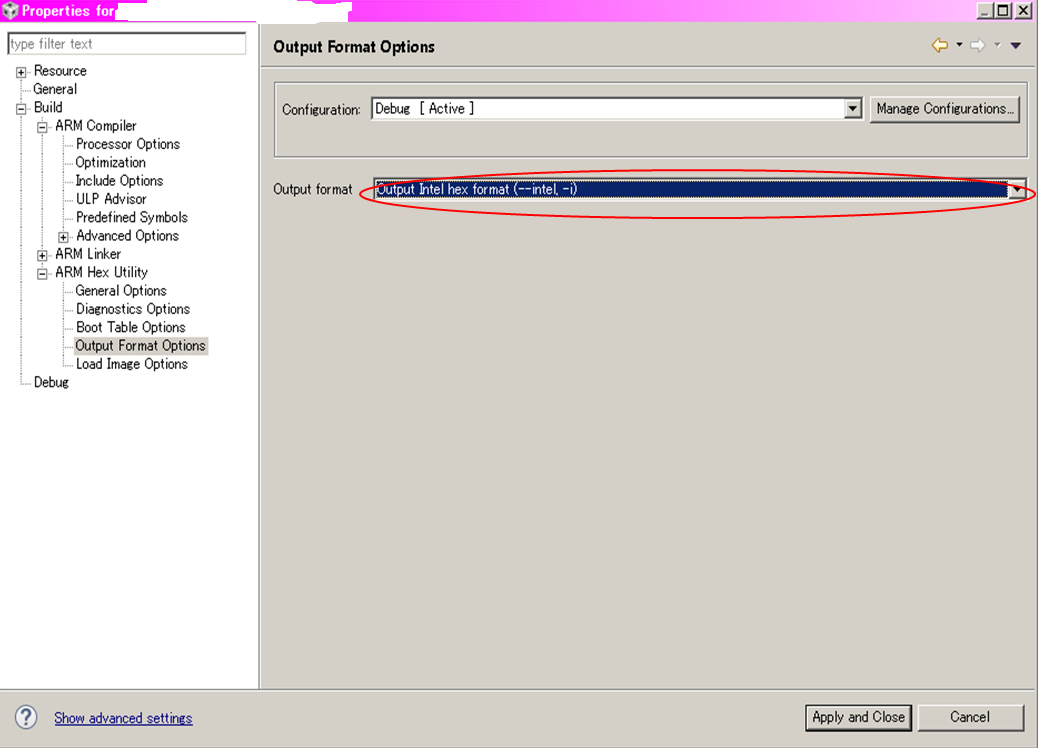
  • To convert the executable .out file to a hex file, use the hex conversion utility.  The screen shot attached below is a guide for how to enable the hex utility in CCS.  To understand the available options, please read the hex utility chapter in the Assembly Language Tools User's Guide for your device family.  Since you don't say which device family you use, this page has links to all of them.

    To get you started, you probably want to use these options.

    • --intel : Set the output format to intel
    • --romwidth=32 : Change the width of the ROM from 8-bits (default) to 32-bits

    We have no expertise with the DTS Insight tool.  Depending on what that tool requires, you may need to specify yet other hex utility options.

    Thanks and regards,

    -George

  • George-san,

    Thanks for your feedback.

    Yes, we have already recognized User Guide & ARM Hex Utility tool.

    Our customers use different method to create Intel Hex format file. So, we are asking.

    Customer1 is,

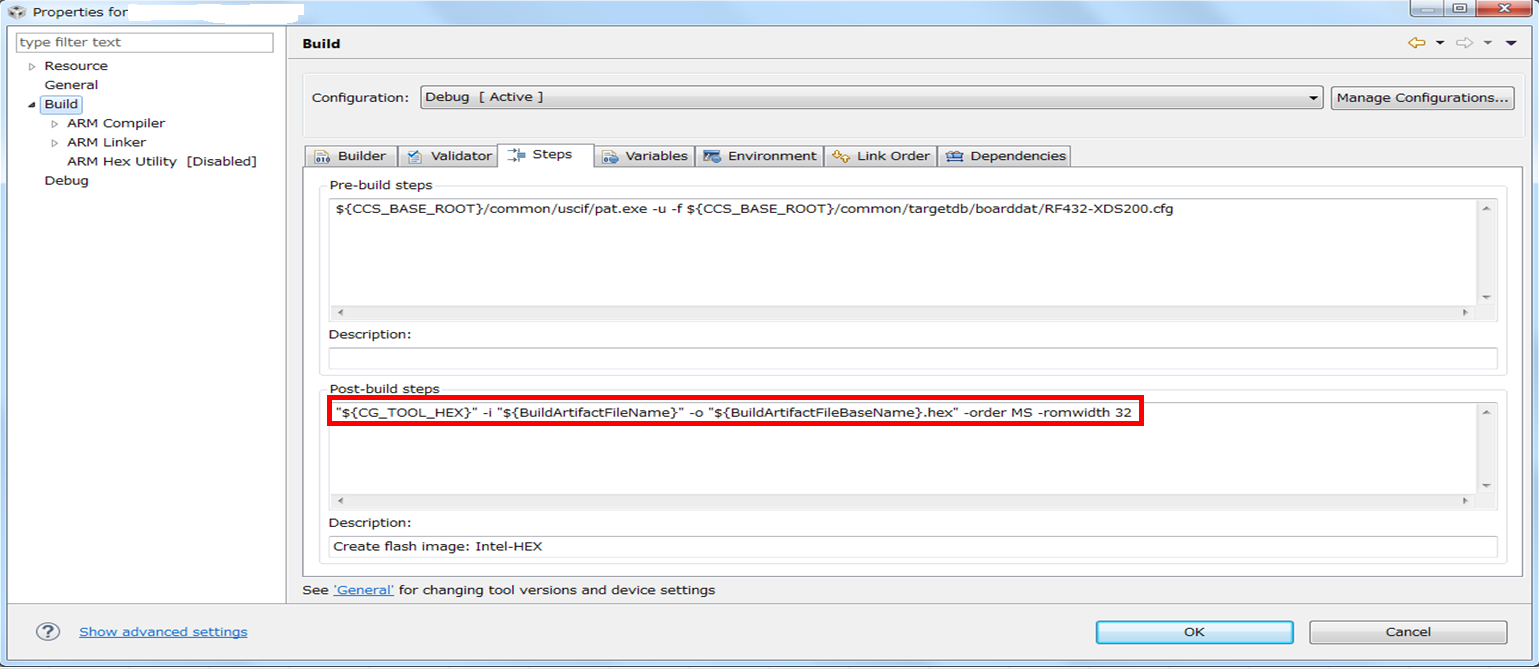
    Customer1 is not use ARM Hex Utility, They add Post-build steps as below and build the projects.

    "${CG_TOOL_HEX}" -i "${BuildArtifactFileName}" -o "${BuildArtifactFileBaseName}.hex" -order MS -romwidth 32

    Actuary, not sure thier above settings are enough & correct parameters.

    (Sorry, what is "-order MS"?)

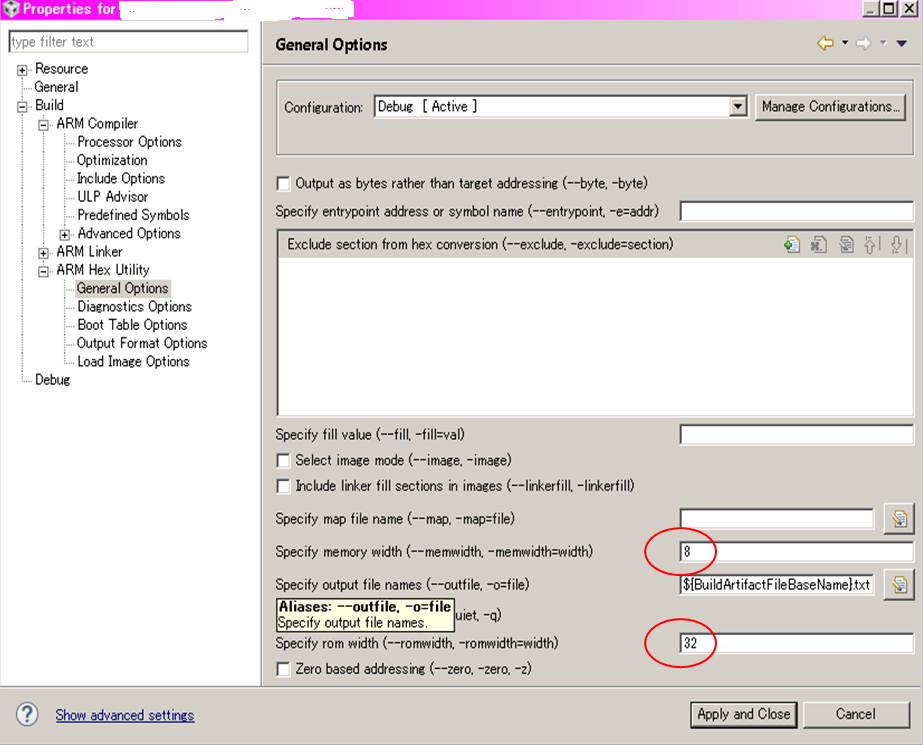
    Customer2 use ARM Hex Utility and set as below.

    I personally think Customer2 setting is correct, and if Customer1 use below command, it became same output file. (checked already)

    "${CG_TOOL_HEX}" -i "${BuildArtifactFileName}" -o "${BuildArtifactFileBaseName}.hex" -order MS  -memwidth 8  -romwidth 32

    (Sorry, but what is "-order MS" parameter?)

    Thanks and Best regards,

    Hasegawa
  • Older versions of CCS do not support the hex utility in the build configuration dialog.  So, using a post-build step was the only method.  Each method has the same capability for invoking the hex utility.  It comes down to what the customer prefers.  I suspect most customers prefer using the build dialog.  But if a customer already likes using a post-build step, that is more than OK.

    Yasutoshi Hasegawa said:
    Actuary, not sure thier above settings are enough & correct parameters.

    That depends on what is required by the next step in the process, which is the DTS Insight tool.  We can't help you with that.

    Yasutoshi Hasegawa said:
    what is "-order MS" parameter?

    It is not documented in the ARM assembly tools manual.  It is documented in the C6000 assembly tools manual.  You probably ought to read all of the sub-chapter titled Understanding Memory Widths.  Then read the explanation of -order at the end of that sub-chapter.  I strongly suspect that, in your case, it doesn't do anything.

    Thanks and regards,

    -George