This thread has been locked.

If you have a related question, please click the "Ask a related question" button in the top right corner. The newly created question will be automatically linked to this question.

CCS/MSP430G2230: moving from CCS cloud to CCS offline

Part Number: MSP430G2230
Other Parts Discussed in Thread: CCSTUDIO, MSP430WARE

Tool/software: Code Composer Studio

Forgive this newbie question, but having started to experiment with CCS cloud but now moving to the full offline version, how do I access my initial projects and copy them over to my local system?  I can't find any reference to 'export' in CCS cloud, nor to the cloud files system in my new local CCStudio.

Thanks!

  • Noah,

    The option is named a little differently than you might expect.

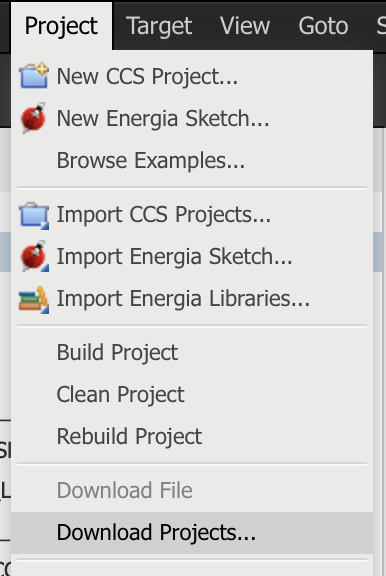
    Select the project(s) that you want to move to the desktop version of CCS.  Then go to the project menu and select download projects.

    That will download the selected projects in a zip that you can then import into CCS.

    However if your project is leveraging some other software package, like MSP430Ware, you will want to install MSP430Ware locally on your desktop.  You can do that via Resource Explorer inside CCS.

    Regards,

    John