


Tool/software: Code Composer Studio
Hello?
I've tried multiple times changing network environment to install CCS 8.3.0.000009 on my laptop.
Each time I've tried it will halt on failure to download jre_root_1.8.0.122 as like followings.
Starting Install
Installing utilities and miscellaneous
Downloading software-dl.ti.com/.../com.ti.ccstudio.installer.msvc.2017.win32_root_14.11.25325
Downloading software-dl.ti.com/.../com.ti.ccstudio.installer.msvc.2017.win32_root_14.11.25325
Downloading software-dl.ti.com/.../jre_root_1.8.0.122
Downloading http://software-dl.ti.com/ccs/esd/CCSv8/CCS8.3.0.00009_win32/featurerepo/binary/jre_root_1.8.0.122
If I've tried abobe URL in chrome web browser, it succeed to download the components, but installer doesn't.
I've also tried linux x64 version on Ubuntu 16.04 LTS, it succeed w/o problems.
The installer pops up the following dialog to report the problem to TI, but it doesn't succeed to logs also due to some internal errors.
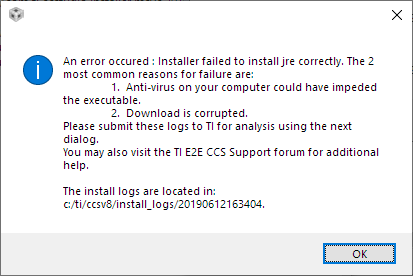

I've also tried with separate installation in JRE before installing CCS, but it always trying to download jre_root_1.8.0.122.
How can I proceed to install CCS in Windows 10 for this case?
Nore that runtime virus checking disabled already before running CCS installer.
I've attached all installation logs.
/cfs-file/__key/communityserver-discussions-components-files/81/3010.install_5F00_logs.7z
Regards,
SeongHan Kim

