This thread has been locked.

If you have a related question, please click the "Ask a related question" button in the top right corner. The newly created question will be automatically linked to this question.

CCS/AM5728: It cann't call constructed function,when we used "new" operator for class.

Part Number: AM5728


Tool/software: Code Composer Studio

we code c++ on the CCS7.4.0.00015  & TI v8.2.6 compiler . It cann't call constructed function, when we use operator "new" for class, like below:

class CTest{ 

CTest(int n);

~CTest();

int m_t;}

CTest::CTest(int n)

{

....

}  

....

main()

{

     CTest *pTst;

     pTst = new CTest(1);

....

}

     when we execute to  "pTst = new CTest(1);" ,  step into is not CTest constructed function , the CCS info is:"Can't find a source file at "/tmp/scratch/build_jenkins/workspace/BuildAndValidate_Worker/build/c60/product/linux/lib-internal/src/new_.cpp" ". View Disassembly is:
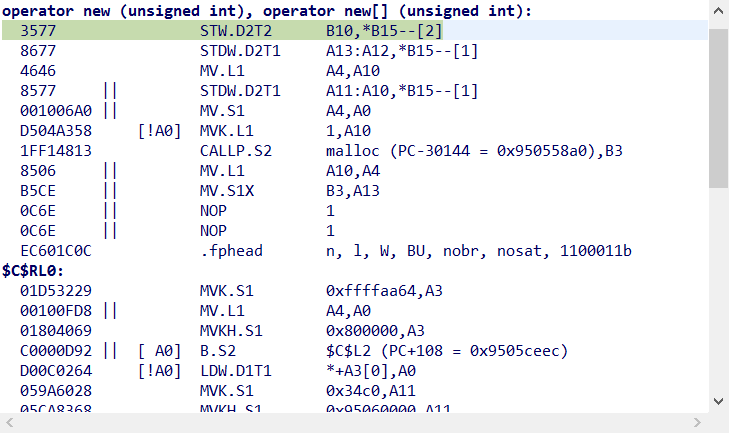
    Do we need change the CCS compiler parameter or  what should we do? Thank you!

  • Hello,

    sfloat s said:
     when we execute to  "pTst = new CTest(1);" ,  step into is not CTest constructed function , the CCS info is:"Can't find a source file at "/tmp/scratch/build_jenkins/workspace/BuildAndValidate_Worker/build/c60/product/linux/lib-internal/src/new_.cpp" ".

    What is happening is that the debugger is attempting to go a source step into the RTS code for the new operator and it can't find the "new_.cpp" source file that was used to build the rts lib. This is a pretty common issue: https://e2e.ti.com/support/tools/ccs/f/81/t/738885

    You can use the "Locate File" button to browse to the location of the "new_.cpp" file. It should be in:

    <COMPILER INSTALL DIR>/lib/src

    Thanks

    ki

  • Hello, Ki

    Thank you very much for your reply. When I have a user-defined class, like CTest. is it possible to declare an object in this way in CCS, e.g.

    CTest * cTestObject;

    cTestObject = new CTest(2);

    The problem is that, when I use this method to declare a user-defined class object, and to debug the code step-by-step, the ccs compiler throw that error to me. It seems that the new operator is not able to locate the right address of my class constructor. The object is not correctly declared.

    Thanks again.

    Best

    sFloat.

  • sfloat s said:

    CTest * cTestObject;

    cTestObject = new CTest(2);

    That looks ok. That should work.

    sfloat s said:
    , the ccs compiler throw that error to me.

    It is not an error. As mentioned before, the debugger simply cannot find the source code for the RTS library You can tell the debugger where it is by browsing to it.

  • sfloat s said:
    It seems that the new operator is not able to locate the right address of my class constructor.

    Set a breakpoint within a constructor and check it. 

  • Hello, Tomasz Kocon

    Thank you very much for your reply.

    we set a breakpiont in the constructor---- CTest::CTest(int n), but we cann't step into this code.   And CCS info is:"Can't find a source file at "/tmp/scratch/build_jenkins/workspace/BuildAndValidate_Worker/build/c60/product/linux/lib-internal/src/new_.cpp". It seem the new operator is not able to locate the right address of my class constructor.

  • Thank you  for your reply.

  • sfloat s said:
    we set a breakpiont in the constructor---- CTest::CTest(int n), but we cann't step into this code.   And CCS info is:"Can't find a source file at "/tmp/scratch/build_jenkins/workspace/BuildAndValidate_Worker/build/c60/product/linux/lib-internal/src/new_.cpp"

    As mentioned earlier, this is because the loaded debug symbols are looking for the new_.cpp source file in a location that does not exist on your environment:

    https://e2e.ti.com/support/tools/ccs/f/81/p/815103/3017413#3017413

    This is NOT an issue with your code/application. It is simply a debug visibility issue that can be easily resolved if you tell the debugger where the correct location of the file is.