This thread has been locked.

If you have a related question, please click the "Ask a related question" button in the top right corner. The newly created question will be automatically linked to this question.

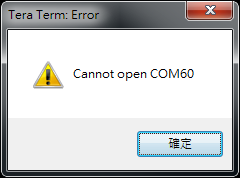
CCS/IWR6843ISK-ODS: The CCS occupied the COM port in debug mode for Overhead People Counting Demo

Part Number: IWR6843ISK-ODS

Tool/software: Code Composer Studio

Hi,

  The CCS will occupy COM port and can't enter sensor configurations via terminal softwares (e.q. TeraTerm, Putty). It need to turn off CCS, relanuch it and the COM port will be released. I'm not sure what's happen about this behavior. Can you please help to check it?

Thanks.

  • Hello,

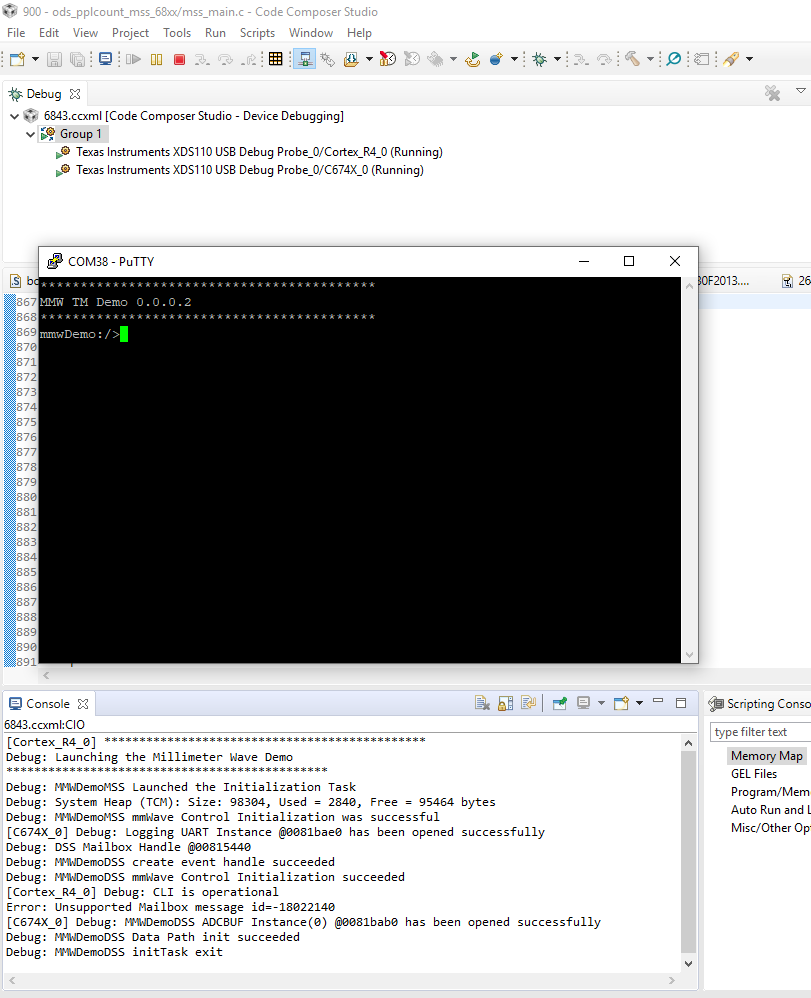
    I cannot seem to reproduce this issue. I am running the same example via CCS and am also able to access the the COM port without issue (via putty in the example below)

    Can you provide more details on the steps you are doing to reproduce the issue?

    Thanks

    ki

  • Hi Ki,

      I follow these steps:

    1. Flash device with debug software
    2. Take device out of flash mode and put device into functional mode (remove SOP2)
    3. Open "IWR6843" target configuration in CCS
    4. Connect to both MSS and DSS
    5. Load firmware to MSS and DSS
    6. Run both MSS and DSS
    7. Run GUI and connect to com ports.
    8. Start debug the demo code.
    9. Terminate the debugging.
    10. Repeat step 3 ~ 7.
    11. I can't connect the device in step. 7.

    Thanks.

    C.W

  • Are you terminating the GUI before restarting the debug session?

  • Hi Ki,

      Yes, the GUI has been terminated. And I tried to use terminal to enter the sensor configuration without GUI, it still has the same problem.

    Thanks.

    C.W.

  • Strange, it sounds like the COM port is not being released correctly. I cannot reproduce the issue when i follow your steps. I can connect to the COM port every time.

    After you terminate the debug session, can you try physically disconnecting the USB cable from the board and then reconnecting it before repeating the steps?

    Thanks

    ki

  • Hi Ki,

      I have terminated the debug session, removed the USB cable, and re-plug in the AC charger. But the problem is not solved. I have to turn off CCS and launch it again to solve this issue. 

    Thanks.

    C.W

  • What exact CCS version are you using? And what TI Emulators Pack version?

    You can find the TI Emulators pack version under 'Help -> About Code Composer Studio -> Installation Details'

    Thanks

    ki

  • Hi Ki,

      The CCS version is 9.0.1.00004. 

      The TI Emulators Pack version is 8.1.0.00007

    Thanks.

    C.W.

  • Thanks. I am using the same CCS version but my TI Emulators Pack is slightly newer (8.1.0.00012). Just so we are using the same versions, can you run the CCS update manager and update your TI Emulators Pack version?

    Thanks

    ki

  • Hi Ki,

      The latest  "TI Emulators" version is "8.2.0.00004" after check for update. Should I update to this version? or how to update TI Emulator to version 8.1.0.00012?

    Thanks.

    C.W.

  • The update manager will typically look for the latest available update. You can take that one since it is the latest.

  • Hi Ki,

      The problem is still happen after updated TI emulator to  version 8.2.0.00004. Can you please help to check it?

    Thanks.
    C.W.

  • I updated my TI emulator version to 8.2.0.00004. I still cannot reproduce the issue - i can connect to the COM port again without any problem. I don't know why this is not the case for you. Would it be possible to the try on a different PC to see if you have the same issue there?

  • Hi Ki,

      My colleague has the same problem. Is it related with any drivers?

    Thanks.

    C.W.

  • hmm... very confusing. Can you close every open view in your perspectives with the exception of the essential ones (like the Debug view, etc) and try again with a minimal amount of views open?

  • Hi Ki,

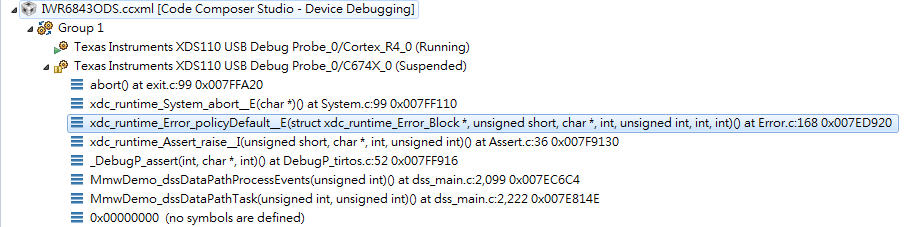
      I still got this problem and it's easy to get assert exception when I debug DSS application. Is it related with this exception?

    Thanks.

    C.W.

  • user5970442 said:
      I still got this problem and it's easy to get assert exception when I debug DSS application. Is it related with this exception?

    This is an unrelated issue and device/application specific. I would start a new thread in the mmWave forum for this topic.

    Did you try my previous suggestion of minimal views open in all your perspectives?

  • Hi Ki,

      I have tried your suggestion, but it's not solved.

    Thanks.

    C.W.

  • Hi Ki,

      Is it possible to share your debug steps?

    Thanks.

    C.W.

  • user5970442 said:
    Is it possible to share your debug steps?

    I copied your steps in you rpost below:

    https://e2e.ti.com/support/tools/ccs/f/81/p/815446/3019676#3019676

    The only difference is that I don't get any COM port error and hence I can repeat the steps without issue.

  • Hi Ki,

      Do you have tried to debug DSS source code? I think you will get exception when you debug DSS part. Maybe you can follow these steps to try this issue.

    1. Set breakpoints to debug DSS source in somewhere.

    2. Configure the radar and trigger it to work (sensorStart).

    3. The debug process will stop in the breakpoint.

    4. Wait a second. I'm not sure that the actual time you need to wait it.

    5. You will get exception.

    6. Terminate the debug session.

    7. Try to debug it again, and check the COM port status.

    Thanks.

    C.W.

  • I will give this a try. What exact version of the Industrial Toolbox are you using? I want to make sure I am using all the same versions as you.

  • Hi Ki,

      You can use mmwave_industrial_toolbox_3_4_0 to try this issue.

    Thanks.

    C.W

  • Hi Ki,

      Do you have any feedback?

    Thanks.

    C.W.

  • Hi C.W.

    I have tried your recommended steps with multiple Industrial Toolbox 3.4.0 labs. I have not had an issue with the COM port. The only I do run into is that after hitting the exception, I often need to reset the board to get the examples to run again. But I have not yet needed to shut down CCS to free up the COM port. It must be an environment specific thing local to your machine. Have you tried using other USB ports for the USB cable? What kind of USB port are you currently using (2.0? 3.0? 3.1?, is it connected to a USB HUB? If so, is it powered? etc)

    Thanks

    ki 

  • Hi Ki,

      The USB port is 2.0. I don't use USB HUB to connect with the sensor device.

    Thanks.

    C.W.

  • Can you try a different example like the standard People Counting Demo?

    http://dev.ti.com/tirex/explore/node?node=AINFSRMXfigu9F5ugfjB1A__VLyFKFf__LATEST

  • Hi Ki,

      I have tried the "lab0015_pplcount_68xx" demo in mmwave_industrial_toolbox_3_6_1 and got the same problem. The COM port is occupied by CCS.

    Thanks.

    C.W.

  • C.W. - I have tried to reproduce this on multiple PCs in my office. I also just tried to reproduce this issue on my home PC. I have yet to be able to reproduce the issue. The GUI can connect to the COM ports every time without issue. I never have to restart CCS.

    I have followed all your steps. The only thing I am doing that you did not mention is that after terminating the debug session and restarting a new one, I always do a System Reset before connecting the cores. If I don't do a system reset, the target program(s) will not run successfully. After a system reset, it will run fine. I assume you are also doing the system reset. If not, give it a try. Otherwise, unfortunately, I do not have any other suggestions.

    ki

  • Hi Ki,

      Per your suggestion, it seems work well. The issue will happen if I pull out the charger instead of press NRST button after debug session terminated.

    Thanks.

    C.W.

  • C.W. - to confirm, the system reset resolves the issue? If you were not doing it before, I'm surprised that you were able to run the program again without it. In my case, I must do a system reset each time otherwise the program fails to execute immediately.

  • Hi Ki,

    the system reset resolves the issue?

    ==> I think the answer is yes. I have tried this issue three times. I pressed NRST button to restart the sensor board after debug session terminated. CCS doesn't occupy COM port.

    If you were not doing it before, I'm surprised that you were able to run the program again

    ==> I pulled out and pushed in the charger to restart sensor board after debug session terminated. CCS occupied COM port. I have to close CSS to release it.

    Regards,

    C.W.

  • user5970442 said:
    ==> I think the answer is yes. I have tried this issue three times. I pressed NRST button to restart the sensor board after debug session terminated. CCS doesn't occupy COM port.

    Sounds promising. The system reset is a good idea. I often do this with my other multi-core targets to put the device in a good start.

    user5970442 said:
    ==> I pulled out and pushed in the charger to restart sensor board after debug session terminated. CCS occupied COM port. I have to close CSS to release it.

    The thing is that just doing a power cycle is not always enough for me. Sometimes the program doesn't run successfully (it hits an exception right away and aborts). Doing a system reset before connecting to the target seems to always work for me.

    That said, even in the instances when just a power cycle is enough, I never had an issue of the COM port being locked by CCS. Perhaps there are some other differences between our environments that is contributing to the issue manifesting on your PC only.

    In any case, it looks like you have a good sequence that resolves the issue on your end. And a system reset is certainly a more preferable sequence than constantly power cycling. I will close this thread.

    Thanks

    ki

  • Hi Ki,

      Thanks for your support.

    Regards,

    C.W.