This thread has been locked.

If you have a related question, please click the "Ask a related question" button in the top right corner. The newly created question will be automatically linked to this question.

CCS/MSP430F5529: MSP430F5659

Part Number: MSP430F5529

Tool/software: Code Composer Studio

Dear sir/madam,

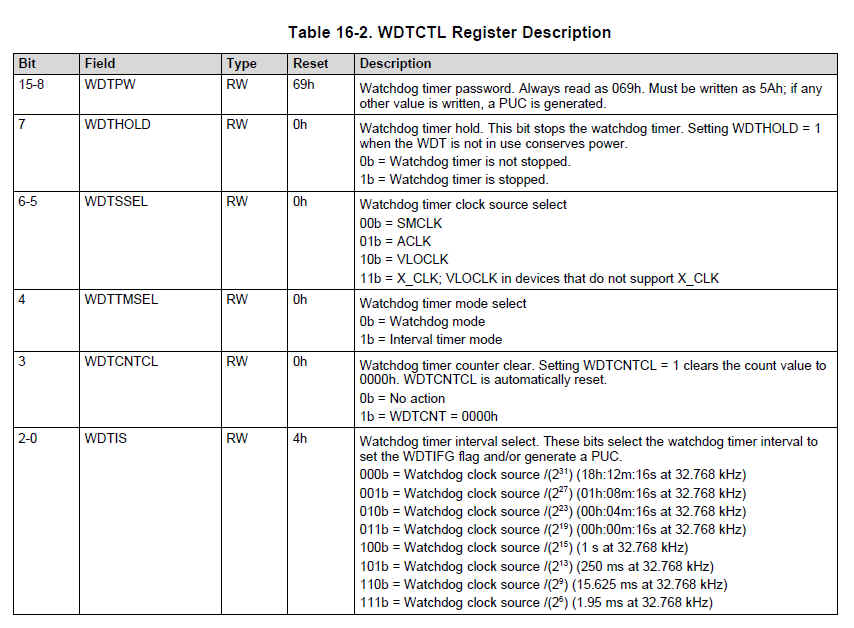
I am using MSP430F5529, when ever we write the code we use( WDTCTL = WDTPW | WDTHOLD; // stop watchdog timer),     so if we stop the watchdog timer through out the whole programs then how can it works. when it will enable the watchdog.

kindly please explain  it,and if we eliminate the watchdog then what effect will be on my programmed.

waiting for your positive response.

thanks

  • Hi Vikash,

    The watchdog timer should be enabled by your program code if needed.

    However, in most case, if there is no hang-up/deadlock risk in your program, you can always disable the watchdog.

    Regards,

    Harry

  • Hi Harry,

    thanks for the reply, I would like to asked one more questions that is , if i want to enable the watchdog then how can i do this.

    waiting for your positive reply

    vikash

  • Hi Vikash,

    In general, suppose there is the main loop in your program, and the run time (period) of your main loop is around t1 (more or less). Then, a proper way is to set your watchdog period to t2 (t2 should be a little bit larger than t1) and uses it in watchdog mode.

    Since you are using F5529, I choose WDT_A in F5529 for example.

    I assume the run time for your main loop is several ms, the WDT interval will be set to 15.625ms.

    You could put "WDTCTL = WDTPW | WDTSSEL_1 | WDTCNTCL | WDTIS2 | WDTIS1;" in your main loop to enable the watchdog timer, to work in watchdog mode. In normal case, every several ms this code will be served and watchdog will be cleared to an initial state; however, if deadlock happens and watchdog this code can't be served, after the "15.625ms" the watchdog will cause a reset signal to perform a PUC to your device.