This thread has been locked.

If you have a related question, please click the "Ask a related question" button in the top right corner. The newly created question will be automatically linked to this question.

CCS/LAUNCHXL-CC1350-4: could not open ccs.out on debug process

Part Number: LAUNCHXL-CC1350-4
Other Parts Discussed in Thread: CC1350

Tool/software: Code Composer Studio

Hi there,

I am trying to build and debug a project to my CC1350 Launchpad using Code Composer Studio version: 9.1.0. The example I am trying to build is "rfSynchronizedPacketTx_CC1350_LaunchXL_tirtos.ccs. This can be found in my TI project directory for code composer studio. If you would like to know the exact path, then just check the screenshots below.

I have already checked my target configurations and the Launchpad is connected successfully.

The error: The error itself is something to do with gmake which can be seen in the build console (second screenshot).

The first screenshot is just the standard console. Not much information here but it might help at some stage.

The second screenshot is of the build console.


The third screenshot is the project overview, where I have 2 projects; one is labelled as RTSC and the other is CSS. The CSS project has a noticeable red cross in the corner of the icon. It is worth noting that the CSS project "rfSychronizedPacketTx_CC1350_LAUNCHXL_tirtos_ccs" is the one that isn't building, however the RTSC project "hello_CC1350_LAUNCHXL_tirtos_ccs" builds/debugs just fine. Originally I thought that the problem was with the RTOS projects since all of the NORTOS projects I have tried, build first time. So that is not the case.


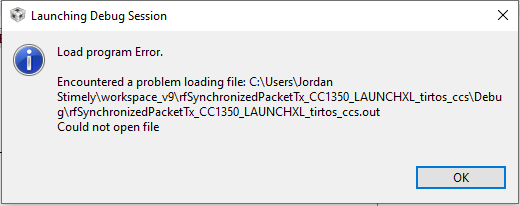
The fourth and final screenshot is of the actual error popup I receive straight after I start a debug process.

Thank you. I Hope to hear back from somebody soon with a possible solution. Please note I am new to this software and the launchpads. And embedded systems programming as a whole. Will try my best to get this sorted on my own accord also.

  • Hi,

    Which version of SDK is this? The reason is that CCSv9.1 ships with some components that may be newer than the ones expected by the latest version of the SDK, namely 3.20.00.23 but, at least in my case, this particular version did not throw any errors.

    If you are running the same version, try to manually erase the directories "src" and "Debug" of the companion project rfSynchronizedPacketTx_CC1350_LAUNCHXL_tirtos_ccs. These files will be re-created by the build process. 

    Hope this helps,

    Rafael 

  • Hi Rafael,

    Thank you for your reply.

    Sorry for not mentioning the SDK version earlier. the SDK is "SimpleLink CC13x0 SDK - v:3.20.00.23".


    Which I believe is the same one which you were using. I tried deleting the "debug" directory and the "src" folder doesn't exist for me. Thus still having the same problem on debug process.

  • Hi,

    Sorry, I mentioned the wrong project. The project that has both a "src" and a "Debug" directories is the tirtos_builds_CC1350_LAUNCHXL_release_ccs. 

    In this case, I would delete these directories from the project above, as well as the "Debug" directory of the rfSynchronizedPacketTx_CC1350_LAUNCHXL_tirtos_ccs project

    If that does not work, I suspect that you may have other component missing or perhaps some other misconfiguration. To help me try to find what may be wrong, do the following:

    - Build the tirtos project after deleting the aforementioned directories "src" and "Debug"
    - Save the Console build output to a file by clicking on the "Copy Build Log" button
    - Build the application project after deleting the "Debug" directory
    - Save the Console build output to a file by clicking on the "Copy Build Log" button
    - Attach both files here

    This way there will be additional information to analyze what may be going wrong. 

    Regards,

    Rafael

  • Hi Rafael, thank you for your reply.

    The above suggestions also didn't help this time so I have posted the two console outputs that you requested.

    The tirtos project built fine.

    **** Build of configuration Debug for project tirtos_builds_CC1350_LAUNCHXL_release_ccs ****
    
    "C:\\ti\\ccs910\\ccs\\utils\\bin\\gmake" -k -j 4 all -O 
     
    Building file: "../release.cfg"
    Invoking: XDCtools
    "C:/ti/ccs901/xdctools_3_55_00_11_core/xs" --xdcpath="C:/ti/simplelink_cc13x0_sdk_3_20_00_23/source;C:/ti/simplelink_cc13x0_sdk_3_20_00_23/kernel/tirtos/packages;" xdc.tools.configuro -o configPkg -t ti.targets.arm.elf.M3 -p ti.platforms.simplelink:CC1350F128 -r release -c "C:/ti/ccs910/ccs/tools/compiler/ti-cgt-arm_18.12.2.LTS" --compileOptions " -DDeviceFamily_CC13X0 " "../release.cfg"
    making package.mak (because of package.bld) ...
    generating interfaces for package configPkg (because package/package.xdc.inc is older than package.xdc) ...
    configuring release.xem3 from package/cfg/release_pem3.cfg ...
    generating custom ROM library makefile ... 
    Starting build of library sources ...
    making C:/Users/JORDAN~1/workspace_v9/tirtos_builds_CC1350_LAUNCHXL_release_ccs/src/sysbios/rom_sysbios.aem3 ...
    clem3 C:/ti/simplelink_cc13x0_sdk_3_20_00_23/kernel/tirtos/packages/ti/sysbios/BIOS.c ...
    asmem3 C:/ti/simplelink_cc13x0_sdk_3_20_00_23/kernel/tirtos/packages/ti/sysbios/family/arm/m3/Hwi_asm.sv7M ...
    asmem3 C:/ti/simplelink_cc13x0_sdk_3_20_00_23/kernel/tirtos/packages/ti/sysbios/family/arm/m3/Hwi_asm_switch.sv7M ...
    asmem3 C:/ti/simplelink_cc13x0_sdk_3_20_00_23/kernel/tirtos/packages/ti/sysbios/family/arm/m3/IntrinsicsSupport_asm.sv7M ...
    asmem3 C:/ti/simplelink_cc13x0_sdk_3_20_00_23/kernel/tirtos/packages/ti/sysbios/family/arm/m3/TaskSupport_asm.sv7M ...
    arem3 rom_sysbios.obj m3_Hwi_asm.obj m3_Hwi_asm_switch.obj m3_IntrinsicsSupport_asm.obj m3_TaskSupport_asm.obj ...
    Build of libraries done.
    clem3 package/cfg/release_pem3.c ...
    Finished building: "../release.cfg"
     
            1 file(s) copied.
    making ../src/sysbios/rom_sysbios.aem3 ...
    gmake[1]: Nothing to be done for 'all'.
    gmake[1]: Nothing to be done for 'configPkg/linker.cmd'.
    making ../src/sysbios/rom_sysbios.aem3 ...
    gmake[2]: Nothing to be done for 'all'.
    
    **** Build Finished ****
    

    The Second Project (rfSychronizedPacketTx)... threw the same errors as before.

    **** Build of configuration Debug for project rfSynchronizedPacketTx_CC1350_LAUNCHXL_tirtos_ccs ****
    
    "C:\\ti\\ccs910\\ccs\\utils\\bin\\gmake" -k -j 4 all -O 
     
    gmake: *** No rule to make target 'CC1350_LAUNCHXL.obj', needed by 'all'.
    gmake: *** No rule to make target 'CC1350_LAUNCHXL_fxns.obj', needed by 'all'.
    gmake: *** No rule to make target 'StateMachine.obj', needed by 'all'.
    gmake: *** No rule to make target 'ccfg.obj', needed by 'all'.
    gmake: *** No rule to make target 'rfSynchronizedPacketTx.obj', needed by 'all'.
    gmake: *** No rule to make target 'smartrf_settings/smartrf_settings.obj', needed by 'all'.
    gmake: Target 'all' not remade because of errors.
    
    **** Build Finished ****
    
    I want to make it clear that I remembered to delete the "src" and "debug" folder before building tirtos. And the "debug" folder before building the target project.

  • Hi,

    Thanks for sending the logs; I couldn't spot any problems, thus I asked for an extra set of eyes to look at it. She spotted a blank space in the path of your workspace - this is known to cause problems with XDC and gmake, which are two components used by CCS projects like yours. 

    In this case, can you open a new workspace in a path that has no space characters on it?

    Hope this helps,

    Rafael

  • Hi Rafael,

    You and your other sets of eyes managed to crack this problem. After changing my workspace to a location without spaces in the address. The "rfSynchronizedPacketTx_CC1350_LAUNCHXL_tirtos_ccs" project built and debugged succesfully.

    Thank you for all of the help you have provided. I'm sure I'll be back!

    Jordan