This thread has been locked.

If you have a related question, please click the "Ask a related question" button in the top right corner. The newly created question will be automatically linked to this question.

CCS/AM4379: Example project create fails

Part Number: AM4379

Tool/software: Code Composer Studio

Hi,

I am trying to create a DCAN example project for my AM437x evm from the command line with no success, even though I follow the text documennt exactly. I would greatly appreciate if you could assist me with this. I follow the following steps to create the project:

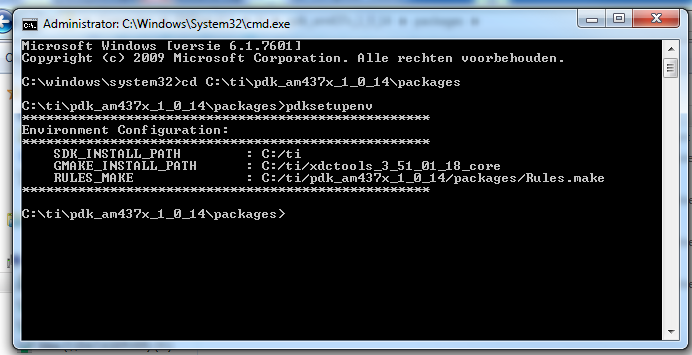
run the pdksetupenv script file, which seems to operate successfully:
I then run the pdkProjectCreate.bat file as follows, which provides an error:
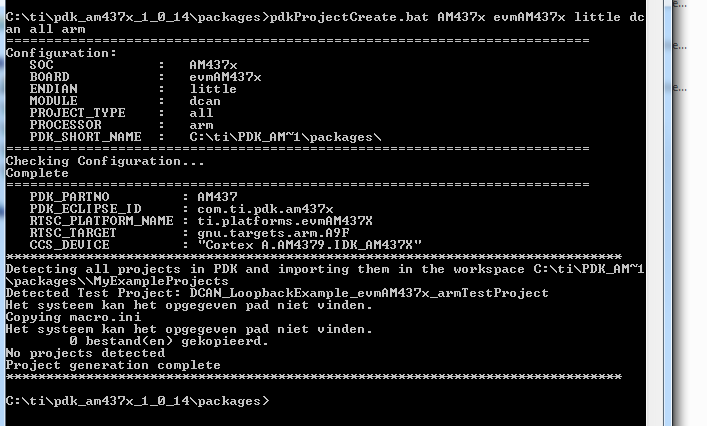
The error is in dutch, but it basicly states that the sistym cannot detect the given path? I do note the '\\' before the MyExamplesProjects folder, but I do not know how to change that to only one. Could you please provide some assistance as to how to fix this or an alternative method to create a project.

Thanks in advance!

  • Hi There,

    There two potential issues here may cause your pdkProjectCreate.bat error:

    1. If you are using the Processor SDK RTOS for AM437x 5.3.0.7, the CCS 8.x has to be installed at the same directory of the Processor SDK RTOS. By default, it will be the C:\ti. Make sure the C:\ti\ccsv8 exists.

    2. After install the Processor SDK RTOS for AM437x 5.3.0.7, before you run the pdkProjectCreate.bat, you will need to run the CCS 8.x at least once to let CCS 8.x to re-discover the new RTSC components installed at C:\ti, such as BIOS, PDK, XDCTools etc. The CCS 8.x will pop up a dialog box to show the "New Installable Products Discovered". Make sure you install them all by press the "Intsall" button. You may have to restart the CCS 8.x a few times.

    3. Now you are ready to run pdkProjectCreate.bat. In your case type in "pdkProjectCreate.bat AM437x all little dcan all arm". It will generate DCAN_LoopbackExample_evmAM437x_armTestProject under C:\ti\pdk_am437x_1_0_14\packages\MyExampleProjects. I have tried Processor SDK RTOS for AM437x 5.3.0.7 along with CCS 8.3.0 on Windows 10. It works as expected.

    Best regards

    Ming

  • Hi Ming,

    Thanks for your reply.

    Processor SDK RTOS for AM437x is used, however I have CCS 9.1 installed instead of CCS8.x (I had trouble installing CCS8.x which was also very frustrating). Thus Processor SDK RTOS and CCS is installed under the same directory (C:\ti), and C:\ti\ccs910 exist.

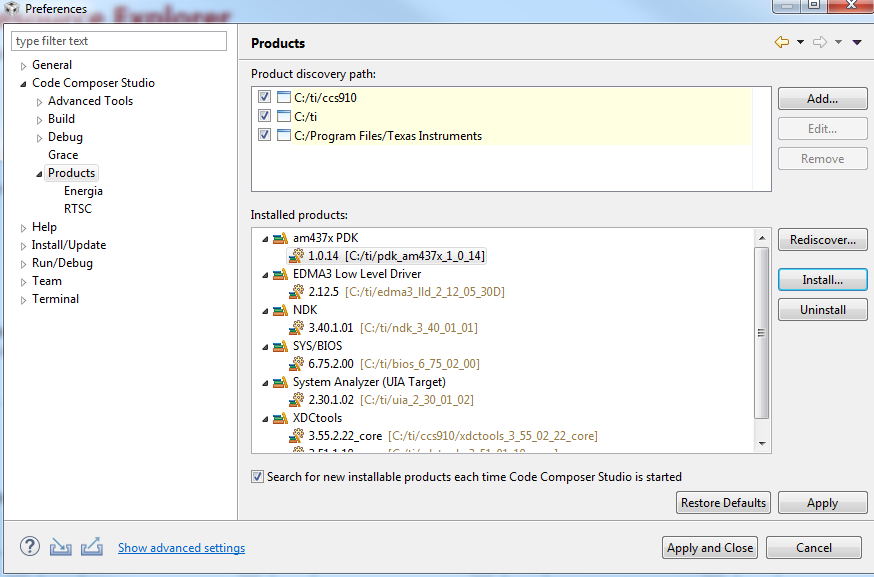
    The installed products were successfully detected by CCS and installed on startup. I then restarted CCS and even my PC a few times, withouht any success. I still receive the error that the specified path is not found. See below screenshot of the installed products view:

    The examples are also not visible from the resource explorer.

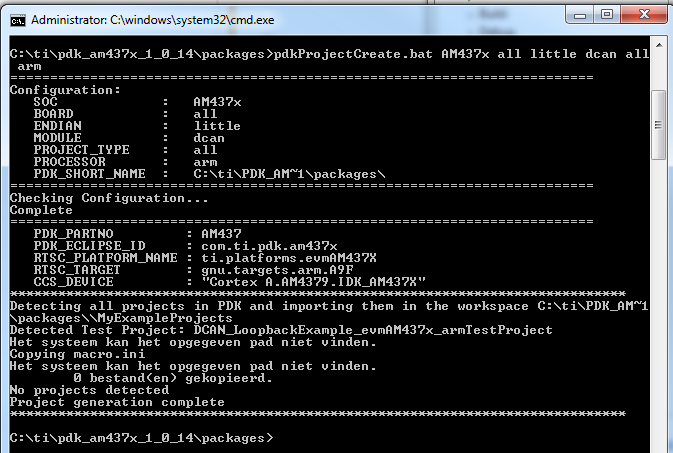
    When running the "pdkProjectCreate.bat AM437x all little dcan all arm" command, I get the following

    The DCAN_LoopbackExample_evmAM437x_armTestProject is detected, however no project were copied because the system could not find the specified path (Het systeem kan het opgegeven pad niet vinden in Dutch). I find this very strange? Any further assistance would be greatly appreciated as this is getting quite frustrating.

    Thank you!

  • Hi There,

    In this case, you will need to change the pdkProjectCreate.bat line 448 - 450

    from

    if not defined CCS_INSTALL_PATH (
        set CCS_INSTALL_PATH=C:/ti/ccsv8
    )

    to

    if not defined CCS_INSTALL_PATH (
        set CCS_INSTALL_PATH=C:/ti/ccsv910
    )

    The key is the BAT file need to know where the CCS is installed. If above change is still not working try to change it to:

    set CCS_INSTALL_PATH=C:/ti/ccsv910.

    Best regards,

    Ming

  • Thanks for your reply Ming.

    The default directory for CCS version 9.1 seems to be C:/ti/ccs910/ccs.

    Entering this into the .bat files seems to do the trick!

    Thanks!

    Regards