This thread has been locked.

If you have a related question, please click the "Ask a related question" button in the top right corner. The newly created question will be automatically linked to this question.

CCS/CC2640R2F: Can't Run Target CPU: (Error -2134 @ 0x0)

Part Number: CC2640R2F

Tool/software: Code Composer Studio
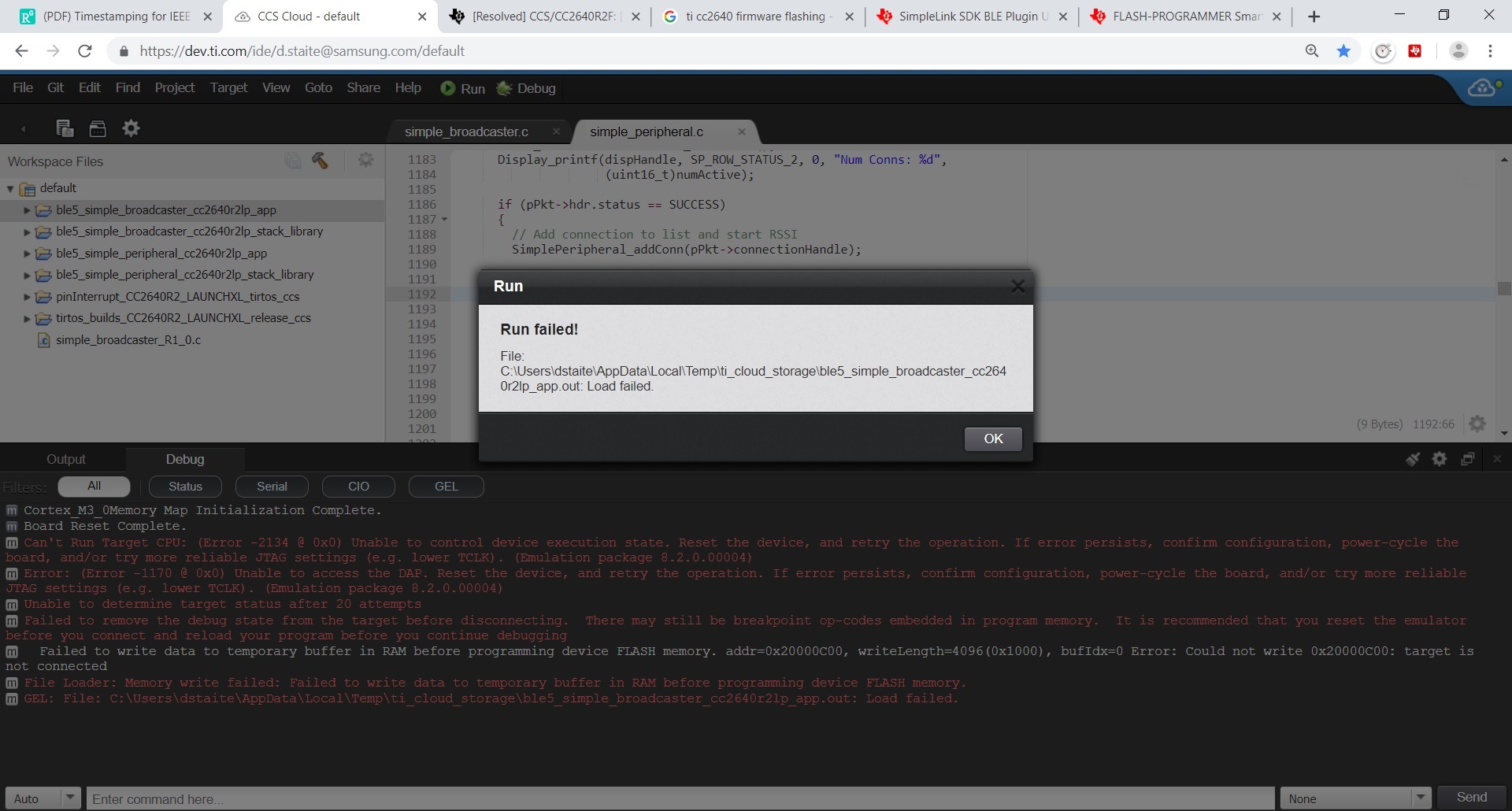
Above is the screen shot of when this happens, It seems to vary from board to board with the same project. 

  • Hi,

    Please check the section JTAG clock speed considerations of the XDS110 page below:

    http://software-dl.ti.com/ccs/esd/documents/xdsdebugprobes/emu_xds110.html

    Given you are in the CCS Cloud environment, the changes shown there can only be applied by editing the XML code of the target configuration file.

    Double-click on the target configuration file of your project:

    Then, add the text below to the place indicated in the screenshot below:

    ccxml said:

    <property Type="choicelist" Value="1" id="The JTAG TCLK Frequency (MHz)">
    <choice Name="Fixed with user specified value" value="SPECIFIC">
    <property Type="stringfield" Value="2.5MHz" id="-- Enter a value from 100.0kHz to 2.5MHz"/>
    </choice>
    </property>

    Save the file. You should be able to connect.  

    Hope this helps,

    Rafael